 3Z Axis

Overview:
The Measure Distance Pro for Blender is an advanced tool that allows you to easily measure distances between selected elements—whether vertices, edges, or faces—within one or more mesh objects in the 3D viewport. This professional-grade addon streamlines and enhances the measurement process, ensuring both accuracy and efficiency in complex modeling tasks. Whether you're handling simple measurements or intricate designs, Measure Distance Pro delivers precise results with minimal effort.
Key Features:
-
Single Object Measurement
Measure distances within a single mesh object, including vertices, edges, and faces. Ideal for basic object modeling and measuring individual components. -
Multiple Object Support
Seamlessly measure distances across multiple mesh objects. This feature is crucial for complex scenes and multi-part models. -
New Features:
-
Unlimited Vertex Selection:
No more limitations on vertex selection. Measure distances between 3, 5, 10, or even 100+ vertices with ease. -
Bézier Curve Measurement: Accurately measure the length of Bézier Curves — ideal for cables, pipes, and organic shapes. (Bézier only; NURBS Path and Path Curve not supported.)
-
Professional Accuracy:
Provides precise world-space coordinate measurements, making it ideal for both technical and organic modeling.
-
-
Additional Features:
-
Units Conversion:
Supports Centimeters, Meters, and Inches, with results displayed directly in the panel for easy reference. -
User-Friendly Interface:
An intuitive, easy-to-use interface integrated within Blender’s UI, making it simple to access measurement results quickly. -
Error Handling:
The tool will notify you if no mesh objects are selected or if you're not in Edit Mode, ensuring you are always aware of any issues.
-
Perfect For:
-
Cable and Wire Length Measurements: Ideal for professionals working with cables, pipes, and other similar objects in their designs.
-
Curved Surface and Path Calculations: Perfect for measuring along curves, arcs, and organic shapes.
-
Technical & Organic Modeling: Whether you're working on mechanical or organic models, this addon ensures precision.
-
Architecture & Product Design: A valuable tool for architectural visualizations, product design, and other industries requiring accurate measurements.
Use Cases:
-
Accurate Path and Distance Calculations: Quickly measure distances for complex scenes, including multiple objects and intricate shapes.
-
Ideal for Technical, Architectural, and Organic Modeling Projects: Whether you're modeling buildings, mechanical parts, or organic creatures, this addon helps streamline your workflow.
-
Multi-Object Distance Measurements: Perfect for large, multi-part models where distance calculations across various objects are required.
-
Efficient Cable and Wire Length Measurements: Quickly calculate the length of wires, pipes, or other complex paths in your models.
How to Use:
-
Install the Addon:
After downloading, install the addon via the Preferences menu in Blender. -
Select Elements to Measure:
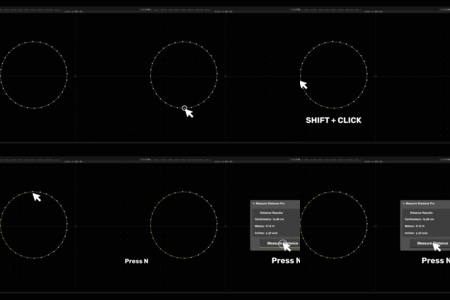
Choose the vertices, edges, or faces you want to measure, either within a single object or across multiple objects. -
Activate the Measurement Tool:
Use the Measure Distance Pro tool to calculate and display the distances between your selected elements. Results are shown directly in the Blender UI.
Compatibility:
-
Blender Versions: Compatible with Blender 2.8 and above.
-
Cross-Platform: Works on Windows, macOS (requires pngpaste), and Linux (requires xclip or wl-paste).
Conclusion:
The Measure Distance Pro for Blender is an essential tool for anyone who requires precise measurements in Blender. Whether you're a professional designer or hobbyist, this addon will enhance your workflow, making it faster and more efficient. With an intuitive interface, powerful features, and broad compatibility, Measure Distance Pro is the perfect tool for designers, engineers, and 3D artists alike.
Support & Updates:
For any questions, issues, or support inquiries, please feel free to contact us. We provide ongoing updates and improvements to ensure compatibility with the latest versions of Blender and to introduce new features based on user feedback.
Have questions about this product?
Login to message

Discover more products like this
Measure Distance measure distance ruler m measurement inch cm