 Dynos
Dynos


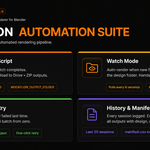
This means the render loop crashed before any job could run. Open the Blender System Console (Window → Toggle System Console) and look for the Python traceback. Common causes: a material referenced in Color Variants does not exist in the scene, or a required property is missing.
Make sure the Texture Target in the Design Slot matches the node's name or label in the Shader Editor exactly. Partial matches also work — if the node is named DESIGN_MAIN.001, setting the target to DESIGN_MAIN will still work.
Make sure you have added at least one object to the Shadow Catcher Objects list (your floor or ground plane), and that the scene uses the Cycles render engine. Shadow catchers do not work in Eevee.
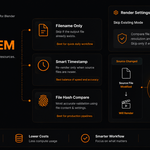
Hash mode computes a signature from source file content, camera, variant, pass, and render settings. If any of those changed since the last render, the job re-renders. Check that resolution, naming template, and other settings are identical to the previous session.
The failed jobs file is cleared after a fully successful batch. Run the batch again to generate new failed job data.
Pillow is required. Install it via Blender's bundled Python. On Windows: navigate to Blender's Python folder and run python.exe -m pip install pillow. On macOS/Linux: ./python3.x -m pip install pillow.
-
$0.90 $1
✓ Multi Design Slots ✓ Batch Rendering ✓ Smart Skip System ✓ Live Preview ✗ Watermark Removal ✗ Unlimited Resolution
-
$20.70 $23
✓ Everything in FREE ✓ No Watermark ✓ Unlimited Resolution ✓ Commercial Use ✓ Priority Updates ✓ All features are included
Have questions about this product?
Login to message
| Blender Extension Compatible | Yes |
| Published | 4 months ago |
| Blender Version | 4.4 - 5.1 |
| Extension Type | Add-on |
| Render Engine Used | Cycles, Eevee |
| License | GPL |
Discover more products like this
Render Automation mockup renderer E-commerce print on demand Texture Automation Production Pipeline product mockup pod workflow smart rendering batch render Batch rendering blender addon