 SkdSam





📦 Installation & Setup
Node Mapper works across all versions of Blender as both a Legacy Add-on and a Blender Extension.
Standard Install
Go to Edit > Preferences, select the Add-ons (or Extensions) tab, click Install... and choose the .zip file. Enable "Node Mapper" in the list.
One-Click Activation
Once enabled, look for the Node Mapper icon in the top header of any node editor, or toggle it via the N-Panel sidebar under the "Node Mapper" tab.
🖱️ Mastering Navigation
LMB Click
Jump instantly to any location in your node tree.
LMB Drag
Rapidly pan through the tree view—a massive time saver for massive setups.
Double Click
Instantly fit all nodes to the view. You will never lose a floating node again.
⚙️ Tailoring your HUD
All options are available in the N-Panel sidebar for quick tweaking while you work:
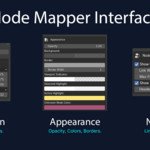
- Size & Position: Choose between Fixed Pixels or Percentage-based sizing. Place the mapper in any of the four corners.
- Smart Layout: The mapper respects the Blender sidebar—it will move automatically to ensure it never overlaps your controls.
- Link Visibility: Toggle node connections on the map to see your full logic flow at a glance.
- Styling: Full control over opacity, background colors, and custom colors for Active/Selected highlighting.
- *Note: Due to Blender limitations, node header colors are mapped manually. A custom fallback color is used for unknown node types.
Have questions about this product?
Login to message
| Blender Extension Compatible | Yes |
| Dev Fund Contributor | |
| Published | 8 months ago |
| Blender Version | 3.6 - 5.0 |
| Extension Type | Add-on |
| Render Engine Used | Cycles, Eevee |
| License | Mit |