 Skava
Skava




NodeGenius — AI-Assisted Geometry Nodes for Blender
Type a description, get a working Geometry Nodes setup. Three AI backends, 20+ curated presets, plain-English graph explainer.
Why NodeGenius
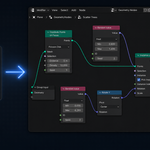
Geometry Nodes are powerful but verbose — even simple scatter or displacement setups need 8-10 nodes wired correctly. NodeGenius generates them from a text prompt and explains existing graphs in plain English so you actually learn the system instead of fighting it.
Features
- Three AI backends: OpenAI (GPT-4o), Anthropic (Claude), Ollama (local)
- 20+ curated presets — scatter on surface, slope scatter, random scale/rotation, proximity density, voronoi scatter, array grid, terrain noise, …
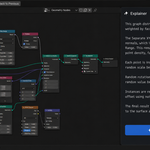
- Node-graph explainer — plain-English breakdown of any selected Geometry Nodes graph
- Auto-fill Instance source — scatter presets get a default Mesh Cube placeholder so you see something immediately
- Modal worker thread — the AI HTTP request runs in the background, UI stays responsive
Compatibility
- Blender: 3.2 and later
- OS: Windows / macOS / Linux
- AI: bring your own OpenAI / Anthropic / Ollama API key
What you get
- NodeGenius add-on (Python only, no DLL)
- README with full quick-start guide
- Free updates for v1.x
- Support through marketplace messaging
Install
Edit → Preferences → Add-ons → Install... → pick node_genius_v1_0_0.zip → enable. Open the Geometry Nodes editor → the NodeGenius tab appears in the N-panel.
License
GPL-3.0. Standard for Blender add-ons.