Ns Brick Wall Builder
 Nick Sayce Designs



Installation Instructions
1. Download ns_brick_wall.zip and NS Brick Wall.blend
2. Open Blender, navigate to Edit / Preferences, then select the addons tab. Click the dropdown in the top right of the window, click Install from device and point it to where you downloaded ns_brick_wall.zip.
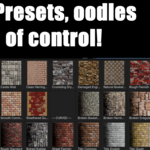
3. Open NS Brick Wall.blend, which contains the materials NS Brick Wall, NS Mortar and NS Quoin, the addon will be available to edit the example wall in the scene.. You can also append these materials into your own scene.
******An important note, some UI functionality is directly tied to the materials, so if the materials aren't present, it will just create blank named materials and some of the UI won't function correctly.*******
Have questions about this product?
Login to message
| Published | 3 months ago |
| Blender Version | 4.0 - 5.1 |
| Extension Type | Add-on |
| Render Engine Used | Cycles, Eevee |
| License | GPL |
Discover more products like this
brick wall english bond irregular course rubble flemish quoin procedural infinite bricks brick patterns