Optiploy Pro: Universal Rig Spawner
 hisanimations




- Removed "OptiPloy ID Tools", and moved into a new standalone add-on, ID Tools
v1.10.0
- Heavily re-worked importer, and should be much better at circular reference loops and shape key/mesh relationships
- Removed "To Cursor" option, replaced with "Place by Origin" and "Place by Bounds" (Bounds by default)
- Added option to prevent texts from executing (Access via OptiPloy ID Behavior)
- Texts will no longer execute if Blender does not recognize it to be a Python script
- If the file ends with .py, or has no file extension, it will be executed. Otherwise, it will be ignored
- Removed Gizmo spawn pad renderer, leaving only one as default
- Removed Bound Validator property, now only treats meshes as valid bound setters
- Merged functionality between spawn pad origin/bound centering and scene cursor origin/bound centering
A line for debugging was not removed, resulting in freezes when spawning anything with a rig. Many apologies for this mistake.
- Code refactoring
- Moved properties to WinMan
- You are now able to move OptiPloy into another category within the viewport
- Fixed a major flaw involving the import of sub-collections
- Fixed a bug that would prevent rotation from being added onto the rig
- Added a "Constant Pad Scale" feature (toggle with A)
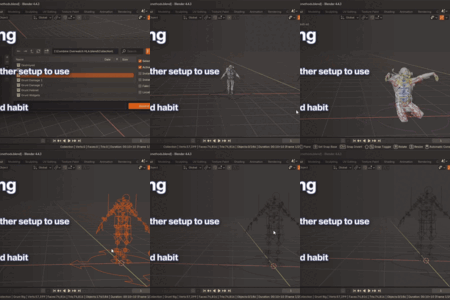
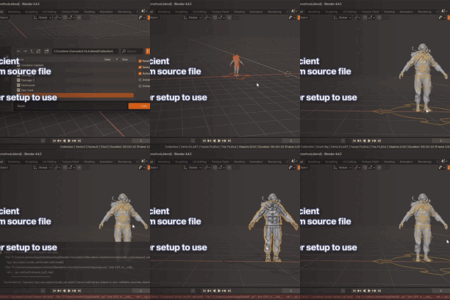
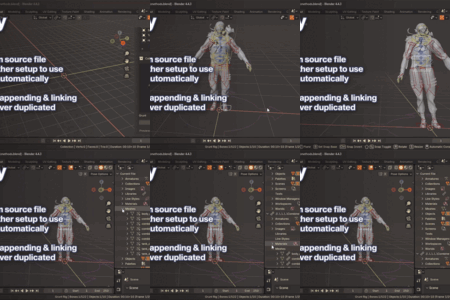
A set of ID tools has been added to OptiPloy to allow more flexibility over what gets imported, and how it gets imported Tools are available in the Outliner or Properties Context Menu
- ID Attach / Quick Attach
- Quickly attaches an ID to a Host ID, always ensuring the import of the parasitic ID(s)
- Remove Selected ID(s) from Host(s)
- Ensures the selected parasitic IDs do NOT get imported
- Removed ID(s) from Selected Hosts(s)
- Removes any possibly attached parasitic IDs from the selected Host IDs
- Make Properties Overridable
- Enables all custom properties on the ID to be library overridden
- User Path Report (Pro Only)
- Prints a report of where an ID is used and the path that leads to it.
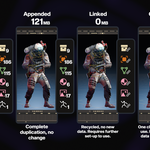
You can now set how IDs are treated in the import process. The three options are:
- Do Nothing
- Prefer Override
- Prefer ID being overridden over being localized
- Stay Linked
- Ensure the ID stays linked
See photos at Github
- Fixed a blender & folder display glitch when using letters outside of the English alphabet
- Integrated the Easy Message Board system ( https://github.com/hisprofile/emb_template/blob/main/README.md ). Developed by me, it helps developers in one-way communication to their customers, ensuring everyone stays in the loop.
- Slight UI changes, added new visual localization "explanations."
- Fixed a crash that occurs when trying to grab thumbnails of assets that have no previews
- Improved the stability of the FAST importer when handling objects outside of the viewlayer
- Fixed not being able to scan the active file
- Added new "Assign Object/Collection to Active Collection" options
OptiPloy Pro 1.7.2
- Added a Fix for preview cache loadings getting interrupted
- Drag 'n' Drop spawn pad is now a constant size
- Fixed an issue with using "Optimize with OptiPloy"
- Storage Benchmark tool now shows old and new size
- Added a new "Import with OptiPloy" tool. Limited to collections and objects only.
Improved thumbnail preview loading
- No longer crashes when closing preferences
- Added a "signal" property to avoid having cache writes with no changes
- Added a timer for cache loading times
- Added thumbnail preview cache
This feature helps thumbnails load faster upon next session. It is enabled by default - Added storage benchmarking
Next to the spawn button, you'll find a button with a disk drive icon. This tool lets you see how much space you save using OptiPloy to import a specific object or collection, compared to appending.
- Changed Drag 'n' Drop behavior to spawn on release of left mouse or return key
- Removed unnecessary print functions
- Tweaked how referenced collections/objects are handled if they are not in view layer
Add recursive folder support (@dotryen in #4)
Add localize actions option (@Flipleerr in #5)
Cleaned up add entry menu
Minor code tweaks, no new behavior
Add counter for search results
Changed how indirectly linked objects and collections are processed if they are not in the view layer. They are attached to the ID that references them to keep them from getting deleted for zero users.
Fixed the post optimizer
-
Tweaked the "FAST" importer to be much more resistant to hierarchy loops. It is now set as the default importer.
I know I've done this two times already about the new importer, but I have much more faith in this. The fixes revolved around getting one of @zayjax_'s (<twitter) rigs to work, and I accomplished that. I also sat down in a call with him and had him try this new version, it worked with every single one of his rigs. First-hand witness, I swear. Thank you zayjax!
Added a switch to change importer
- The importer has been re-written AGAIN for zero-error importing. It is now invulnerable to loops in user hierarchies. This makes a significant improvement to the importing performance, and no longer floods the console with error messages.
- Drag and dropping has been fixed in orthographic view mode
- more functionality was added to the .blend (and now folder) multi-tool.
May 21st 2025, v1.5.1
Reverted the new importer. Sad. It was prone to an infinite recursion error, so it has been reverted to its old, but working, yet warning prone importer.
Discover more products like this
blender-import import cleanup blender 3D asset management spawner 3D importer 3d rigs rigs rig manager animation