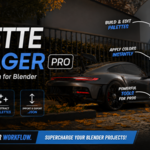
Palette Manager Pro — Color Palette System for Blender
 NovaStrikes


📖 Palette Manager — Documentation
Version: Free v1.0 · Lite v1.0 · Pro v1.0 | Blender 4.0+ and 5.1 | By NovaStrikes
📋 Table of Contents
1. 📦 Installation
- Download the
.zipfor your tier (Free / Lite / Pro) - Open Blender
- Go to Edit → Preferences → Add-ons
- Click Install (top right)
- Select your downloaded
.zip - Tick the checkbox next to "Palette Manager" to enable it
- Done — no restart needed
⚠️ Upgrading? Remove the old version first via Edit → Preferences → Add-ons → Palette Manager → Remove, then install the new zip.
Compatibility
| Blender Version | 4.0, 4.1, 4.2, 4.3, 4.4, 5.0, 5.1+ |
| Operating System | Windows, macOS, Linux |
| Render Engine | EEVEE and Cycles |
2. 🔍 Where to Find the Addon
Palette Manager lives in the Material Properties tab — the ball icon in the Properties panel on the right side of Blender.
- Select any mesh object in your scene
- Click the material ball icon in the Properties panel
- Add a material if needed (+ New)
- Scroll down — the Palette Manager panels will appear
💡 Tip: The addon only shows when a mesh is selected. Cameras, lights, and empties won't show the panel.
3. 🚀 Getting Started — First 60 Seconds
- Select the default cube (or any mesh)
- Go to Properties → Material tab → click + New
- Scroll down to the Palette Manager section
- Click + in the Palettes panel → new palette appears
- Click + in the Colors panel → new color slot appears
- Click the color swatch → pick any color
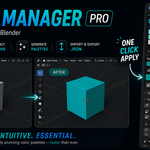
- Click Apply to Object → cube changes color instantly ✅
4. 🎨 Working with Palettes
| Action | How To |
|---|---|
| Create a palette | Click + in the Palettes panel |
| Rename a palette | Double-click the palette name field |
| Switch palettes | Click any palette name in the list |
| Delete a palette | Select it → click − |
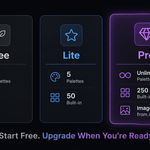
| Palette limits | Free: 2 max · Lite: 5 max · Pro: unlimited |
💡 Palettes save inside your .blend file. Just hit Ctrl+S and they're preserved.
5. 🖌️ Working with Colors
| Action | How To |
|---|---|
| Add a color | Click + in the Colors panel |
| Pick a color | Click the color swatch → Blender color picker opens |
| Name a color | Click the name field and type (e.g. "Neon Pink") |
| Delete a color | Select it → click − |
| Eyedropper | Select a color slot → click the eyedropper icon → samples the object's current base color |
| View HEX code | Select any color → shown in detail box below (Lite / Pro only) |
6. 🖱️ Applying Colors to Objects
Single Object
- Select the color you want in the Colors panel
- Select your mesh object in the viewport
- Click Apply to Object → Base Color updates instantly
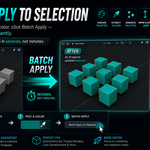
Batch Apply Pro
- Select multiple objects in the viewport (Shift+Click or A)
- Select the color you want
- Click Batch Apply to Selected → all objects update at once
💡 If the object has no material, one is created automatically with the selected color applied.
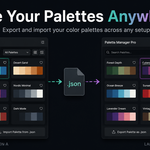
7. 💾 JSON Export & Import Lite / Pro
Export a Palette
- Select the palette you want to export
- Go to the Palette Files section in the Tools panel
- Click Export Palette as .json → choose a save location → click Export
Import a Palette
- Open any Blender project
- Go to Material tab → Palette Manager → Palette Files
- Click Import Palette from .json → select your file → click Import ✅
💡 Use case: Build your brand palette once → export it → import into every new project in seconds. Works perfectly for team color consistency too.
8. 📚 Built-in Palette Library Lite / Pro
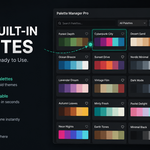
Lite: 50 palettes across 8 categories.
Pro: 250 palettes across 10 categories.
How to Use
- Scroll to the Built-in Library panel in the Material tab
- Use the Category dropdown to filter by type
- Click Preview to see all colors with names and HEX codes
- Click Load to add the palette to your active stack
Categories
| 🌿 Nature | 🌆 Urban | 🏠 Interior | ☀️ Exterior | 🎮 Game & Stylized |
| 🎨 Art Styles | ⚙️ Materials | 🌙 Mood | 🏛️ Architecture (Pro) | 🚀 Sci-Fi & Space (Pro) |
9. 💜 Pro Features Pro Only
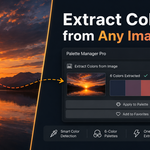
🖼️ Extract Colors from Image
- Go to Tools → Pro Tools → Image Sampling
- Click Extract Colors from Image
- Select any image (JPG, PNG, etc.)
- Dominant colors are extracted into a new palette automatically
🎲 Random Palette Generator
- Go to Tools → Pro Tools → Generators
- Click Random Palette Generator
- Choose a mode: Analogous, Triadic, Complementary, Split-Complementary, or Synthwave
- A harmonious palette generates instantly
🔗 Import from Coolors.co URL
- Find a palette on coolors.co and copy the URL
- Go to Tools → Pro Tools → Generators → Import from Coolors.co
- Paste the URL → click Import → colors load as a new palette
🔀 Sort Colors
Select any palette → Palette Tools → Sort Colors → choose Hue, Brightness, or Saturation.
📋 Copy HEX to Clipboard
Select any color → click Copy next to the HEX code. Paste into CSS, Figma, or client docs.
10. 🔧 Troubleshooting
| Problem | Fix |
|---|---|
| Addon not showing in the Material tab | Select a mesh object with a material. Cameras and lights won't show the panel. |
| Installed the zip, but the addon is not in the list | Use the original zip from Superhive. Don't re-zip. Remove old version, restart Blender, reinstall. |
| Apply to Object does nothing | Make sure a color is selected (highlighted) in the Colors list first. |
| Palette limit warning | Delete an existing palette or upgrade to the next tier. |
| JSON import fails | Only import .json files exported by Palette Manager. Do not manually edit the file. |
| Coolors URL import not working | URL must follow the format https://coolors.co/xxxxxx-xxxxxx
|
| Still having issues? | Leave a comment on the product page or contact NovaStrikes via Superhive. Include your Blender version and a description of the problem. |
🤖 AI Assistance Disclosure: This addon was developed with the assistance of Claude AI (Anthropic). AI helped architect the project across 4 separate files (__init__.py, properties.py, operators.py, panels.py), implement the color preview popup system, and assist with iterative bug fixing. All features were manually tested and verified by the developer before release.
💡 Created with ❤️ by NovaStrikes
-
$4.99
5 palettes, 12 colors each, HEX display, JSON export/import to carry palettes across projects + 50 hand-crafted built-in palettes with live preview. Your colors, everywhere.
-
$9.99
Unlimited palettes, 250 built-in, extract colors from images, batch apply, random generator, Coolors.co import + monthly palette drops. The full toolkit.
Have questions about this product?
Login to message