 hodgson3d


Panel Cutter 2.0 (Blender 5.2+)
Create clean, non-destructive panel lines in Blender.
Panel Cutter lets you tag edges on your mesh and turn them into adjustable panel gaps using Geometry Nodes.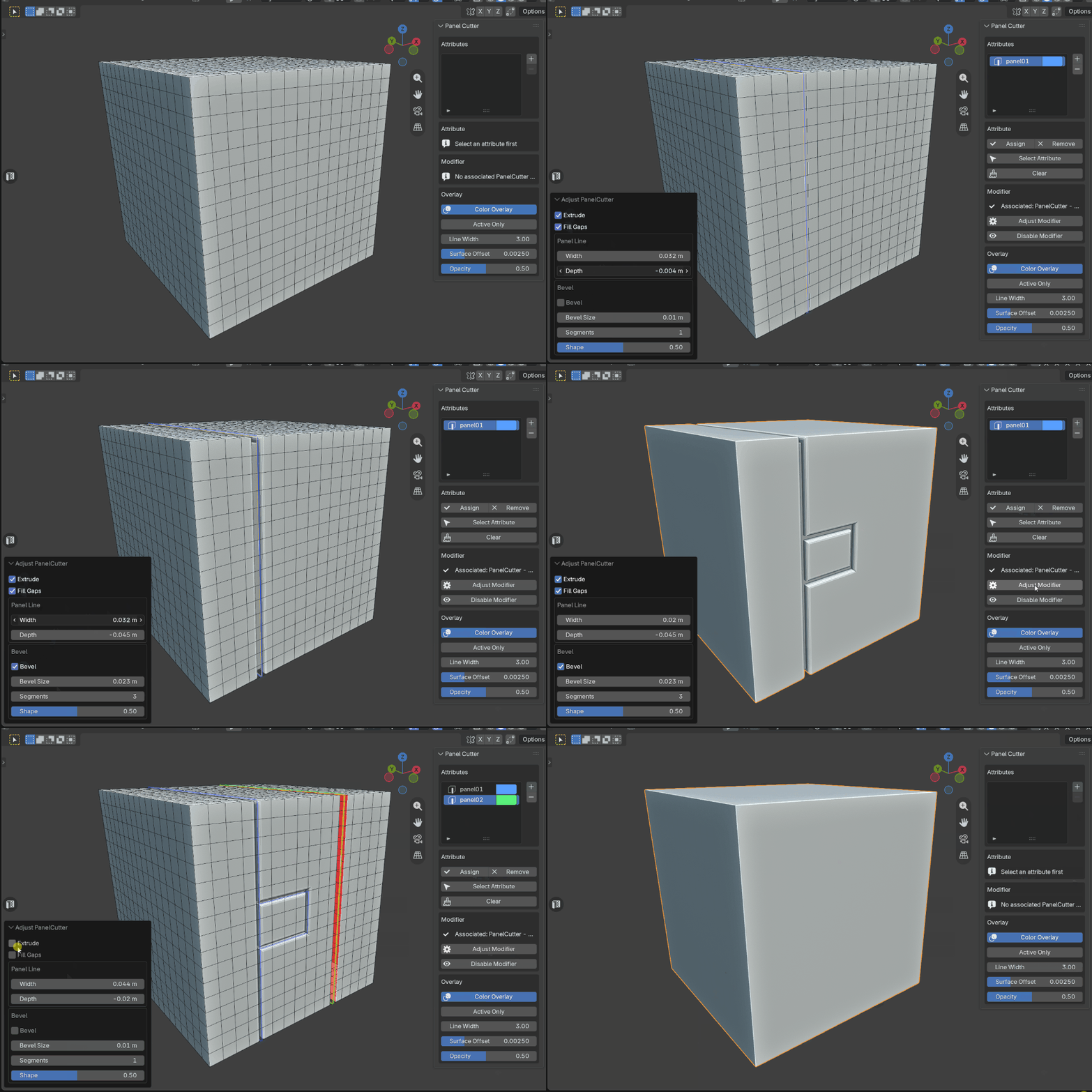
Features
Quick access pop-up menu (Adjustable Hotkey found in preferences)
Non-destructive panel lines
Attribute-based edge selection
Colored viewport overlay
Adjustable Width and Depth
Optional Extrude and Fill Gaps
Adjustable bevel controls
Multiple independent panel groups
Quick modifier adjustment controls from the addon UI
How To Use
Select the edges you want to tag as panel cuts
Click + to create a panel attribute on selected edges
Create the Panel Cutter modifier
Adjust the panel settings to get the result you want
Add/Remove/Select attributes from the UI for further refinement
You can create multiple panel attributes, allowing different areas of the mesh to have their own settings.
Because the system is non-destructive, you can continue editing your mesh and panel selections at any time.
Panel Controls
Adjust:
Extrude
Fill Gaps
Width
Depth
Bevel
Bevel Size
Segments
Shape
Panel Cutter 2.0 makes adding and managing panel lines fast, visual, and easy to adjust.
