Skp Editor - Perfect Export and Import Sketchup File(.skp)
 BlendR6



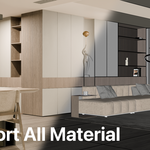
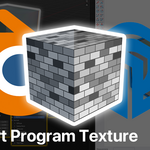
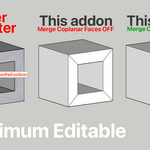
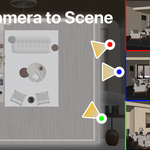
SKP Editor V1.2
# SketchUp Importer & Exporter for Blender
**Current Version: 1.2 (Windows)**
## ✨ Key Features
### New in Version 1.2
- **Object Grouping Control** — Choose TOP level or BOTTOM level grouping when importing groups/components.
- **Improved Scene Import**:
- Per-scene hidden objects
- Layer visibility states per scene
- Scene Axes support (creates arrow empties)
- Enhanced RenderScenes integration with preview image support
- **Layer Support** — Imports SketchUp layers into a "SKP Layers" collection hierarchy.
- **Loose Edge Import** — Imports standalone edges that are not part of faces.
SKP Editor V1.1
# SketchUp Importer & Exporter for Blender**A powerful bidirectional SketchUp (.skp) importer and exporter for Blender with advanced Project Linking capabilities.**
---
## ✨ Key Features
### 1. Import & Export
- **Import** `.skp` files into Blender with groups, components, materials, UVs, scenes, and cameras.
- **Export** Blender meshes back to `.skp` while preserving materials, UVs, smooth/soft edges, and line visibility.
- Supports SketchUp versions 2021–2026.
### 2. **Project Linking Mode** (Recommended Workflow)
- Open a `.skp` file as a **linked project**.
- Incrementally update **only modified objects** (very fast).
- Automatically detects added, modified, and deleted objects.
- Preserves Blender-side materials, modifiers, and RenderScenes data.
- Backup support and version awareness.
### 3. Advanced Capabilities
- **Faster Converter**: Native C++ DLL for dramatically faster handling of complex geometry.
- **Material & UV System**: Accurate UVs, texture packing, and automatic Base Color baking.
- **RenderScenes Integration**: Bidirectional sync between SketchUp Scenes and Blender RenderScenes.
- **Per-Object Settings**: Hide lines, force merge coplanar faces, bake resolution, etc.
- **Smart Selection Tools**: High-face-count objects, objects needing triangulation, etc.
---
## 📥 Installation
1. Download and extract `sketchup_importer_1_1_windows.zip`.
2. Copy the `sketchup_importer` folder into Blender's add-ons directory:
- `Edit → Preferences → Add-ons → Install` (or manually place in `addons` folder).
3. Enable **"SketchUp Importer & Exporter"** in the Add-ons panel.
4. **First-time Setup**:
- Go to **Edit → Preferences → Add-ons → SketchUp** tab.
- Set SketchUp C API path if needed.
- Click **"Setup Converter"** to build the Faster Converter (requires MSVC Build Tools on Windows).
---
## 🚀 Basic Usage
### Standard Import / Export
- `File → Import → SketchUp (.skp)`
- `File → Export → SketchUp (.skp)`
### Project Workflow (Best Practice)
1. **Open Project**: `File → SketchUp Project → Open SKP Project`
2. Edit your model in Blender.
3. **Save Changes**: `File → SketchUp Project → Save SKP Changes`
4. **Save As**: `File → SketchUp Project → Save SKP As`
5. **Update from SKP**: `Update Linked SKP` (pull latest changes from the linked file).
---
## 📋 Detailed Usage
### SKP Setting Panel (N-Panel → SKP Setting)
- Project status (linked / modified / new objects)
- Object Settings List (per-object rules)
- Quick selection tools:
- Select Objects Above Face Count
- Need Triangulate (for Fast UV mode)
- Select Objects In List
### Add-on Preferences
- SketchUp C API folder
- Default export/save behaviors
- Bake resolution, units, backup path, etc.
---
## ⚙️ Advanced Features
- **Faster Converter v2**: Significantly faster face creation for large models.
- **Base Color Baking**: Automatically bakes complex node materials.
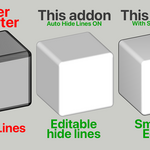
- **Auto Hide Lines**: Intelligently hide edges based on angle.
- **Merge Coplanar Faces**: Optional geometry optimization.
- **Scene Synchronization**: Cameras and RenderScenes round-trip support.
---
## 🛠️ Troubleshooting
**Faster Converter not ready**:
- Run **"Setup Converter"** in the SKP Setting panel (requires Visual Studio Build Tools).
**Cannot open newer SKP files**:
- Point to the correct SketchUp C API version in Preferences.
**UV issues**:
- Try `EXACT` UV mode or triangulate problematic objects first.
**Performance**:
- Use `FAST` UV mode for large textured models.
- Enable "Apply Modifiers" and "Merge Coplanar" when appropriate.
---
## 📄 License
- Copyright (C) 2023-2025 Interior Blender
- Licensed under **GPL-3.0-or-later**
- Requires official SketchUp C API (not included).
---
**Author**: Interior (Jack)
**Version**: 1.1 (Windows)
**Updated**: July 2026
---
**Enjoy efficient SketchUp ↔ Blender workflows!**
Feel free to contribute or report issues.
Have questions about this product?
Login to message