Pianimator - Midi To Motion
 Studio VYS
in VSE
Studio VYS
in VSE


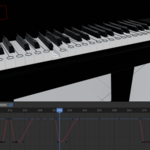
🎹 Pianimator Quick Start Guide
Thank you for choosing Pianimator! Follow these steps to get your first MIDI-driven animation running in minutes.
1. Installation
- In Blender, go to Edit > Preferences > Add-ons.
- Click Install... and select the
Pianimator_[platform].zipfile. - Enable the add-on by checking the box next to "Pianimator - MIDI to Motion".
2. One-Click Dependency Setup
Pianimator requires FluidSynth to generate audio. We've made this easy:
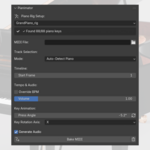
- Open the Animation panel in the Sidebar (press N in the 3D Viewport) then extend Pianimator.
- Click the "Install Dependencies" button.
- Wait for the confirmation message. Blender may freeze for a moment while it downloads the necessary libraries—this is normal!
3. Setting Up Your Piano
- Import your piano rig into the scene.
- Ensure your rig follows the standard nomenclature:
Note.A0,Note.A0#,Note.B0... up toNote.C8 andPedal.sustain,Pedal.sostenuto(optional) - In the Pianimator panel, use the dropdown to select your Piano Rig.
4. Animating from MIDI
-
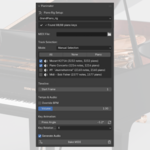
Select MIDI: Click the folder icon to load your
.midfile. - Track Selection: By default, Pianimator uses "Auto-Detect Piano." If your file has multiple instruments, you can manually select the specific track from the list.
- Timing: Set your Start Frame and BPM. (Note: If "Override BPM" is off, it will use the tempo embedded in the MIDI file).
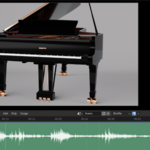
- Ensure the "Generate Audio" checkbox is active if you want to generate the .wav file and add it automatically to the Video Sequence Editor (VSE).
- Bake: Click "Bake MIDI." Pianimator will now generate keyframes for the keys and pedals.
💡 Pro-Tips for Best Results:
MIDI Quality: For the best animation, use MIDI files where the piano is on its own dedicated track.
Key Rotation: If the keys rotate too much or too little, adjust the "Press Angle" and "Key Rotation Axis" settings in the panel before baking.
Support: If you encounter any issues with the dependency installer, ensure Blender is running with Administrator/System permissions so it can write the libraries to the scripts folder.
Have questions about this product?
Login to message
| Blender Extension Compatible | Yes |
| Published | 7 months ago |
| Blender Version | 4.2 - 5.0 |
| Extension Type | Add-on |
| License | GPL |
Discover more products like this
audio automation FluidSynth Instrument music visualizer cinematic animation midi piano