Procedural Pcb Generator
 Synapse Nodes


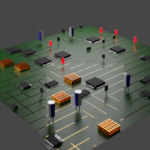
1. Installation
This product is delivered as a .blend file containing the Geometry Node setup and assets.
Option A (Asset Browser): Move the file to your designated Asset Library folder. Mark the "PCB Generator" as an asset to drag and drop it into any scene.
Option B (Append): In your working file, go to File > Append, select this file, and navigate to the NodeTree or Collection section to import the generator.
2. How to Use
Add a Plane or a Curve to your scene (depending on your specific generator type).
Go to the Modifiers Tab and add a Geometry Nodes modifier.
Select the "Procedural PCB Generator" from the dropdown menu.
The board will generate automatically based on the object's dimensions.
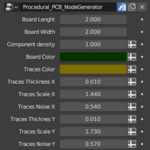
3. Main Parameters Breakdown
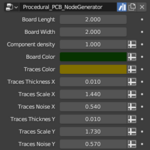
Seed: Randomized distribution of components and traces.
Trace Density: Controls the complexity and number of copper paths.
Component Toggle: Enable or disable resistors, capacitors, and IC chips.
Board Dimensions: Adjusts the X/Y scale (if not using the input geometry).
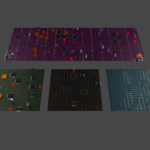
Solder Mask Color: Change the board's primary color (Green, Blue, Black, etc.).
4. Technical Requirements
Blender Version: 3.6.23 or higher.
Render Engine: Compatible with Cycles and Eevee. Note that Cycles is recommended for accurate solder mask transparency and refractive effects.
5. Support
If you encounter any issues with node connections or missing textures, please contact me via the "Ask a Question" button on the product page. I respond as fast as i can
Have questions about this product?
Login to message
| Published | 5 months ago |
| Blender Version | 3.6 - 4.0 |
| Extension Type | N/A |
| Render Engine Used | Cycles, Eevee |
| License | GPL |

Discover more products like this
2026 addon electronic procedural cyberpunk advanced geometry nodes pcb Circuitboard 3D Artist Tool 3d_hard_surface 3d models sci-fi 3D Generator