Procedural Prison Fence - WWII Era Concrete & Barbed Wire Generator
 Hannes Werner



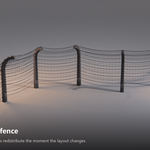
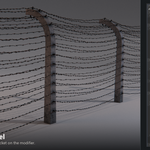

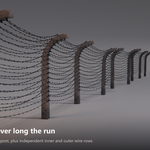
WWII era concrete post and barbed wire generator for Blender
What this is
Procedural Prison Fence is a single Geometry Nodes group that builds a complete WWII-eraperimeter fence along any curve: tapered concrete posts with the characteristic curved-overtops, ceramic insulators, and sagging barbed wire on one or two independent rows.
It is not an add-on. There is nothing to install. It is a node group inside a .blend file,so it works the same on Windows, macOS and Linux, and it will keep working regardless ofwhat happens to any add-on API.
What is in the download
- Procedural_Prison_Fence.blend - the asset. Self-contained: every textureis packed, nothing is linked. Contains the Procedural WWII Era Concrete Fence nodegroup marked as an Asset Browser asset, an example fence curve, and the Wire Holder and WireSpikes source meshes.
- Procedural_Prison_Fence_Example_Scene.blend - the demo scene from thepromo renders: lighting, cyclorama backdrop and cameras. Nothing in it is marked as an asset,so opening it will not add anything to your asset library.
- blender_assets.cats.txt - Asset Browser catalog file.
- HOW TO USE.txt and Documentation.pdf - this document.
Requirements
- Blender 4.5 LTS or newer. Tested in 4.5.5, 5.0.1 and 5.3.
- Cycles or EEVEE.
Quick start
- Open
Procedural_Prison_Fence.blend, or point your Asset Browser at thefolder you unzipped it into. - Drag Procedural WWII Era Concrete Fence onto any curve object.
- Edit the curve. The fence follows it.
To start from scratch: add a curve, add a Geometry Nodes modifier, and pick the nodegroup from the dropdown. Or simply duplicate the Fence Curve object that ships inthe file, which already has everything wired up.
Using the Asset Browser
Copy both .blend files and blender_assets.cats.txt into a folder inside yourasset library, keeping them together. The catalog file has to sit in the library root forthe asset to land in the right category. Then refresh the Asset Browser.
The curve
Any Blender curve works: poly, Bézier andNURBS. Straight runs, corners, long sweeping perimeters and closed loops allbehave. Posts distribute along the curve at the spacing you set, and everything downstreamfollows: wire re-sags between the new post positions, barbs redistribute along the newstrands, and the randomisation reseeds.
Two practical notes. Corners tighter than roughly the post spacing can push neighbouringposts into each other, so either widen the corner or drop Post Distance locally by splittingthe fence into two curve objects. And on a Bézier curve, the curve's ownResolution Preview U controls how finely the fence samples the path, so raise it ifa sweeping curve looks faceted.
Parameter reference
Everything lives on the modifier panel, grouped into the same sections listed here.
Geo
| Wire holder | Object used as the insulator. Swap in your own mesh and the generator distributes it for you. |
| Wire Spikes | Object used as the barb. Same idea. |
Posts
| Post Distance | Spacing along the curve, in metres. |
| Post Height | Height in metres. The historical reference sits around 2.5 to 2.9. |
| Arc Radius | The signature curved-over top. 0.0 gives a clean flat top. Values between roughly 0.02 and 0.12 produce a small angled stub at the tip that reads as a modelling error, so avoid that range. From 0.2 upward it reads as a deliberate hook; 0.8 matches the reference most closely. |
| Size X / Size Y | Post cross-section. Around 0.15 is typical; 0.09 gives a slender boundary post, 0.24 a heavy one. |
| Taper Top / Taper Bottom | Independent taper at each end. Values above 1 widen, below 1 narrow. |
| Post Bevel width | Edge bevel. 0 is a hard cast edge; small values read as worn concrete. |
| Bevel Resolution | Segments in that bevel. Keep low for background fences. |
| Post Material | Material slot for the posts. |
Randomization
These all ship at 0, so the fence starts out perfectly uniform. Raise themto break up repetition, which matters most on long runs.
| Scale | Random size variation per post. Around 0.2 is subtle and believable; past 0.5 the posts start to look inconsistent rather than weathered. |
| Seed | Change it to get a different arrangement from the same settings. |
| Offset X / Y / Z | Random position shift per post. Offset X is the one that varies apparent spacing, which is usually what sells a long run. |
| Rotation X / Y / Z | Random rotation per post. Rotation Z gives each post its own lean. |
A good starting point for a long perimeter: Scale 0.22, Offset X 0.24, Offset Y 0.09,Rotation X 0.04, Rotation Y 0.04, Rotation Z 0.15.
Wire
| Material | Material for the wire strands. |
| Holder Material | Material for the insulators. |
| Distort Wire + Distortion Amount | Breaks up the mathematically perfect sag so strands read as hand-strung. Around 0.5 is a good default. |
Wire Inside and Wire outside
Two fully independent rows, each with its own copy of the controls below. Switch eitheroff for a single-sided fence, or run a dense inner row against a sparse outer one.
| Wire Thickness | Strand radius. |
| Profile Resolution | Sides on the strand cross-section. 3 is plenty at distance and is a large saving. |
| Wire Amount | Number of strands in the row. |
| Wire Bend | How far each strand sags between posts. |
| Spikes Spacing | Distance between barbs along the strand. Smaller means more barbs and more geometry. |
| Spikes Random Rotation | Rolls each barb so they do not all sit at the same angle. |
| Top / Bottom Wire Offset | Where the band of strands starts and ends on the post, as a factor of post height. |
| Wire Holder Scale | Size of the insulator. |
| Wire Position on Holder | Where the strand attaches along the insulator. |
| Secondary Wire + Twist | The second strand of a twisted-pair barbed wire, and how tightly it twists. |
| Resolution | Sampling along the strand. Lower it for background fences. |
Realize for Export
A single checkbox at the bottom of the panel. Leave it off while you work.See the next section for when to switch it on.
Exporting, or converting to a real mesh
Read this before you try to export. The posts, barbs and insulators are Geometry Nodesinstances, which is what keeps long fences light. Instances have to berealized before they can be converted.
The short version
- Tick Realize for Export at the bottom of the modifier panel.
- Object > Convert To > Mesh.
Both steps, in that order.
Why Apply does not work
Clicking Apply on the modifier gives"Cannot apply constructive modifiers on curve. Convert curve to mesh in order toapply". That is a Blender rule about curve objects, not a fault in this asset: it appliesto any modifier that changes geometry on any curve. Use Convert To > Mesh instead, exactlyas the message suggests.
What each combination gives you
| Realize | Route | Result |
|---|---|---|
| ON | Convert To > Mesh | One merged mesh, about 80,000 verts on the example curve, all three material slots. This is what you want. |
| ON | Convert > Visual Geometry to Objects | Same geometry, also correct. |
| OFF | Convert To > Mesh | Wrong. You get the wire only, about 23,700 verts and one material slot. The posts and insulators are dropped without a warning. |
| OFF | Convert > Visual Geometry to Objects | Keeps everything, but explodes the instances into hundreds of separate objects. |
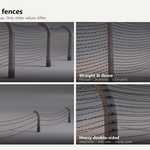
Four recipes
Exact values for the looks shown on the product page. Everything not listed stays at itsdefault.
Camp perimeter
Post Distance 3.0 · Arc Radius 0.80 · Post Height 2.8 · Wire Amount 17· Wire outside off
Straight and dense
Post Distance 2.2 · Arc Radius 0.0 · Post Height 3.2 · Wire Amount 24· Spikes Spacing 0.11 · Size X/Y 0.10 · Wire outside off
Low boundary
Post Distance 4.5 · Arc Radius 0.35 · Post Height 1.2 · Wire Amount 4· Wire Bend 0.35 · Size X/Y 0.09 · Bottom Wire Offset Inside 0.70· Wire outside off
Heavy double-sided
Post Distance 3.8 · Arc Radius 1.40 · Post Height 2.6 · Size X/Y 0.24· Wire Amount 12 on both rows · Wire outside on
Performance
At default settings the fence is about 23,700 vertices on the 5 m examplecurve, roughly 4,800 verts per metre, and the topology is all quadswith no triangles. Cost scales with your settings, so the three dials worth reaching forfirst on a background fence are Profile Resolution, WireAmount and Spikes Spacing. Dropping Profile Resolution to 3 andhalving the strand count makes a large difference and is invisible at distance.
Leave Realize for Export off while working. Instanced, the example fence evaluatesat about 23,700 verts; realized it is about 80,000, and that gap widens the longer the run.
Troubleshooting
The tops of my posts have a small angled stub
Arc Radius is in the 0.02 to 0.12 dead band. Use exactly 0.0 for a flat top, or 0.2 andabove for a hook.
I converted to mesh and the posts vanished
Realize for Export was off. Undo, tick it, and convert again.
Apply is greyed out or throws an error
Expected on a curve object. Use Object > Convert To > Mesh.
Every post looks identical
All the randomisation values ship at 0. Raise Scale, Offset X and Rotation Z. See theRandomization section for a starting point.
The fence is slow in the viewport
Check that Realize for Export is off, then lower Profile Resolution, Wire Amountand Resolution. Raising Spikes Spacing also helps, since barbs are instanced per strand.
A sweeping curve looks faceted
Raise the curve object's own Resolution Preview U in the curve data properties.
Support
Questions, requests, or something not behaving as documented? Message me through thestore and I will get back to you.
Have questions about this product?
Login to message
| Published | 2 months ago |
| Blender Version | 4.5 - 5.2 |
| Render Engine Used | Blender-Internal, Cycles, Eevee |
| License | Royalty Free |