Pv Asset Validator
 pavelvesnin



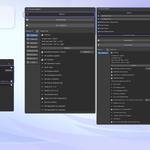
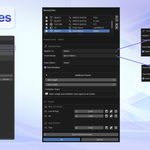
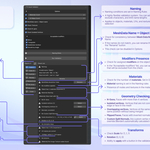
Basic workflow
-
Open the PV Asset Validator panel in the 3D Viewport sidebar.
-
Configure naming rules and validation options if needed.
-
Select one or more objects.
-
Click Run Validation to analyze the selected assets.
-
Review the validation list and apply available safe fixes or resolve issues manually.
-
Export validated assets.
Validation behavior
-
Validation runs on a fixed list of objects captured at the moment it is started.
-
Changing selection does not affect the list until Refresh or Run Validation is used.
-
This ensures stable and predictable validation results.
Safe fixes
-
Some issues provide Safe Fix buttons.
-
Safe fixes are non-destructive and only available when automatic correction does not risk data loss.
-
Issues without safe fixes must be resolved manually.
Naming rules
-
Naming rules are fully user-defined.
-
Rules can include prefixes, suffixes, excluded characters, length limits, and optional regex.
-
Naming validation can be applied to objects, materials, UVs, and textures.
Notes
-
Not all detected issues can or should be fixed automatically.
-
The add-on is intended as a quality control tool, not a one-click optimization solution.
Have questions about this product?
Login to message
| Published | 8 months ago |
| Blender Version | 4.0 - 5.0 |
| Extension Type | N/A |
| Render Engine Used | Blender-Internal |
| License | GPL |
Discover more products like this
texture techart Checker performance validator detector asset control 3d model checker pipeline mesh batch 3d-game-ready tool optimalization Material quality Export topology