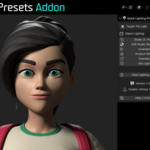
Quick Lighting Presets Addon
 Alireza Taherpor


Does the addon work with Blender 4 and 5?
Yes. The addon has been tested with Blender 4.x and 5.x.
Versions below Blender 4 were not tested, but may still work depending on compatibility.
Do I need to select an object before using a preset?
Yes. For best results, select the object you want to preview before applying a lighting preset.
Does the addon modify my original object?
No. The lighting presets are designed to create lighting setups for your scene and do not modify the selected object's geometry.
Can I switch between different lighting presets?
Yes. You can quickly switch between the available presets to compare different lighting styles.
How can I remove the generated lights?
Use the Clear Lighting Setup button included in the addon.
Can I adjust the generated lights manually?
Yes. After a preset is created, you can manually adjust the generated lights using Blender's standard light controls.
What type of objects can I use with the add-on?
The addon can be used with different types of 3D objects.
For the intended workflow, it is especially useful for quickly previewing characters, props, assets, and other models.
I found a bug. How can I report it?
Use the Help / Contact Support button included in the addon to get in touch.
When reporting a bug, including your Blender version and a short description of the issue can help identify the problem more quickly.
Can I request a new feature or lighting preset?
Yes. Feedback, feature requests, and suggestions are welcome and may be considered for future updates.
-
$3
The complete version of Quick Lighting Presets with all available features included.
Have questions about this product?
Login to message
| Blender Extension Compatible | Yes |
| Published | about 2 months ago |
| Blender Version | 4.0 - 5.2 |
| Extension Type | Add-on |
| Render Engine Used | Cycles, Eevee |
| License | GPL |
Discover more products like this
character lighting lighting setup studio rendering render setup blender lighting Lighting Studio Lighting Lighting preset product rendering