 Luigi Crv



Build your shortcuts,
your way.
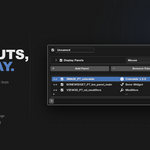
Press Alt+F1 to open the Quick Panel Manager from anywhere in Blender. This is your control center: create Quick Panels, give them a name, assign a key, add the panels you use most, and choose how they appear. Every change takes effect instantly.
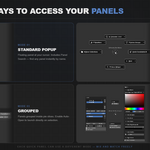
3 Ways to Open Your Panels
Each Quick Panel can be set to one of three display modes. Choose the one that fits your workflow.
| MODE 1 Standard Popup The panel appears floating at your cursor. Click outside to close. Multiple panels open in tabs inside the same popup. | MODE 2 Pie Menu Panels arranged radially around the cursor. All options visible at once. Minimal mouse movement required. | MODE 3 Grouped Panels grouped inside the pie slices. Enable Auto-Open to launch the panel directly on selection — no extra click. |
Browse, preview,
and add any panel.
Press Alt+F2 anywhere in Blender to open the Panel Browser — a full library of every indexed panel, including panels from all your installed add-ons. Filter by category, preview panel contents, and add them to any Quick Panel in a few clicks.
Just installed a new add-on?
Open the Browser, search for it, add it. No restart. No reconfiguration. Live.
Find any panel.
Just type.
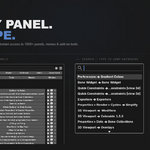
Panel Search is built into every Quick Panel popup. Open your Quick Panel and start typing — a dynamic search bar with fuzzy matching activates instantly, scanning all your panels. Typos forgiven. Your 5 most recently opened panels appear at the top every time.
No shortcut needed
Open your Quick Panel with its shortcut and start typing — the search bar activates instantly, without pressing anything else.
Flip any value. Anywhere.
Hover over any numeric field in Blender and press Alt + Right Click. The value flips its sign instantly — 1 becomes −1, −0.5 becomes 0.5. Does not work inside any Blender popup — a current API limitation that applies to all popups in Blender.
Everything you need. Nothing you don't.
Works Everywhere
Every editor. Every mode. Every context. Object, Edit, Sculpt, UV, Shader, Geometry Nodes — your shortcut works in all of them.
Unlimited Shortcuts
Create as many Quick Panels as you need. One for modeling tools, one for rigging, one for rendering settings — each with its own key.
Export & Import
Copy your entire configuration to clipboard with one click. Paste it on another machine, another Blender version. No files, no friction.
Negate Value
Alt + Right Click on any numeric field to flip its sign instantly. Active in sidebars, Properties, and most editors.
Auto-Detection
100+ add-ons already indexed. Hard Ops, BoxCutter, Modifier Tools, RetopoFlow, Rigify — their panels are immediately available in the Browser.
Context-Aware Locking
Some panels only work in specific contexts. Locked panels show an icon explaining why — no silent failures, no confusion.
Your setup is always portable.
Copy your entire Quick Panels configuration — all shortcuts, panels, and settings — to the clipboard in one click. Paste it into any other Blender installation. Works across machines, across Blender versions. If a panel isn't installed on the new machine, it's silently skipped — no errors.
The roadmap
Quick Panels is actively developed. What comes next depends on how the community grows — but here's what's already planned.
What you need
Add-ons featured in our demos
These add-ons appear in our screenshots and videos to demonstrate what Quick Panels can do. Thanks to their developers.
Hi, I'm Luigi !
Quick Panels started as a tool I built for myself — to fix something that was quietly costing me time every single day in Blender. I'm sharing it in case it helps your workflow too.
AI Disclosure
Quick Panels was built with AI as an implementation assistant. The product concept, feature decisions, Blender validation, testing across versions, and day-to-day refinement came from me over three months of daily use. I am not a Python developer — AI helped me write the code. Without it I could not have built this. Without me, Quick Panels would not exist either.