 Luigi Crv


I just installed a new add-on — why does Panel Search not find its panels?
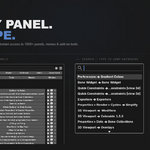
Panel Search uses a cache built when Quick Panels itself is installed. Add-ons installed after that won't appear in Panel Search until you reinstall Quick Panels. They are available immediately in the Panel Browser without any reinstall.
Does Quick Panels work in every Blender mode and editor?
Yes — shortcuts are global. They work in Object Mode, Edit Mode, Sculpt Mode, and across every editor (3D Viewport, Shader Editor, UV Editor, etc.). If a panel requires a specific context to display, Quick Panels will show a message explaining why it cannot open.
A panel inside my Quick Panel isn't opening — why?
Pressing your shortcut opens the Quick Panel (the popup or pie). From there, some panels require specific conditions — an active mesh, selected object, active material, etc. If conditions aren't met, the panel won't open and Quick Panels shows a message. In the Panel Browser, panels that have open conditions are marked with a lock badge.
How do I transfer a Quick Panel to another Blender installation?
Open the Quick Panel you want to transfer and click its Export Data button — your configuration is copied to the clipboard. On the other machine, open any Quick Panel, click Import Data, and paste. Works across different PCs or different Blender versions. Note: if the versions differ significantly, some panel names may not match — panels that no longer exist will simply be skipped.
-
$14.99
1 user, personal/freelance projects
Have questions about this product?
Login to message
| Published | 6 months ago |
| Blender Version | 3.4 - 5.0 |
| Extension Type | N/A |
| Render Engine Used | Cycles, Eevee |
| License | GPL |
Discover more products like this
navigation customization ui panels productivity menu workspace Workflow interface Hotkeys efficiency Shortcut