 Bonaventure Labs




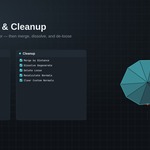
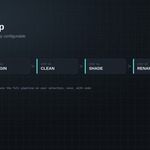

ReadyMesh turns any mesh into a production-ready asset in seconds.
If you've ever finished a model and then spent ten minutes doing the same
manual checklist, apply transforms, fix the origin, merge doubles, clear
loose geometry, recalculate normals, set smooth shading, rename the object
ReadyMesh replaces all of it with one button.
WHAT IT DOES
- One-Click Prep: Apply Transforms → Set Origin → Clean Mesh → Smooth
Shade → Rename, in one operator, with one undo step. Toggle any stage
on or off per run.
- Smart Origins: Bottom Center, Bounding Box Center, Geometry Median,
or 3D Cursor, applied to your whole selection at once.
- Mesh Cleanup: Merge by Distance, Dissolve Degenerate, Delete Loose,
Recalculate Normals, and Clear Custom Split Normals, individually
toggleable.
- Transforms & Shading: Apply location/rotation/scale, and smooth by angle
shading with automatic fallback on older shading setups.
- Quick Modifiers: Clipped Mirror on X, Y or Z, and a ready to tweak
Bevel modifier, one click each.
- Batch Rename: Sequential, zero padded naming across an entire
selection (Prop_001, Prop_002, …), with a configurable base name.
- Studio Defaults: Set your preferred merge distance, smooth angle and
bevel settings once in Add-on Preferences, and hide the advanced
fields you don't need for a cleaner panel.
WHO IT'S FOR
Game artists prepping props for export, archviz/product-viz artists
finishing scene assets, asset-pack creators processing dozens of meshes
at once, and studios that want every artist's output to hit the same
baseline before it ships.
WHY IT'S DIFFERENT
ReadyMesh isn't a mega-toolkit, it's a focused, fast finishing pass. Every
operator works standalone too, so you can run just Clean Mesh, or just
Batch Rename, without touching the rest of your workflow.
REQUIREMENTS
Blender 4.2 or newer. Works on mesh objects; no external dependencies.
SUPPORT
Questions or issues: [email protected]. Full documentation is
included on this product page.
