 Paco Barruguer


Description
When rendering animations in Blender, one of the most common questions is simple:
how long will this render take?
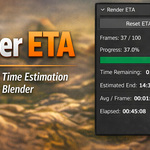
Blender shows frame progress but does not provide a clear estimate of the remaining render time during the job. This addon fills that gap by displaying a live ETA directly inside the Image Editor while an animation is rendering.
The addon tracks the duration of completed frames and continuously updates an estimated remaining time based on recent frame performance. A configurable smoothing parameter allows the estimate to stabilize even when frame render times vary across the animation.
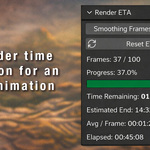
The panel shows:
-
Current frame progress
-
Render completion percentage
-
Estimated remaining time
-
Estimated completion time
-
Average render time per frame
-
Total elapsed render time
The ETA is recalculated during the render and updated live in the interface, so you always have a clear idea of when the render will finish.
This is especially useful for long renders where knowing the expected completion time helps with planning work sessions or overnight renders.
The addon is lightweight, requires no external dependencies, and integrates cleanly into Blender’s UI.
Features
-
Live ETA (estimated remaining render time)
-
Estimated completion time
-
Average render time per frame
-
Render progress percentage
-
Progress bar
-
Elapsed render time
-
Adjustable smoothing window for frame averaging
-
Manual reset of ETA statistics
-
Supports animation renders and single-frame renders
-
Lightweight and non-intrusive UI
Compatibility
Blender 4.0 and newer
Location in Blender
Image Editor → Sidebar → Render ETA
How it Works
The add-on tracks the render duration of completed frames during an animation render.
From this information it calculates:
-
average frame render time
-
estimated remaining render time
-
estimated completion time
-
total elapsed render time
The ETA becomes more accurate as more frames are rendered.
Installation
-
Download the ZIP file.
-
Open Blender.
-
Go to Edit → Preferences → Add-ons.
-
Click Install.
-
Select the downloaded ZIP file.
-
Enable Render ETA in Image Editor.
Usage
-
Start rendering an animation.
-
Open the Image Editor.
-
Press N to open the sidebar.
-
Go to the Render ETA tab.
-
Monitor render progress and estimated completion time.
You can adjust Smoothing Frames to control how many recent frames are used to compute the average render time.
Panel Information
The panel displays:
-
rendered frames vs total frames
-
render progress percentage
-
progress bar
-
estimated remaining time
-
estimated completion clock time
-
average render time per frame
-
total elapsed render time
Notes
-
ETA becomes more accurate after a few frames have been rendered.
-
For single frame renders (F12), the add-on displays timing information for that render.
-
The reset button clears the statistical samples without interrupting the current render.
Version
1.1.3
Changelog
1.1.3
-
Improved ETA stability
-
Reset button now resets statistics without breaking the active render
-
Progress bar added to panel
-
Estimated render end time added
-
UI improvements
1.1.2
-
Initial public release
