Render Eta in Image Editor
 Paco Barruguer


Documentation
Overview
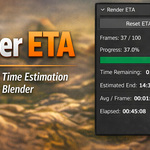
Render ETA in Image Editor displays a live estimate of the remaining render time while rendering animations in Blender. The estimate is calculated dynamically based on the render duration of previously completed frames.
The panel is located in the Image Editor sidebar and updates automatically during the render.
Panel Location
Image Editor → Sidebar → Render ETA
How it Works
During an animation render the addon:
-
Tracks the render time of each completed frame
-
Calculates the average frame render time
-
Estimates the remaining render duration
-
Updates the ETA and estimated completion time live
The estimate becomes more accurate as more frames are rendered.
Controls
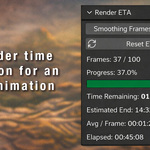
Smoothing Frames
Defines how many recent frames are used to calculate the average render time.
Lower values:
-
react faster to changes
-
less stable ETA
Higher values:
-
more stable ETA
-
slower to react to changes in frame complexity
Default value: 10
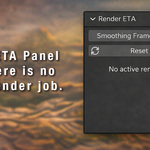
Reset ETA
Resets the timing statistics.
If used during an active render, only the collected frame samples are cleared and the ETA will be recalculated from the following frames.
Displayed Information
The panel shows:
-
Frames – number of rendered frames vs total frames
-
Progress – render completion percentage
-
Progress Bar – visual render progress
-
Time Remaining – estimated remaining render time
-
Estimated End – estimated time when the render will finish
-
Average per Frame – average render time per frame
-
Elapsed – total time since the render started
Notes
-
The ETA becomes reliable after the first few frames have completed.
-
Highly variable frame render times may cause ETA fluctuations.
-
The addon supports both animation renders and single frame renders.
Have questions about this product?
Login to message
| Blender Extension Compatible | Yes |
| Published | 7 months ago |
| Blender Version | 4.0 - 5.0 |
| Extension Type | Add-on |
| Render Engine Used | Arnold, Blender-Internal, Blender-Game-Engine, Cycles, Eevee, Freestyle, Luxrender, Mental-Ray, Octane, Vray, Yafaray |
| License | GPL |

Discover more products like this
timer 3DPipeline #AnimationProductivity Render 3DWorkflow animation utility