 Pardesco LLC


You already have the shot
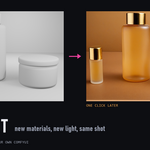
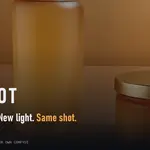
The camera is right, the composition is right, the geometry is right. What you don't have is the twelve hours it would take to build every material and light it properly — or the client meeting where they ask to see it in brushed brass instead.
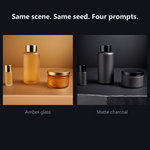
Reshoot renders your active camera, sends it through a ComfyUI workflow with your scene's depth, normal, albedo and selection-mask passes, and brings the result straight back into Blender's Image Editor. Same framing. Same geometry. Completely different materials and lighting.
No node graph. No web UI. No copying files between windows.
One render, every pass
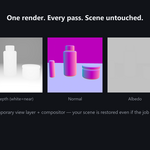
Reshoot renders once and extracts every pass in that single render — on a temporary view layer and temporary compositor nodes that are removed again when the job finishes, fails, or is cancelled. Your view layers, your compositor graph, your mist settings and your render settings come back exactly as you left them. If Blender is killed mid-render, the next generation cleans up after the last one.
- Combined — the beauty render, display transform applied.
- Depth — mist-based, white = near, with the range recorded alongside the result.
- Normal — the render normal pass, world-space, 8-bit RGB.
- Albedo — diffuse colour, sRGB, no film look.
- Selection mask — a Cryptomatte matte of the objects you selected.
Geometry stays put
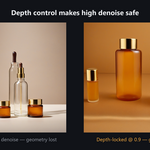
Plain img2img at high denoise repaints your composition along with your materials. The flagship Product Studio Pro capsule feeds your depth pass to a ControlNet, so denoise can run at 0.85 for a total material rebuild while the silhouette and proportions hold. The gallery above includes a same-seed A/B of exactly that, generated with the shipping build at its default settings.
Every result is reproducible
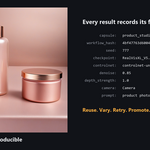
Every image is written with a .json sidecar recording the capsule and its version, a hash of the workflow, every input value, and the seed. The History panel keeps that across Blender restarts, with thumbnails, A/B against the input, and one-click Reuse, Variation, Retry, Promote and Send to Compositor.
Workflow capsules
A capsule is a ComfyUI API workflow plus a small manifest describing which inputs to expose and which render passes to feed it. Reshoot ships four:
- Diagnostic — Text to Image — proves the round trip end to end before you touch your scene.
- Product Studio — clay render to studio product photograph.
- Product Studio Pro (Depth) — the same, with geometry locked by a depth ControlNet.
- Refine & Upscale — re-render the active camera larger, with detail added.
All four use ComfyUI core nodes only — nothing to install, nothing to break on the next ComfyUI update. Drop your own capsule folder into the user capsule directory and it appears in the panel next to the bundled ones, with its inputs laid out automatically. Capsule authoring is documented.
Local by default
Reshoot talks to one address: the ComfyUI server in its preferences, 127.0.0.1 unless you change it. No account, no telemetry, no analytics, no third-party service. It never installs custom nodes and never downloads models. If you point it at a remote server, it tells you, and the support bundle it generates strips your paths before you send it to anyone.
Requirements — read this before buying
- Blender 4.5 LTS or newer. Verified on 4.5 LTS, 5.1 and 5.2 LTS. Blender 4.2 LTS is end-of-life and not supported.
- Windows. This is the release-gated platform. The add-on is pure Python with no compiled parts and no Windows-only APIs, so macOS and Linux are expected to work, but they are not part of the tested matrix and are not advertised as supported. Say so in a support ticket and I will help; do not buy on the assumption.
- Your own ComfyUI, running locally. Not included, not installed by Reshoot, not bundled. ComfyUI Desktop and standard/portable ComfyUI are both verified. Test Connection finds a normal local install by itself (it probes 8188–8191 and 8000); any other address you paste in.
- At least one SDXL-family checkpoint, installed in your ComfyUI. Not included. Product Studio Pro additionally needs an SDXL depth ControlNet (~2.5 GB; the documented one is Apache-2.0). The bundled capsules target SDXL, but Reshoot drives whatever your ComfyUI runs — other model families work through a capsule of your own, and the documentation explains how.
- A GPU that can run SDXL in your ComfyUI. If ComfyUI already generates images at a speed you find acceptable, Reshoot will too — it adds a render and an upload, not a new inference engine.
Costs
There are no per-image costs, no subscription and no API keys, because nothing runs in the cloud. You supply the hardware and the models. If you choose to point Reshoot at a paid remote ComfyUI, that provider's costs are between you and them — Reshoot neither meters nor marks up anything.
Model licensing is your responsibility
Reshoot ships no model weights, and it will happily drive a model you are not licensed to use commercially — it neither checks nor enforces this. Terms differ sharply even inside one family: FLUX.1 [schnell] and FLUX.2 [klein] are Apache-2.0, while FLUX.1 [dev] and FLUX.2 [dev] are non-commercial. Confirm the licence of the exact checkpoint you generated with before the output goes to a client. The documentation includes a table.
What you get
- The Blender extension (GPL-3.0-or-later).
- Four workflow capsules: three production capsules plus the diagnostic.
- A tutorial
.blendscene, built to work with the bundled capsules. - Written documentation: getting started, troubleshooting, privacy and networking, and capsule authoring.
- A video quick start.
- Updates through the current major version, and support replies within 72 hours.
What this is not
Stated plainly, because it is cheaper than a refund:
- It is not a physically accurate renderer. Results are AI images guided by your scene, not light simulations of it. Do not use them where measured accuracy matters.
- It does not guarantee shot-to-shot consistency. Same seed and same settings reproduce a result; different cameras or frames will drift.
- It is not a universal ComfyUI front end. It runs capsules — workflows with a manifest. Arbitrary workflows do not appear automatically; they need a capsule, which is documented and takes minutes for a workflow you already have.
- It does not make your GPU faster or your models better.