 Skava
Skava
Install
- Keep the archive zipped. Do not unpack it.
- In Blender open Edit > Preferences > Add-ons.
- Press the arrow button in the top right corner and choose Install from Disk.
- Pick the archive from your purchase page and tick the checkbox next to RetargetProof.
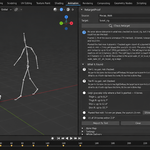
Press N in the 3D Viewport. Sidebar tab: RetargetProof. Nothing is downloaded, no external Python packages are installed, no network is used and there is no AI model inside.
Check
- Have both armatures in the scene: the Source — the one the motion came from, with its animation still on it — and the Target — the one the motion was transferred onto. It does not matter which tool made the transfer.
- Pick Source and Target in the panel.
- Press Check Retarget. On the first check the bone map is filled from the bone names; open Bone Map to see or correct it.
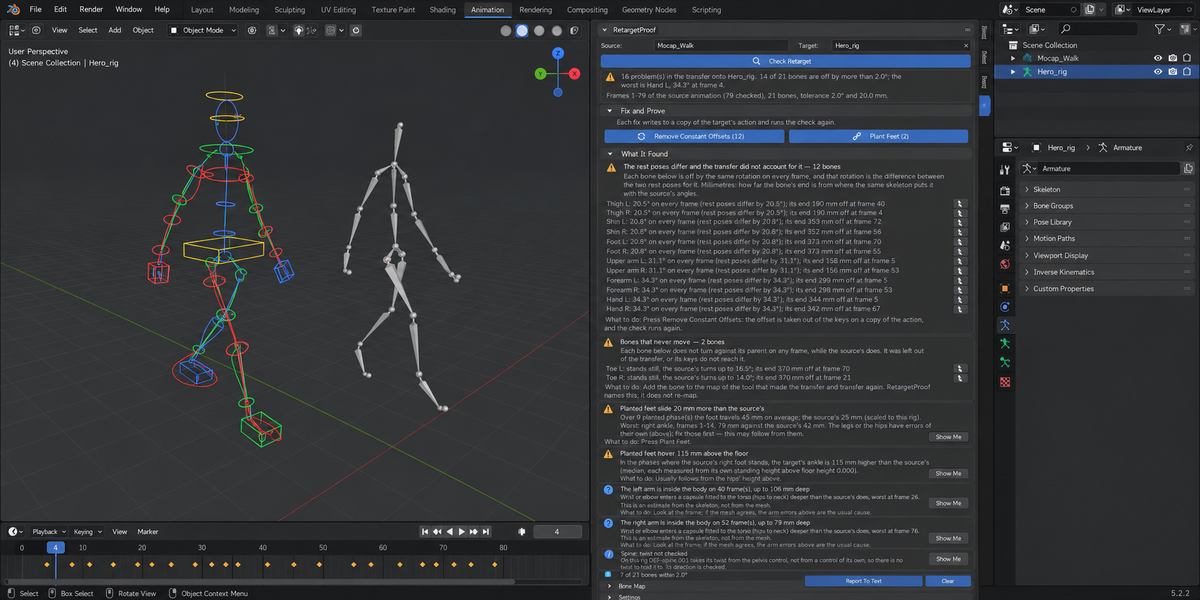
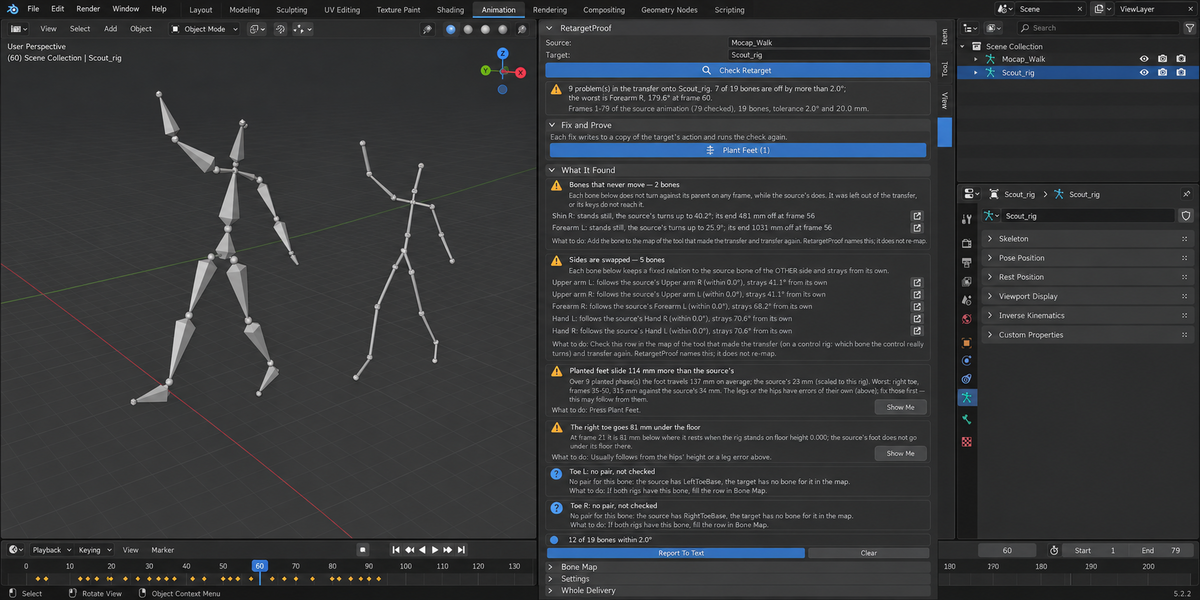
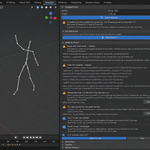
- Read What It Found. Every finding names the bone, the frame, the degrees and the millimetres. Show Me goes to that frame and selects the bone.
The check reads the evaluated pose — after actions, NLA strips, constraints and drivers — so it does not matter how the target is animated. It changes nothing in the file: the scene is stepped through the frames and put back on the frame it was on, with the pose as it was — a change made on that frame without a key included. The source is only ever read.
What is measured
- Degrees. How far each target bone is from the pose the source asks for. Arms and legs (upper arm, forearm, thigh, shin) are compared by the direction they point in, plus the twist about the bone. The hips, spine, chest, neck, head and clavicles keep the character's own rest shape and are compared by their rotation from rest. Hands, feet and toes keep their rest relation to the forearm and the shin.
- Millimetres on the target's own skeleton. The target's joints, re-posed with the angles the source asks for, against where they really are. The distance between the source skeleton and the target skeleton is never shown as an error: on a rig of other proportions a perfect transfer is far from the source in space.
- Planted feet. The phases where a foot of the source stands still near the floor are found first; then how far the target's foot travels in each of them, against the source's, scaled by the two rigs' leg lengths.
- Floor. A foot going under the floor, or hovering above it in a planted phase, by more than the source's does.
- Hands inside the body. Wrist or elbow entering a capsule fitted to the torso deeper than the source's does. This is an estimate from the skeleton, not from the mesh, and is reported as "worth a look".
- Hips. The hips' travel against the source's, compared with the ratio of the two rigs' standing hips heights, and the hips' height above the floor.
- Bone length. An arm or leg bone that gets longer or shorter than at rest (a scale key, a location key on the next bone) by more than the source's does. The angles cannot see this; it is reported as "worth a look", with no fix.
A character that faces another way. When the target's rest pose faces another way than the source's (the object is turned in the scene, or the rig was built facing another axis), two transfers are right: the character turns and moves in the source's directions, or the motion is turned with it and it walks where it faces. RetargetProof reads which one was made from the whole skeleton; where ordinary errors (a time shift, noise) blur that, from the hips' own path — whether it runs turned with the character. It compares in that reading, and a note in the findings says which. When neither tells (the character hardly travels and the bones are noisy), the note says so, and the hips' travel is not judged and not fixed. Bones turned one way while the hips travel the other way are not right in either reading, and are reported.
A bone is reported when its error (the 95th percentile over the checked frames) is above Angle Tolerance; feet, floor and hips when they are off by more than Distance Tolerance.
Reading the findings
Findings about bones are grouped by cause: one heading, one explanation, one line per bone. A cause is named only when its test holds within the tolerance; anything else is listed as not explained, with its numbers.
- The rest poses differ and the transfer did not account for it — the bone is off by the same rotation on every frame, and that rotation is the difference between the two rest poses (a T-pose source on an A-pose character, a mocap skeleton that rests with its legs apart). Fixable.
- Bones carry the source bone's orientation as is (bone roll) — the world orientation was copied, and the bone axes of the two rigs differ. Fixable.
- Constant twist about the bone (roll) — direction right, twisted by a fixed angle. Fixable.
- Constant offset — the same rotation on every frame that is none of the above. Fixable.
- "The same rotation on every frame" means: it varies by less than Angle Tolerance. An offset that wanders more than that is listed as not explained — removing its average would leave the rest of it behind.
- Rotation about turned axes (roll) — the bone turns by the right amount about axes rotated around the bone. Named, not fixed.
- Sides are swapped — the bone follows the source bone of the other side: in the world (a world-space copy with the sides crossed), or in its motion against its parent (a local copy with the sides crossed in the tool's map). Named, not fixed.
- Bones that follow another source bone — a map that is off by one, or a control that turns two bones. Named, not fixed.
- Bones that never move — left out of the transfer. Named, not fixed.
- Limbs held in place by an IK control — the limb's end stays at one point while the source's travels: the keys sit on FK bones and the limb follows an IK target. Named, not fixed.
- Not explained — the error changes from frame to frame and matches none of the tests.
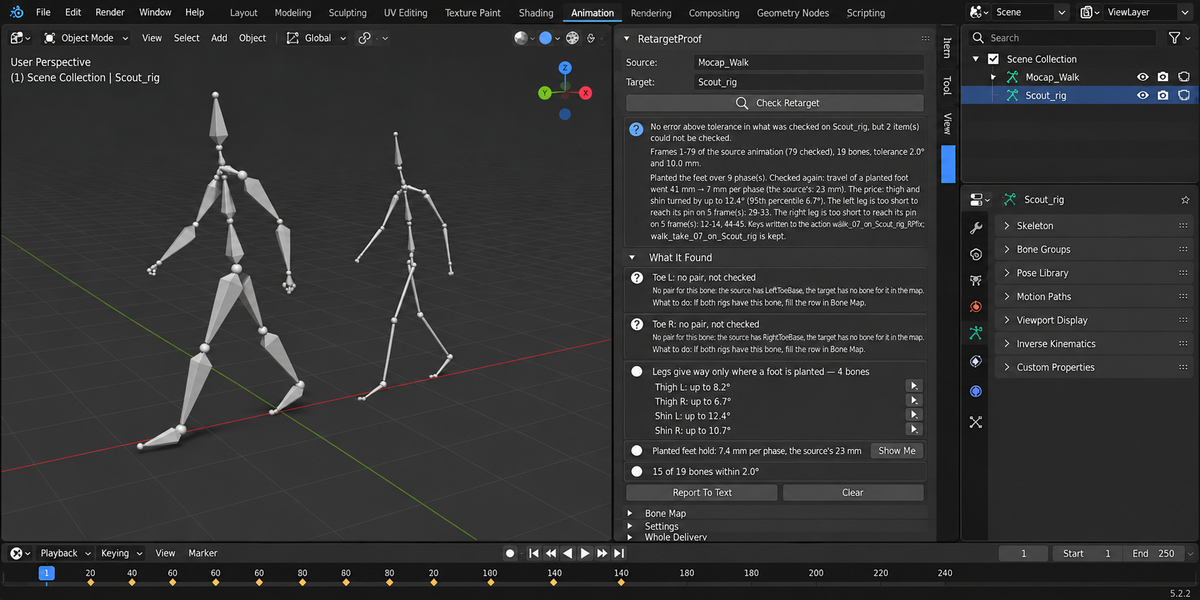
- Carried by a parent's error and Legs give way only where a foot is planted — for the record: the bone itself is right, or it is what IK foot planting does.
- Planted feet slide … (FK without support) — the leg angles match the source, so no rotation is wrong: with other leg proportions the same angles cannot keep a foot where it landed. Fixable.
- Hips travel … / Hips do not follow the source's path / Hips ride … higher or lower — fixable.
- The body faces N° away from its path — the character goes sideways or backwards, more than the source does. Fix Hips is offered for the travel only when rebuilding the path from the source's would put it where the body faces; otherwise the finding says that Fix Hips does not mend it, and the travel gets no button.
- … not checked (worth a look) — a bone with no pair in the map, a bone with no length to take a direction from, a segment of a twist chain, feet that never stand in the range. What could not be checked is always said; it is never counted as passed.
Fix and Prove
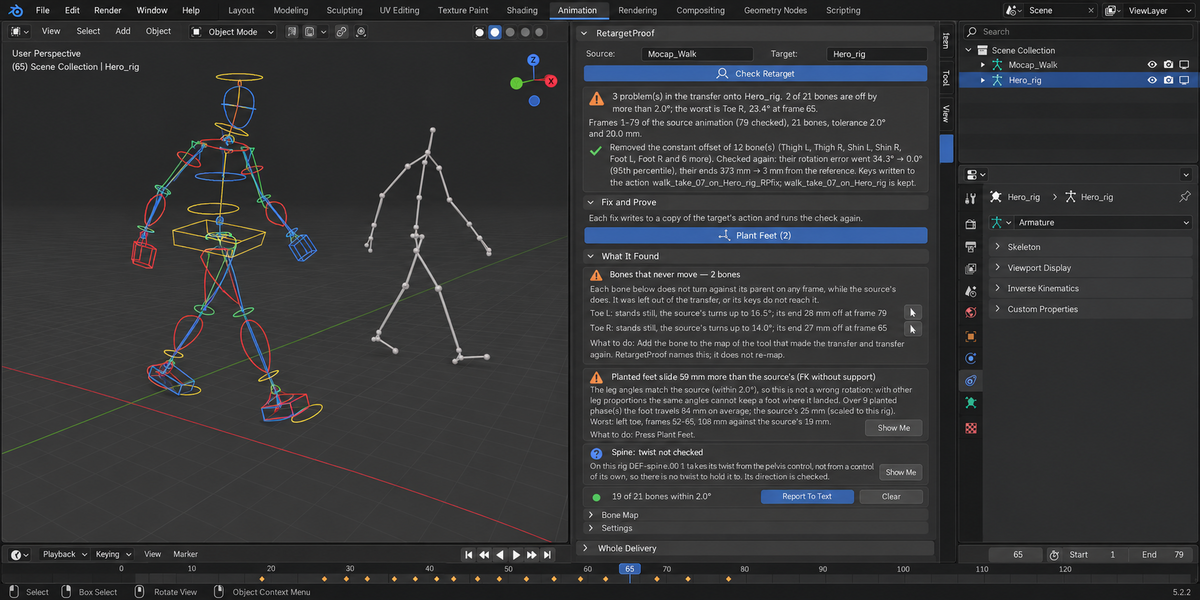
Each fix writes its keys to a copy of the target's action — the original action is kept in the file — then runs the same check again and shows the numbers before and after. Every fix is one undo step.
- Remove Constant Offsets takes the named constant offsets out of the keys. Bones below a corrected bone are handled by measurement: whichever of "keep its own keys" and "keep where it pointed" leaves the smaller error.
- Fix Hips Travel and Height takes the hips' travel over the floor from the source's path, scaled by the ratio of the two rigs' standing hips heights and starting where the character starts, and brings the hips to the source's height. The hips' own up-and-down motion is kept.
- Plant Feet pins each planted foot where it landed with two-bone IK of thigh and shin. The pelvis is not touched and the foot keeps its own rotation. The result line states the price — how far thigh and shin were turned — and lists the frames where the leg is too short to reach its pin.
A fix writes a key on every frame of the checked range for the bones it changes, and only on the channels it owns: bone scale is never touched, a rotation fix leaves the location alone, the hips fix leaves the rotation alone. If the same check does not confirm the fix afterwards — for Remove Constant Offsets: the fixed bones are not within Angle Tolerance; or something else overrides the keys — the fix is taken back, the action is left as it was, and the panel says so.
Keys are written on the bones that already carry keys. On a control rig the measured bone is not the keyed one; the keyed bone that turns it rigidly is found from the motion itself. Where there is none (the bone is driven by IK, or a constraint or a driver sits on top of its keys), or the target's motion sits in NLA strips, or the target is linked from a library, the finding says so and no fix is offered. For the hips' location the carrying bone is found by moving each candidate a little and watching whether the hips follow; the bone is put back at once. Checking goes over the frames and puts the pose back as it was, including a change you made on the current frame without a key.
Swapped sides, a bone following the wrong source bone, a missing bone and a limb held by IK are decisions about the bone map or the rig. RetargetProof names them and does not change them.
Bone Map
Auto Map fills the map from the bone names. Known naming schemes are read from tables (Mixamo and mocap BVH names, Unreal Mannequin, Rigify, Character Creator, Daz Genesis, VRoid, 3ds Max Biped, Auto-Rig Pro); anything else is matched by the words in the names, keeping left and right apart. Each row can be corrected by hand; Save Map and Load Map write and read the map as a file. The map is stored in the scene and is cleared when another armature is picked.
On a control rig the target column holds the bones that are measured — the ones the mesh follows — not the controls. On a generated Rigify rig the four limb bones are read from its ORG skeleton, because a limb's deform chain spreads the twist over its segments; the torso, clavicles, hands and feet are read from the deform bones.
Settings
- Angle Tolerance and Distance Tolerance (mm) — how strict the check is. There is no magic number here: the tolerance is yours.
- Frames — the source's animation, or the scene range (the preview range when it is on). Every Nth Frame thins the check; the fixes always work on every frame.
- Planted: Slower Than / Lower Than — when a foot of the source counts as planted.
- Set Floor Heights — by default the floor of each rig is the height of its object origin; switch this on to give the two heights yourself.
Pipeline mode
RetargetProof also runs from the Whole Delivery panel in the same tab and from the command line with the rest of the Proof line. Each file is checked with the Source and Target stored in its scene; a file with none chosen is reported as not checked, never as passed.
Limits
- Human bipeds: hips, two spine bones, neck, head, clavicles, arms, legs and toes. Fingers, faces, tails, wings and four-legged rigs are not checked.
- Hand-to-hand, hand-to-prop and other contacts are not checked and not fixed.
- "Hands inside the body" is a capsule estimate from the skeleton; the mesh is not read.
- A time shift between the source and the target is not recognised: it shows as "not explained".
- On a control rig with twist or bendy chains other than Rigify, a bone that is only a segment of the way to the next joint has its direction checked and its twist not checked; the finding says so.
- The Auto-Rig Pro name table is there, but RetargetProof has not been run on an Auto-Rig Pro rig.
- Hips travel keyed on the object instead of a bone is measured; its fix is not offered.
- The source has to keep its animation. Some tools take the action off the source when they bake; assign it back before checking.
- An armature in Edit Mode, in Rest Position, disabled in viewports or with a mirrored scale is reported as not readable.
Requirements
Blender 4.2 or newer. Checked on 4.2.9 and 5.2.2, on macOS and Windows.
Have questions about this product?
Login to message
| Published | about 18 hours ago |
| Blender Version | 4.2 - 5.2 |
| Extension Type | N/A |
| Render Engine Used | Cycles, Eevee |
| License | GPL |
Discover more products like this
mixamo validation foot sliding mocap proof animation rigify Animation Transfer rig retargeting motion capture retarget