Review Notes
 phamduyson






How do I navigate to a specific note in the scene?
In the Review Notes panel, every note has a 🔍 Jump button. Click it, and Blender will navigate your viewport directly to that note's pinned location, and select the attached object or node if applicable.
Can I delete or edit a note after posting?
You can delete your own notes and replies at any time. Editing note text is not currently supported — this ensures the integrity of the review trail. If you need to correct something, simply delete the note and create a new one, or add a clarifying reply.
Can multiple people leave notes on the same file?
Absolutely. Each note and reply is signed with the user's name. When different team members open the file, their previously set usernames are recognized. The addon prevents name conflicts across different machines.
How does this improve our team's workflow?
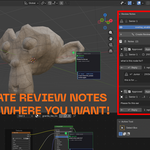
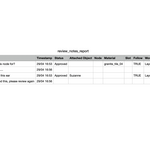
Instead of sending screenshots and writing review note, a supervisor clicks directly on the problem area and types their note. The artist opens the file, sees the pin exactly where the issue is, fixes it, and replies in the same thread. The supervisor can then approve it. No ambiguity, no lost feedback, and a full CSV report tracks everything.
What is Review Notes?
Review Notes is a Blender addon that lets you pin feedback directly onto 3D models, shader nodes, material slots, modifiers, bones, and more. It turns messy review workflows — screenshots, chat messages, vague descriptions — into a precise, trackable system inside Blender. Perfect for studios, production teams, and freelance collaborations.
$10
Have questions about this product?
Login to message
| Dev Fund Contributor | |
| Published | 5 months ago |
| Blender Version | 4.5 - 5.1 |
| Extension Type | N/A |
| Render Engine Used | Cycles, Eevee |
| License | GPL |