Scale Print Camera – PDF & Exact Scale
 Jan Holinka


Documentation
Scale Print Camera – PDF & Exact Scale
Overview
Scale Print Camera is a professional Blender add-on for creating scale-accurate, print-ready drawings.
It configures an orthographic camera and render resolution to exactly match paper size, drawing scale, and DPI, and allows exporting the result to true-size PDF.
The add-on is designed for workflows where printed scale matters, not just visual output.
Core Functionality
Scale Print Camera automates the setup required for accurate printing:
Configures the selected camera to orthographic projection
Calculates camera visible area from paper size and drawing scale
Automatically computes render resolution from DPI
Ensures rendered output matches paper dimensions exactly
Exports rendered images to PDF with true physical size
This eliminates manual calculations, trial-and-error prints, and scale inconsistencies.
Camera Setup
Works with any existing camera object
Automatically switches camera to orthographic mode
Calculates and sets correct
ortho_scaleSets the camera as the active render camera
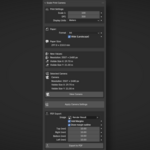
Displays current camera information (resolution, visible size)
A quick View Camera toggle allows instant verification of the result.
Scale & Resolution
Supports any drawing scale (e.g. 1:50, 1:100, 1:200)
DPI-based resolution calculation
Preview of calculated resolution and visible area before applying
Display units available in meters or feet & inches
All calculations are performed consistently to ensure print accuracy.
Paper Configuration
Supported paper formats:
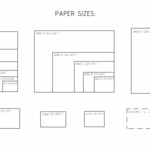
ISO A-series (A5 – A0)
US Letter / Legal / Ledger
ANSI and ARCH formats
Fully custom paper sizes
Orientation:
Portrait and landscape support for standard formats
Custom sizes:
Enter dimensions in millimeters or inches
Automatic unit conversion while preserving physical size
PDF Export
Scale Print Camera includes built-in PDF export for reliable printing:
Exports rendered images directly to PDF
PDF page size matches selected paper dimensions exactly
Designed for printing at 100% (Actual Size)
No external libraries or dependencies
Lossless compression and white background compositing
PDF export is the recommended way to preserve scale accuracy across different printers and systems.
Margins can be added during PDF export to create printer-safe areas.
Margins are applied by cropping with white space, not by scaling, so the drawing scale remains accurate.
Each margin (top, right, bottom, left) can be configured individually.
An optional inner outline can be drawn to visually indicate the margin boundary.
Typical Use Cases
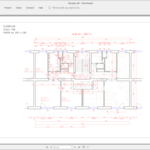
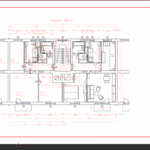
Technical and construction drawings
Survey and geodetic documentation
Architectural plans and sections
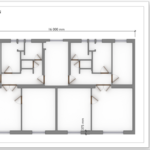
Print-ready visuals for reports
Any workflow requiring precise scale on paper
The add-on is fully usable on its own and fits naturally into technical and survey-oriented pipelines.
Requirements
Blender 5.0 or later
Windows, macOS, Linux
Notes on Performence and Printing
PDF export may take a few seconds to complete, especially for large paper sizes or high DPI values.
Existing PDF files with the same name are automatically overwritten during export.
For accurate scale:
Always print at 100% / Actual Size
Do not use “Fit to Page” or automatic scaling
PDF export is strongly recommended for consistent results
Incorrect printer scaling will affect output accuracy regardless of camera setup.
Have questions about this product?
Login to message
| Blender Extension Compatible | Yes |
| Published | 8 months ago |
| Blender Version | 5.0 |
| Extension Type | Add-on |
| Render Engine Used | Cycles |
| License | GPL |
Discover more products like this
print camera paper size orthographic dpi construction Technical drawing blueprint scale render setup PDF survey