Scale Print Camera – PDF & Exact Scale
 Jan Holinka


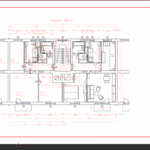
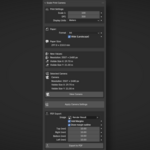
What scale should I use?
Use the scale that matches your drawing requirements. Common scales: 1:50 (details), 1:100 (plans), 1:200 (sections).
How does scale affect the output?
Scale determines how much real-world space fits on the paper. Higher scale = more space shown, smaller objects on paper.
Can I change scale after applying?
Yes, just change the scale value and click "Apply Camera Settings" again.
What DPI should I use?
300 DPI is recommended for standard prints. Use 150 for drafts, 600 for high quality.
Why is my render resolution so high?
Resolution = paper size × DPI. Large paper or high DPI results in high resolution. This is normal and ensures print quality.
Why is my printed scale incorrect?
Most likely, your printer is scaling the image. Ensure you print at 100% (Actual Size) and disable "Fit to Page" options.
Do I need to create a camera first?
Yes, add a camera to your scene (Add → Camera). The add-on configures existing cameras.
$8
Have questions about this product?
Login to message
| Blender Extension Compatible | Yes |
| Published | 8 months ago |
| Blender Version | 5.0 |
| Extension Type | Add-on |
| Render Engine Used | Cycles |
| License | GPL |
Discover more products like this
orthographic camera scale print render setup dpi Technical drawing paper size survey construction blueprint PDF