 arsha 3D plant designer


BLENDER WORKFLOW TOOL
Scene Doctor
Analyze. Diagnose. Optimize.
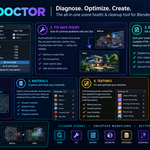
A powerful scene analysis and cleanup tool designed to help Blender artists identify potential problems, evaluate scene health, and maintain cleaner, more organized projects.
Scene Analysis | Safe Cleanup | Health Score | HTML Reports
What Is Scene Doctor?
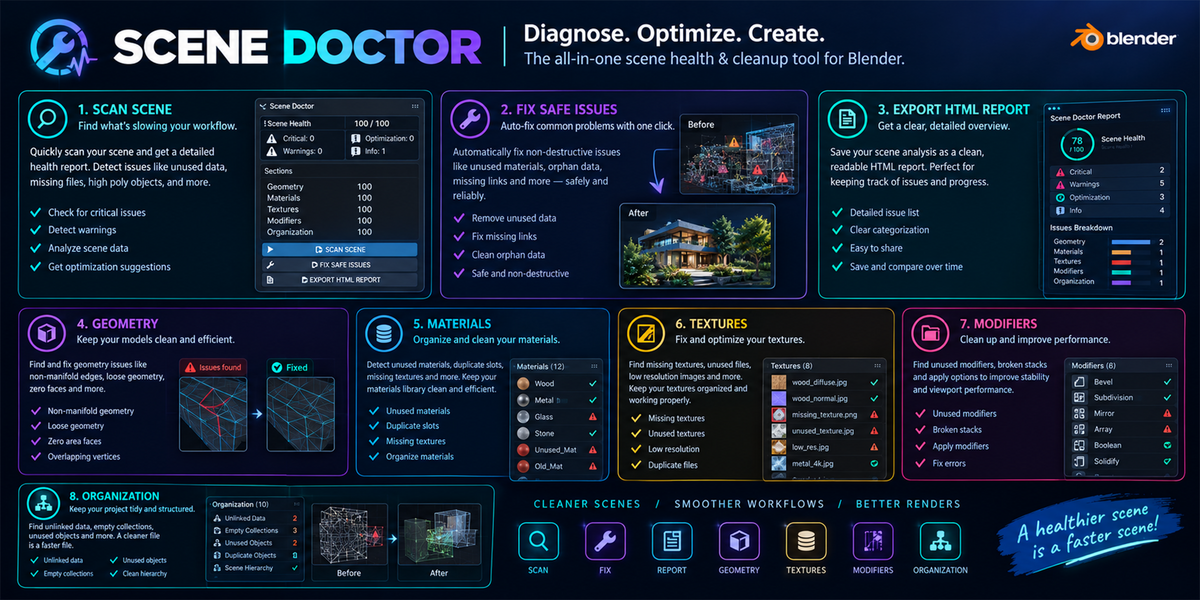
Scene Doctor is a Blender add-on that helps you inspect your 3D projects and identify potential issues affecting scene organization, geometry complexity, materials, textures, modifiers, and data management.
As projects become more complex, unused datablocks, oversized textures, heavy geometry, duplicate resources, and organizational issues can make scenes more difficult to maintain. Scene Doctor brings these findings together in one convenient interface.
Run a scan, review the detected issues, inspect affected objects, and apply supported safe fixes when appropriate. The initial scanning process is diagnostic and does not modify your scene.
Key Features
Comprehensive Scene Analysis
Scan geometry, materials, textures, modifiers, collections, datablocks, UVs, normals, and duplicate mesh data to identify potential issues throughout your project.
Scene Health Score

Get an overall scene health score out of 100, review issue counts by severity, and inspect category-level scores to understand which areas may need attention.
Safe Cleanup Tools
Identify and remove supported unused data and completely empty collections. Review the proposed operations before confirming bulk cleanup.
Problem Explorer
Expand issue details, inspect technical information, select affected objects, and focus the 3D Viewport on objects that require attention.
HTML Report Export
Export scene health information, detected issues, statistics, and cleanup results into an HTML report that can be opened in a web browser.
Configurable Scan Settings
Enable or disable individual scanners and adjust supported thresholds to suit the complexity and requirements of your projects.
Available Scanners
Geometry Scanner
Identifies heavy meshes and potentially excessive triangle counts.
Material Scanner
Checks material complexity, duplicate materials, and unused materials.
Texture Scanner
Checks large textures, duplicate images, and missing image files.
Modifier Scanner
Reviews modifier counts and potentially expensive modifier configurations.
Collection Scanner
Identifies empty collections and deeply nested collection structures.
Datablock Scanner
Finds unused data blocks that may be candidates for cleanup.
UV / Normal Scanner
Examines UV-related data and potential normal orientation issues.
Duplicate Scanner
Identifies similar meshes and meshes sharing underlying datablocks.
Issue Severity Levels
Critical
Serious issues that deserve immediate attention, such as missing texture files.
Warning
Potential problems that should be reviewed and addressed when appropriate.
Optimization
Opportunities to improve scene efficiency or simplify project data.
Info
Additional diagnostic information about your scene.
Main Controls
SCAN SCENE

Runs all enabled scanners and collects detected issues without modifying the scene.
FIX SAFE ISSUES
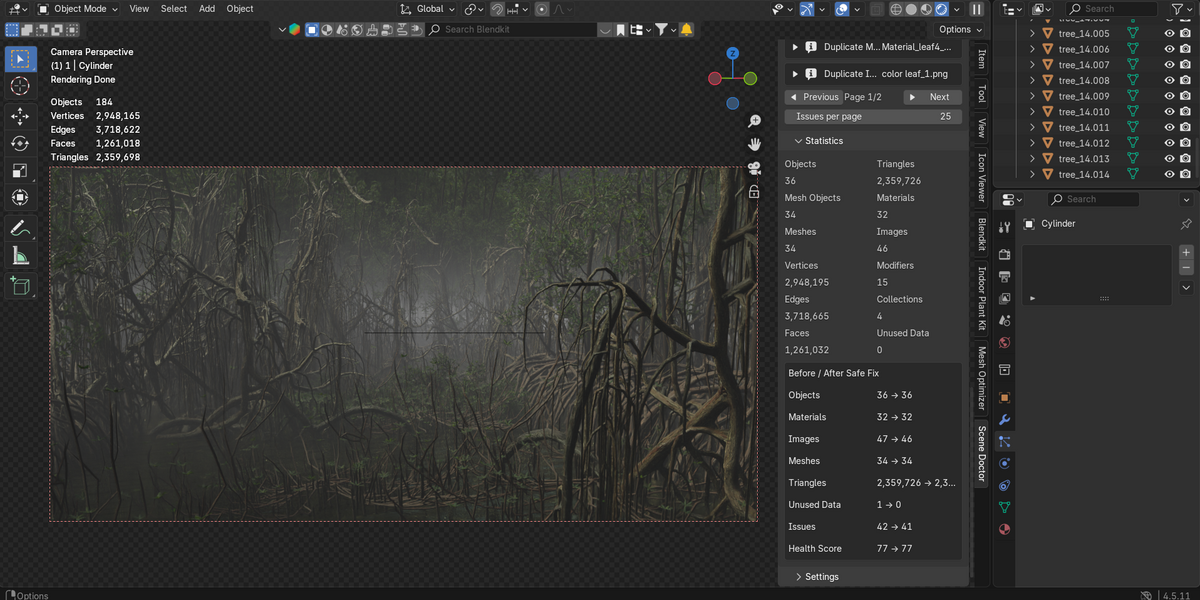
Processes supported safe-fix operations. A confirmation dialog allows you to review the proposed cleanup before execution. The scene is rescanned after cleanup.
EXPORT HTML REPORT
Generates an HTML report containing scene health information, issue details, statistics, and cleanup results. Run a scan before exporting.
Problem Explorer
Expand / Collapse
Show or hide detailed information about an issue.
Select
Select the object associated with a detected issue.
Focus
Focus the 3D Viewport on the affected object.
Fix Safe
Apply the supported safe fix for an individual issue when available.
Previous / Next
Navigate between pages of detected issues.
Filters and Statistics
Severity Filter
Filter issues by Critical, Warning, Optimization, or Info.
Category Filter
Filter results by Geometry, Material, Texture, Modifier, Collection, Datablock, UV / Normal, or Duplicate.
Pagination
Choose how many issues to display per page, from 5 to 100.
Scene Statistics
Review object counts, mesh counts, materials, images, triangle counts, and unused data.
Configurable Thresholds
Heavy Object Warning: 500,000 triangles
Heavy Object Critical: 2,000,000 triangles
Large Texture Warning: 4,096 pixels
Large Texture Critical: 8,192 pixels
Material Node Warning: 60 nodes
Modifier Count Warning: 10 modifiers
Subdivision Level Warning: Level 3
These are the documented default values for version 2.4.35. Supported settings may be adjusted to match your workflow.
Recommended Workflow
01. Scan
Run SCAN SCENE to analyze all enabled categories.
02. Review
Check the health score and filter issues by severity or category.
03. Inspect
Expand issue details and select or focus affected objects.
04. Clean Up
Review and confirm supported safe-fix operations.
05. Verify
Review the updated scan and scene statistics.
06. Export
Generate an HTML report for reference.
Compatibility
Documented Version: 2.4.35
Blender Version: Blender 4.2+
Report Format: HTML
Take Control of Your Scene
Identify potential problems, understand scene health, and keep your Blender projects organized with a controlled, diagnostic-first workflow.
Scene Doctor — A clearer view of your scene's health.
