Scene Cleanup Wizard
 Anvil Interactive Solutions



Scene Cleanup Wizard Documentation
Overview
Scene Cleanup Wizard is a powerful Blender add-on designed to streamline 3D scene management by automating common cleanup tasks. It optimizes scenes by removing unused data, merging duplicate vertices, applying transforms, organizing objects into collections, renaming objects logically, and arranging them spatially for better visualization. This add-on is ideal for artists, animators, and developers working with complex Blender scenes who need to improve workflow efficiency and scene organization.
Version: 1.1
Blender Compatibility: 2.93 and above
Author: Anvil Interactive Solutions
License: MIT
Location: 3D View > Sidebar > Scene Cleanup
Features
The add-on provides six optional cleanup operations, each configurable via a user-friendly interface:
Delete Orphan Data: Removes unused data blocks (e.g., meshes, materials, textures) to reduce file size and improve performance.
Remove Doubles: Merges duplicate vertices in mesh objects to optimize geometry.
Apply Scale/Rotation: Applies rotation and scale transforms to objects without affecting their location, ensuring consistent transforms.
Organize Collections: Groups objects by type (e.g., Meshes, Lights, Cameras) into dedicated collections for better scene hierarchy.
Auto-Rename Objects: Renames objects using a consistent format (e.g., MESH_001) for clarity and organization.
Arrange Objects Horizontally: Aligns mesh-like objects (meshes, curves, fonts) along the X-axis with customizable spacing.
Installation
Follow these steps to install Scene Cleanup Wizard in Blender:
Download the Add-on:
Obtain the scene_cleanup_wizard_v1.1.zip file from the Superhive Marketplace or the author's repository.
Install in Blender:
Open Blender and go to Edit > Preferences > Add-ons.
Click Install... and select the downloaded scene_cleanup_wizard_v1.1.zip.
Enable the add-on by checking the box next to "Object: Scene Cleanup Wizard".
Verify Installation:
Open the 3D View, press N to open the sidebar, and look for the "Scene Cleanup" tab.
If the tab is not visible, ensure the add-on is enabled and Blender is version 2.93 or higher.
Note: The add-on is distributed as a ZIP containing a folder (scene_cleanup_wizard) with __init__.py, scene_cleanup.py, README.md, LICENSE, and this DOCUMENTATION.md. Do not extract the ZIP manually; Blender will handle it during installation.
Usage
To use Scene Cleanup Wizard:
Open the Interface:
In Blender’s 3D View, press N to open the sidebar.
Navigate to the "Scene Cleanup" tab.
Configure Options:
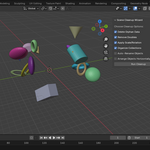
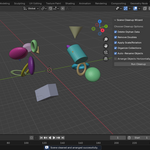
The panel displays six checkboxes corresponding to the cleanup features (all enabled by default):
Delete Orphan Data
Remove Doubles
Apply Scale/Rotation
Organize Collections
Auto-Rename Objects
Arrange Objects Horizontally
Enable or disable options as needed for your scene.
Run Cleanup:
Click the "Run Cleanup" button to execute the selected operations.
The operation is undoable (Ctrl+Z), but it’s recommended to save a backup of your scene before running.
Check Results:
Review the scene for changes (e.g., organized collections, renamed objects, or rearranged objects).
A confirmation message ("Scene cleaned and arranged successfully") appears in the Blender status bar.
Example Workflow
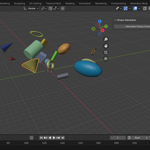
Starting Scene: A cluttered scene with unused materials, duplicate vertices, unapplied transforms, and objects scattered across the viewport.
Run Cleanup:
Enable all options and click "Run Cleanup".
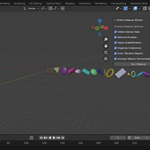
Orphan data is removed, meshes are optimized, transforms are applied, objects are grouped into collections (e.g., "Meshes", "Lights"), renamed (e.g., MESH_001), and aligned along the X-axis.
Result: A clean, organized scene ready for further work or rendering.
Feature Details
1. Delete Orphan Data
Purpose: Removes unused data blocks (meshes, materials, textures, images, curves, cameras, lights, actions) that have no users in the scene.
Technical Details:
Iterates through Blender’s data collections and removes blocks with users == 0.
Uses data_block.remove(block, do_unlink=True) for safe deletion.
Includes error handling to prevent crashes if data blocks are locked or corrupted.
Use Case: Reduces file size and memory usage in scenes with accumulated unused data from imports or modeling.
2. Remove Doubles
Purpose: Merges duplicate vertices in mesh objects to optimize geometry.
Technical Details:
Sets each mesh object as active, enters Edit Mode, selects all vertices, and runs bpy.ops.mesh.remove_doubles().
Error handling ensures the process continues even if a mesh is invalid.
Use Case: Fixes imported or hand-modeled meshes with overlapping vertices, improving rendering and simulation performance.
3. Apply Scale/Rotation
Purpose: Applies rotation and scale transforms to mesh, curve, and font objects, preserving their location.
Technical Details:
Uses bpy.ops.object.transform_apply(location=False, rotation=True, scale=True) on eligible objects.
Temporarily sets each object as active to avoid context issues.
Skips location to maintain object positions.
Use Case: Ensures consistent transforms for export, rigging, or physics simulations.
4. Organize Collections
Purpose: Groups objects into collections based on their type (e.g., Meshes, Lights, Cameras).
Technical Details:
Creates or reuses collections named "Meshes", "Lights", "Cameras", "Curves", and "Empties".
Unlinks objects from their current collections and links them to the appropriate type-based collection.
Handles objects already in the target collection to avoid duplicates.
Use Case: Simplifies scene management in large projects with many objects.
5. Auto-Rename Objects
Purpose: Renames objects using a consistent format (TYPE_XXX, e.g., MESH_001).
Technical Details:
Iterates through all scene objects, assigning names based on object type and a zero-padded index.
Updates pass_index for consistency with the naming order.
Use Case: Improves readability and organization, especially in scenes with generic or duplicate names.
6. Arrange Objects Horizontally
Purpose: Aligns mesh, curve, and font objects along the X-axis with 4cm (0.04 Blender units) spacing.
Technical Details:
Temporarily applies transforms to calculate accurate bounding boxes.
Uses obj.matrix_world and bound_box to compute object width in world space.
Positions each object at (x + width/2, 0, 0), incrementing x by the object’s width plus spacing.
Ensures a minimum width (0.1 units) to avoid issues with zero-sized objects.
Use Case: Organizes objects visually for inspection, animation, or layout planning.
Compatibility
Blender Versions: 2.93 and above (tested up to Blender 4.2).
Operating Systems: Windows, macOS, Linux (any platform supported by Blender).
Dependencies: None; uses only Blender’s Python API and standard modules (mathutils, bpy_extras).
Troubleshooting
Issue: "Scene Cleanup" tab not visible.
Solution: Ensure the add-on is enabled in Edit > Preferences > Add-ons. Check Blender version (must be 2.93+).
Issue: Cleanup fails or crashes.
Solution: Check the Blender console for error messages (Window > Toggle System Console). Ensure the scene has a valid view layer and no locked objects.
Issue: Objects not arranged as expected.
Solution: Verify that "Arrange Objects Horizontally" is enabled. Large or complex objects may require adjusting the spacing (hardcoded at 0.04 units; edit scene_cleanup.py to change).
Issue: Collections not created.
Solution: Ensure no naming conflicts exist in the scene’s collection hierarchy. Delete unused collections manually if needed.
For additional support, report issues on the Superhive product page or contact the author.
Developer Notes
The add-on is structured as a Python module for easy maintenance and extension:
File Structure:
__init__.py: Contains bl_info and registration logic, importing the main functionality.
scene_cleanup.py: Implements all cleanup functions, properties, operator, and panel.
Extending the Add-on:
Add new cleanup functions in scene_cleanup.py and register them in the CleanupProperties class.
Update the SCW_OT_CleanupOperator.execute method to call new functions based on new properties.
Modify the SCW_PT_Panel.draw method to add UI elements for new options.
Example: To add vertical arrangement, create a new function like arrange_objects_vertically and add a BoolProperty to toggle it.
Code Style:
Follows PEP 8 for Python code.
Includes error handling to prevent crashes.
Uses Blender’s temp_override for context-safe operations (Blender 3.2+).
Customization:
Adjust the spacing in arrange_objects_horizontally by modifying the spacing parameter.
Extend organize_collections to support additional object types (e.g., ARMATURE) by updating the object_types dictionary.
To contribute or fork the add-on, check the source code in the Superhive ZIP or the author’s repository (if available).
Changelog
v1.1 (2025):
Modularized code into __init__.py and scene_cleanup.py.
Added error handling for robustness.
Improved renaming logic to update pass_index.
Enhanced documentation and comments.
v1.0:
Initial release with core cleanup features.
License
Scene Cleanup Wizard is licensed under the MIT License. See the LICENSE file for details.
Contact
Author: Anvil Interactive Solutions
Support: Report issues on the Superhive Marketplace product page.
Feedback: Suggestions for new features or improvements are welcome via Superhive or direct contact.
Thank you for using Scene Cleanup Wizard! Optimize your Blender scenes with ease and efficiency.
Have questions about this product?
Login to message
| Published | about 1 year ago |
| Blender Version | 2.93 - 4.0 |
| Extension Type | N/A |
| License | Mit |
Discover more products like this
optimization productivity Scene Management rename cleanup arrange organization mesh Transforms collections