 Mars0hod







Are the generated panels ready for game engines?
The panels are editable, detailed Blender geometry. Automatic topology optimization, UV unwrapping, LOD generation and texture baking are not included. Prepare and optimize a copy for your target engine.
Does the add-on require an internet connection?
No. Panel generation and presets work locally without an account, API key or internet connection.
Why does Sensor Array Default always use the same layout?
Sensor Array Default intentionally preserves the original reference design. Choose variants 1, 2 or 3 for layouts with three, five or seven optical modules.
How do I change the interface language?
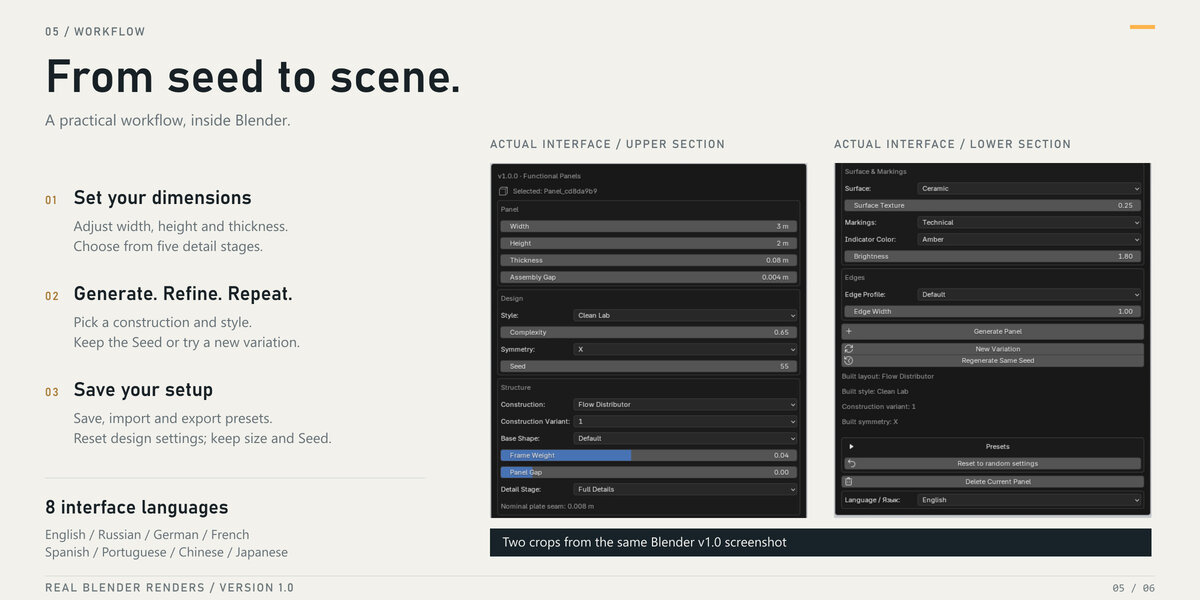
Scroll to the bottom of the add-on panel and use the Language selector. Eight languages are available, and you can choose one independently of Blender’s interface language.
Can I edit the generated objects manually?
Yes. Generated parts are editable Blender objects. Regeneration replaces generated geometry, including manual mesh edits, so keep a separate copy if you want to preserve your changes.
Why does changing a setting not update my panel?
Settings are applied when you click Regenerate Same Seed or New Variation. Generate Panel creates an additional panel instead of updating the selected one.
Where can I find the add-on after installation?
In the 3D Viewport, press N to open the sidebar and select the Sci-Fi Panel tab. Make sure the extension is enabled in Preferences. Use Object Mode to generate panels.
Which Blender version is required?
The release requires Blender 5.2 or later and was tested on Windows with Blender 5.2.2 LTS. Earlier Blender versions and other operating systems have not yet been verified.
$15
Have questions about this product?
Login to message
| Blender Extension Compatible | Yes |
| Published | 1 day ago |
| Blender Version | 5.2 |
| Extension Type | Add-on |
| Render Engine Used | Cycles, Eevee |
| License | GPL |
Discover more products like this
sci fi modeling greebles hard surface hatches environment Spaceship pipes procedural panels panel generator industrial