 Studio Sphaerus


Sculpt Stack - Non-destructive sculpt layers for Blender
Sculpt without commitment. Capture your sculpt passes as independent, blendable layers - then dial each one's strength up, down, or off with a slider, any time you like. Nothing is baked until you choose to bake it.
In Blender, every sculpt stroke is permanent the moment you make it. Decide an hour later that those wrinkles should be softer, that brow heavier, or that detail pass gone entirely? You're re-sculpting by hand. Sculpt Stack changes that - it brings a familiar, layer-based sculpting workflow natively into Blender's sculpt mode.
Why I built it
I'm a 3D environment artist, and I kept hitting the same wall: I'd sculpt something, then wish I could adjust how strong a pass was after the fact - without redoing it by hand. I wanted sculpt layers I could blend, the way other industry tools let you. So I built the tool I wanted for my own work, tested it on real production meshes, and refined it until it felt right. Sculpt Stack is the result.
Updates & Support
I'm a working environment artist building this because I use it every day, and I update it as Blender evolves. When a new Blender version drops, log into your account and grab the latest build.
Questions or a bug? Message me directly through the Superhive inbox — I read every message and aim to respond within 72 hours.
What it does
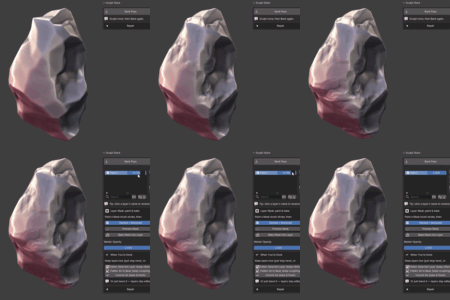
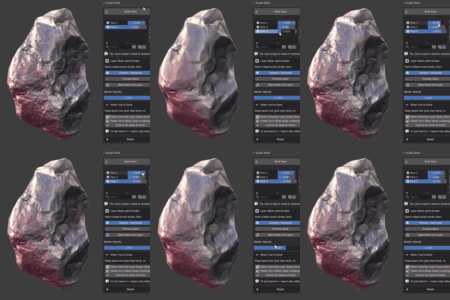
- Blendable sculpt layers - capture any number of sculpt passes as independent layers, each with its own weight slider. Adjust strength after sculpting, live.
- Master opacity - fade your entire stack up or down with one control. Instant before/after, instant intensity tuning.
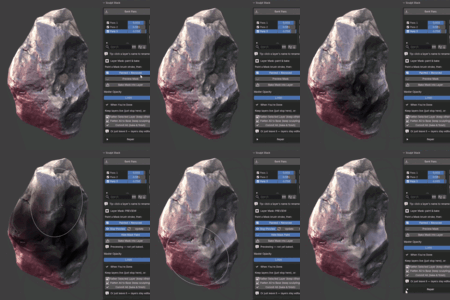
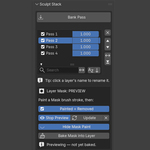
- Per-layer masking - paint with Blender's native Mask brush, preview the masked result before committing, then bake it into the layer. The mask paint hides during preview so you can see the result clearly. No new tool to learn.
- Full layer control - reorder, rename, invert, and merge layers like any layer-based workflow.
- Non-destructive finishing - flatten one layer, flatten the whole stack, or commit everything into the mesh — only when you choose.
- Works with your modifiers - Subdivision and Mirror modifiers display normally over your layered result.
- Built for real meshes - vectorized evaluation keeps blending responsive on dense, production-scale sculpts.
- One-key banking - capture a pass with a customizable shortcut (Ctrl+Shift+B by default), without leaving sculpt mode.
Imagine the workflow
You finish a sculpt and step back. The secondary forms feel a touch heavy - so you grab that layer's slider and ease it back, no re-sculpting. The fine pore detail should only sit on the cheeks - you mask it, preview, and bake. And when a client wants three variations? You toggle layers on and off and hand over a whole family of looks from a single sculpt. That's the day-to-day with Sculpt Stack.
How it works
- Activate Sculpt Stack - freezes your current mesh as the base (works on a clean mesh or one that already has detail).
- Sculpt a pass with any standard brush.
- Bank it as a layer (one button, or the hotkey).
- Blend - drag the layer's weight slider to taste; stack more passes and blend each independently.
- Mask a layer if you want it to affect only part of the mesh — paint, preview, bake.
- Finish - flatten or commit into the mesh when you're done.
Using Sculpt Stack
Getting started: Select your mesh, open the Sculpt Stack panel, and press Activate Sculpt Stack - this sets your base. You can activate on a freshly subdivided mesh, or on a mesh that already has sculptural detail you want to keep as your starting point.
Banking passes: Sculpt normally with any standard brush, then press Bank Pass (or Ctrl+Shift+B) to capture what you sculpted as a layer. Sculpt more, bank again, and build up a stack. Each layer has a weight slider - drag it to blend that pass's strength at any time.
Master Opacity scales the whole stack at once; pull to zero to see your base, back to one for the full result.
Masking a layer: Select a layer, paint a mask with Blender's Mask brush, then press Preview Mask to see the masked result (the mask paint hides automatically so you can see clearly - toggle it back with Hide Mask Paint). Press Update to refresh after painting more. When happy, press Bake Mask into Layer to commit it. The "Painted = Removed / Kept" toggle controls direction.
Managing layers: Reorder with the up/down arrows, rename by clicking a layer's name, invert a layer, or merge a layer down into the one below.
Finishing: When you're done, Flatten Selected bakes one layer into the base, Flatten All bakes the whole stack, or Commit finalizes everything - all optional, all on your terms.
Requirements & compatibility
- Blender 4.2 or newer (built and tested on Blender 5.1). Ships in Blender's modern extension format.
- Works on constant topology. Sculpt Stack measures detail against a frozen base, so while you have active layers it expects the vertex count to stay constant. Standard sculpt brushes (Clay, Crease, Grab, Smooth, etc.) are exactly what it's built for. It is not for use with Dyntopo, Remesh, or Multiresolution while layering - do your topology and resolution decisions first, then layer detail on top. The add-on guards against topology changes and warns you rather than corrupting data.
- No dependencies to install - runs on the Python and NumPy that ship inside Blender.
Support
Questions, bug reports, and feature requests are welcome through the Superhive inbox - I read and respond to them, and aim to reply within 72 hours. Sculpt Stack is released under the GNU GPL v3, so you're free to use it on any project, personal or commercial.

