 Skava
Skava


Shader Bridge — Documentation
Version: 1.2.3
Compatibility: Blender 4.0 + (4.2 LTS recommended) · Unity 2022.3 LTS + (URP / HDRP / Built-in) · Unreal Engine 4.27 + and 5.x
1. Installation
- Download
the archive from your purchase page(do not unpack). - In Blender open
Edit → Preferences → Add-ons. - Click
Install..., pick the ZIP, and tick the ShaderBridge entry to enable it. - Press
Nin the 3D Viewport. A new ShaderBridge tab appears in the sidebar.
No external Python packages or DLLs are required.
2. Quick start
- Select the object whose first material slot you want to convert.
- Open
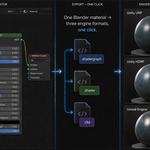
Sidebar → ShaderBridge. - Pick a target engine:
-
Unity URP →
.shadergraphfile (Universal Lit target) -
Unity HDRP →
.shadergraphfile (HDRP Lit target) -
Unity Built-in →
.shaderfile (ShaderLab surface shader) -
Unreal Engine 5 →
.t3dmaterial file
-
Unity URP →
- Set the export folder.
- (Optional) toggle Bake Procedurals if your material uses Noise / Voronoi / Wave / Musgrave or any node the engine has no equivalent for.
- (Optional) toggle Auto Channel-Pack to produce engine-correct packed maps automatically.
- (Optional) toggle Include Textures to copy any referenced Image Texture files alongside the shader.
- Click Export Material.
The exported file lands in the chosen folder, named after the Blender material.
3. Supported root shaders
Shader Bridge auto-detects the master surface — whatever sits at the Material Output's Surface input. The following Blender shader types are accepted as a root:
| Blender shader | How it maps to engine |
|---|---|
| Principled BSDF | Direct one-to-one conversion. All standard inputs (Base Color, Metallic, Roughness, Normal, Emission Color/Strength, IOR, Alpha, Coat, Transmission, Subsurface) are preserved. |
| Emission Shader | → Principled with emission_color / emission_strength set from the Emission Color and Strength inputs; base_color defaults to black, roughness to 1.0 (so engines that ignore emission still render reasonably). |
| Diffuse BSDF | → Principled with metallic = 0, specular = 0, roughness from the Diffuse roughness input. |
| Glossy BSDF | → Principled with metallic = 1, roughness preserved. |
| Glass BSDF | → Principled with transmission = 1, IOR copied, metallic = 0. |
| Transparent BSDF | → Principled with alpha = 0, transmission = 1, roughness = 0. |
Reroute nodes are walked through transparently — they don't need any pre-cleanup.
4. Mix Shader / Add Shader
Both are walked transparently to find the dominant branch:
-
Mix Shader — the
Facvalue selects which branch is the master:-
Fac < 0.5→ Shader 1 input becomes the master -
Fac >= 0.5→ Shader 2 input becomes the master - Default if Fac is unconnected: 0.5 → Shader 2
-
- Add Shader — the first connected branch becomes the master.
The non-master branch is still added to the IR graph as auxiliary nodes, so any Math / Mix / Texture nodes feeding it carry over and can be referenced by upstream logic.
5. NodeGroups
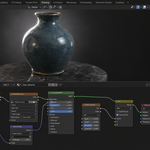
Custom node groups are entered automatically. Shader Bridge looks at the group's internal GROUP_OUTPUT node and follows the connection on the requested output socket back to the real BSDF inside.
This means materials from BlenderKit, Poliigon, Quixel Bridge, and any other asset library that wraps its guts in a custom group convert correctly without you having to ungroup them first.
The only requirement: the group's GROUP_OUTPUT must have a Shader-typed output wired to a real BSDF (or to a Mix Shader / Add Shader / nested group that eventually leads to a BSDF).
6. Procedural baking
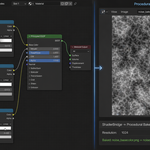
Toggle Bake Procedurals in the export panel. Shader Bridge will:
- Identify nodes the target engine has no native equivalent for (Noise / Voronoi / Wave / Musgrave / unsupported BSDFs).
- Use Cycles to bake each into an Image Texture at the resolution set in the Bake panel.
- Replace the procedural with an
Image Texturenode referencing the baked file. - Restore the original material's connections after baking is finished.
If a bake step fails (cancelled / out-of-memory / context error), the original Principled BSDF emission settings are restored cleanly — your material is not left half-rewired.
7. Channel packing
Toggle Auto Channel-Pack for engine-correct packed maps:
| Target | Pack | Channels |
|---|---|---|
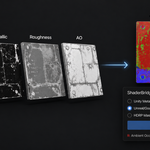
| Unity URP / Built-in | Metallic + Smoothness | R = Metallic (replicated to G, B), A = Smoothness |
| Unity HDRP | Mask Map | R = Metallic, G = AO, B = Detail Mask, A = Smoothness |
| Unreal Engine | ORM | R = AO, G = Roughness, B = Metallic |
The packed PNG is written next to the shader file with a clear suffix (_metallic_smoothness.png / _mask_map.png / _orm.png).
8. Diagnostic Conversion Report
Every export returns a Conversion Report with these fields:
-
success— boolean -
file_path— absolute path to the exported shader file -
supported— number of nodes that converted to native engine nodes -
unsupported— number of nodes that fell back to baked-texture placeholders or are unsupported by the target -
root_kind—PRINCIPLED/EMISSION/DIFFUSE/GLOSSY/GLASS/TRANSPARENT/ADD_SHADER— tells you which path the converter took -
baked_maps— paths of any textures baked during this export -
warnings— human-readable messages about anything noteworthy (toon patterns detected, baked maps, copy results, errors)
If the material can't be converted at all (e.g. Use Nodes disabled, no Material Output, Surface input not connected), the warnings list contains a specific error with a concrete fix — no more Supported: 0 / Unsupported: 0 mystery.
9. Viewport approximation
A one-click button that nudges EEVEE and color management toward the engine's look so you can preview shaders without leaving Blender.
- Auto-detects EEVEE Next on Blender 4.2+; properties that don't exist (e.g. the old bloom controls) are skipped silently.
- Settings tuned per engine: Unity uses Filmic, Unreal uses an ACES-like high-contrast view transform.
Click Deactivate Preview to restore your original render / color-management settings — Shader Bridge stores them in a scene custom property and restores them exactly.
10. Toon detector
Materials that use ShaderToRGB to drive a Color Ramp are flagged as toon patterns. The export still proceeds, but a warning is added to the Conversion Report so you know the result will not be a true PBR shader. For toon styles, route the material through the procedural baker so the toon shading bakes into a flat texture the engine can render.
11. Troubleshooting
"Conversion Report shows Supported: 0 / Unsupported: 0"
Fixed in v1.1. Used to happen on Emission-only and Mix-Shader-rooted materials because the converter couldn't pick a master surface. v1.1 accepts six common BSDFs as roots and walks through Mix / Add Shader and NodeGroup containers automatically.
"Material has no surface shader connected"
Pre-flight diagnostic. The error message tells you the exact issue:
-
Use Nodesdisabled → enable it in the Material panel and reconnect a shader. - No Material Output node → add one (
Add → Output → Material Output) and connect your shader. - Surface input not connected → wire your shader (Principled BSDF / Emission / Mix Shader) into Surface.
- Surface connected to something Shader Bridge can't use as master → 5 concrete fixes are listed.
"Procedural baker leaves my material broken"
The baker now restores Principled BSDF emission settings even when the bake step itself fails. If you saw this on an earlier build, re-import your material.
"Reroute or NodeGroup crashes the export"
Fixed: the traverser walks through REROUTE and GROUP nodes transparently and skips dangling from_socket = None links.
"EEVEE preview throws AttributeError on use_bloom / use_ssr"
Fixed in v1.0.0: each EEVEE attribute is probed with hasattr before write, so the same code works on legacy EEVEE (3.x) and EEVEE Next (4.2+).
"Exported shader has empty values"
Fixed in v1.0.0: emitters now read IRInput.default_value and params instead of non-existent attributes.
12. Limitations
- Multi-output Material (Surface + Displacement + Volume) — only the Surface socket is consumed; Displacement and Volume are ignored. This is the right behaviour for game-engine target materials.
-
Multiple Material Output nodes — the first one with
is_active_output = Truewins; if none is active, the first found is used. If you have separate Cycles and EEVEE outputs, mark the one you want for export as active. - Hair / Velvet / Anisotropic / SSS-only / Translucent BSDFs — currently fall back to baked-texture placeholders. Mix them with a Principled BSDF if you need them as upstream contributors; otherwise, the procedural baker flattens them to a usable texture.
13. Changelog
v1.2.3
- Texture properties are typed by what the texture is. All of them were declared as normal maps, so Unity showed “This texture is not marked as a normal map — Fix Now” on a plain colour texture. Calibrated against 253 texture properties in Unity's own shipped graphs.
- Texture properties carry the image name. They used to be named after the Blender node — all of them “Image Texture” — so the exported PNG could not be matched to its slot and the shader came up with no texture applied.
- The material has controls. Base Color, Metallic, Smoothness and Alpha are exposed as properties with your Blender values as defaults. Where a texture drives an input, the knob for it is correctly absent.
- Verified end to end. The exported graph is imported into a real Unity editor, a material is built from it, the exported textures are bound by name, the material is rendered, and the rendered colour is compared with the colour it should be showing.
v1.2.2
- The material you built is now the material that arrives. Only connected inputs used to be exported; values typed as numbers were dropped and replaced by defaults, so a metal with Metallic 1.0 and Roughness 0.2 reached Unity as Metallic 0.0 and Smoothness 0.5, and reached Unreal as an empty material — four of seven test materials had not a single expression in the file.
- Roughness is converted, not renamed. Unity stores smoothness and Blender stores roughness; they are opposites. Measured: Roughness 0.2 now arrives as Smoothness 0.8. Without it a mirror metal arrived matte.
-
Three fixes on the Unreal side. Materials were all named
M_Materialand now carry their own name; a texture node with no image was written with an empty reference and wired to Normal, and a normal map now takes the image from the texture feeding it; an unconnected Normal is left alone instead of being pinned to a degenerate constant. Measured on seven materials: empty materials 4 → 0, wrong names 7 → 0, dead texture references 1 → 0.
v1.2.1
-
Every exported graph now compiles in Unity. Until this version they imported and then failed with
invalid subscript 'TangentSpaceNormal'in the vertex program — three errors per shader — and every material came out pink. The cause was one wrong value: a shader graph has two blocks built on the same slot class but living in different coordinate spaces, and the exporter took the space from the slot class instead of from the block, so the vertex Normal block was written as tangent space. Measured on seven materials — plain, metal, glass, image texture, normal map, bump, UV transform: before, 18 of 22 compiled stages failed on every one of them; after, 22 of 22 compile with zero errors on Unity 6000.4 with URP. Re-export your materials — files exported with an earlier version need re-exporting, not repairing. - Two new checks, because the old ones passed the broken files. The format check now reads the required coordinate space of every block out of Unity's own shipped graphs and compares. And the exported graphs are now imported into a real Unity editor where every pass of every shader is compiled — the question that was never being asked before.
v1.2.0
- Unity files are now written in the format Unity reads. Earlier versions wrote a single JSON object with the nodes nested inside it. A real .shadergraph is a stream of separate objects that reference each other by id, the surface is described by blocks rather than by a master node, and the render pipeline is named by a target object. Files produced before this version were not importable by URP. Re-export your materials and the new files will open.
- Toon setups arrive as a baked texture. Shader To RGB is an EEVEE-only trick and Unity has no equivalent, so a toon material used to land in the graph as a note saying so. Any node the target engine cannot express is now baked and wired in as a map. The same rule covers procedural textures and colour ramps.
- Channel packing no longer fails as soon as there is something to pack.
- Baking no longer fails with an empty path when the .blend file has never been saved.
- Checked on Blender 4.2, 5.1 and 5.2, all green.
v1.1.0
- Stylised root shaders supported: Emission, Diffuse, Glossy, Glass, Transparent.
- Mix Shader / Add Shader passthrough with dominant-branch selection.
- NodeGroup auto-traversal via GROUP_OUTPUT — works with assets from BlenderKit / Poliigon / Quixel.
- Diagnostic Conversion Report — accurate
supported/unsupportedcounts plus aroot_kindindicator. - Plain-English error messages with concrete fixes for Use Nodes disabled, missing Material Output, unconnected Surface.
v1.0.0
- Initial release. Principled BSDF → Unity URP / HDRP / ShaderLab + Unreal T3D. Procedural baker, channel packing, viewport approximation, toon detector.
14. Support
For questions, bug reports, or feature requests please contact the seller through the marketplace messaging where you bought this add-on.
15. License
GPL-3.0. Standard for Blender add-ons. The license applies to the add-on code only — the shaders you generate with it are yours to ship in any commercial project.
Have questions about this product?
Login to message
| Sales | 10+ |
| Published | 5 months ago |
| Blender Version | 3.1 - 5.1 |
| Extension Type | N/A |
| Render Engine Used | Arnold, Blender-Internal, Blender-Game-Engine, Cycles, Eevee, Freestyle, Luxrender, Mental-Ray, Octane, Vray, Yafaray |
| License | GPL |
Discover more products like this
unreal-material shaderlab unity-shader-graph procedural-bake toon shader hlsl shader-conversion technical-art PBR Node Graph material export shader tools