 Skava
Skava


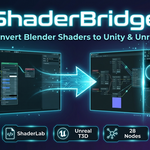
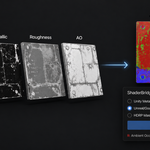
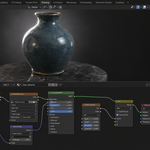
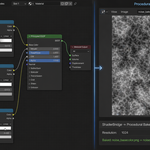
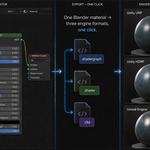
It does not produce a shader that behaves identically to your Blender material — no exporter can, because the engines light surfaces differently. It converts the node graph where a real equivalent exists, bakes what has no equivalent, and says which is which in the conversion report.
It does not build materials for you, and it does not leave your Blender scene changed: baking writes images next to the exported file and puts the material back afterwards.
Unity URP and HDRP get a .shadergraph file; Unity Built-in gets a .shader in ShaderLab; Unreal gets T3D material text. Tested against Unity 2022.3 LTS and newer, with the live import check run on Unity 6000.4 and URP.
On the Blender side: 4.2 LTS and newer, checked on 4.2.9, 5.1.0 and 5.2.0. Nothing is downloaded and no external Python packages are installed — everything ships inside the archive.
Yes, as a baked texture. Shader To RGB is an EEVEE-only trick and Unity has no node like it, so there is nothing to translate it into. From 1.2.0 anything the target engine cannot express is baked to an image and wired into the right input, instead of being dropped into the graph as a note. For a Shader To RGB feeding a Color Ramp you get image maps next to the shader file, plugged into Base Color.
Two things to know before you rely on it. A bake is a snapshot: the ramp is baked as lit in Blender at bake time, so it will not react to Unity lights the way it reacted to EEVEE lights. If you need banding that responds to light in Unity, that has to be built as a Unity shader — no exporter can carry it across. And regular PBR nodes that do have Unity equivalents are still passed through as real nodes, not baked.
Export it again with version 1.2.0 or newer. Versions up to 1.1.1 wrote the file in a shape Unity does not read: one JSON object with the nodes nested inside it, and the master node that Shader Graph removed several releases ago. Unity had nothing to open, and such a file cannot be repaired — it has to be written again.
Update the add-on, press Export once more, and drop the new file into your project. If it still will not open, tell us your Unity version and what the console says.
Since 1.2.0 the format is checked automatically against Unity's own shipped graphs on every build, and the exported files are imported into Unity 6000.4 with URP as part of testing: both a PBR material and a toon material compile into a shader with no errors.
1. Download the archive from your purchase page and keep it zipped — do not unpack it.
2. In Blender open Edit, then Preferences, then Add-ons.
3. Press the arrow button in the top right corner of that window and choose Install from Disk. On Blender 4.0 and 4.1 the same button is called Install. Pick the archive.
4. Tick the checkbox next to Shader Bridge in the list.
5. Press N in the 3D Viewport — a Shader Bridge tab appears in the sidebar.
Blender 4.2 LTS or newer, checked on 4.2.9, 5.1.0 and 5.2.0. Nothing is downloaded and no external Python packages are installed. Always install the newest version from your purchase page: files exported by versions before 1.2.0 cannot be opened by Unity.
Have questions about this product?
Login to message
| Sales | 10+ |
| Published | 5 months ago |
| Blender Version | 3.1 - 5.1 |
| Extension Type | N/A |
| Render Engine Used | Arnold, Blender-Internal, Blender-Game-Engine, Cycles, Eevee, Freestyle, Luxrender, Mental-Ray, Octane, Vray, Yafaray |
| License | GPL |
Discover more products like this
unity-shader-graph shader-conversion toon shader hlsl technical-art procedural-bake shader tools Node Graph PBR unreal-material material export shaderlab