 Skava
Skava


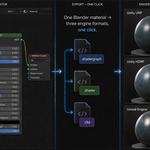
The shader now arrives usable, not just compiling. Three things were wrong, and all three were reported by a buyer rather than found by us.
Every texture property was declared as a normal map, so Unity answered “This texture is not marked as a normal map — Fix Now” on a plain colour texture. The type now follows what the texture actually is; the value was calibrated against 253 texture properties in Unity's own shipped graphs, where 0 means a colour map and 3 means a normal map and nothing else.
Texture properties were named after the Blender node rather than the image — all of them were “Image Texture”. The exported UVGridTex.png sitting next to the graph could not be matched to the slot it belonged in, so the shader came up with no texture applied. Properties now carry the image name.
The material had no controls. Values were baked into the graph and could only be changed by opening it. Base Color, Metallic, Smoothness and Alpha are now exposed as properties with your Blender values as defaults; where a texture drives an input, the knob for it is correctly absent.
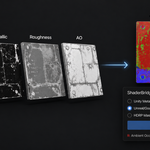
All of this is now measured end to end rather than inspected: the exported graph is imported into a real Unity editor, a material is built from it, the exported textures are bound by name, the material is rendered, and the rendered colour is compared with the colour it should be showing. On 1.2.2 that check raises eight complaints — including the yellow UV grid rendering as the default grey — and on 1.2.3, none.
The material you built is now the material that arrives. Until this version only connected inputs were exported: anything you typed as a number was dropped and replaced by a default. A metal with Metallic 1.0 and Roughness 0.2 reached Unity as Metallic 0.0 and Smoothness 0.5, and reached Unreal as a completely empty material — four of seven test materials exported with not a single expression in the file.
Roughness is now converted, not renamed. Unity stores smoothness, Blender stores roughness, and they are opposites. Measured: Roughness 0.2 now arrives as Smoothness 0.8. Without the conversion a mirror metal arrived matte.
Three more fixes on the Unreal side. Every material was called M_Material regardless of its name in Blender — it now carries its own. A texture node with no image was written out with an empty reference and wired to Normal, so a normal map silently did nothing; a normal map now takes the image from the texture feeding it. And an unconnected Normal is left alone instead of being pinned to a degenerate constant.
Measured before and after on seven materials: empty Unreal materials 4 → 0, wrong material names 7 → 0, dead texture references 1 → 0. A new check covers exactly this and fails on 1.2.1 in 7 of its 11 measurements.
Re-export your materials to pick this up.
Every exported graph now compiles in Unity. Until this version they imported and then failed with invalid subscript 'TangentSpaceNormal' in the vertex program, three errors per shader, and every material came out pink.
The cause was one wrong value. A shader graph has two blocks built on the same slot class but living in different coordinate spaces: the vertex Normal block is object space, the surface Normal (Tangent Space) block is tangent space. The exporter decided the space from the slot class instead of from the block, so the vertex block was written as tangent space. An unconnected tangent-space normal slot asks Unity for a value the vertex stage does not have, and compilation stops there.
Measured on seven materials — plain, metal, glass, image texture, normal map, bump and UV transform. Before: 18 of 22 compiled stages failed on every one of them. After: 22 of 22 compile, zero errors, on Unity 6000.4 with URP.
Re-export your materials. Files exported with an earlier version need re-exporting, not repairing.
Two checks were added, because the ones already in place passed the broken files. The format check now reads the required coordinate space of every block out of Unity's own shipped graphs and compares — it reddens on all seven broken files and passes all seven fixed ones. And the exported graphs are now imported into a real Unity editor and every pass of every shader is compiled, which is the question that was never being asked before.
Unity files are now written in the format Unity reads. Earlier versions wrote a single JSON object with the nodes nested inside it. A real .shadergraph is a stream of separate objects that reference each other by id, the surface is described by blocks rather than by a master node, and the render pipeline is named by a target object. Files produced before this version were not importable by URP. Re-export your materials and the new files will open.
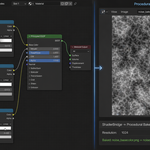
Toon setups now arrive as a baked texture. Shader To RGB is an EEVEE-only trick and Unity has no equivalent, so a toon material used to land in the graph as a note saying so. Any node this engine cannot express is now baked and wired in as a map. The same rule covers procedural textures and colour ramps.
Two crashes fixed. Channel packing failed as soon as there was anything to pack, and baking failed with an empty path when the .blend file had never been saved.
Blender 4.2, 5.1 and 5.2, all green.
Export refusals now name their cause. With no export folder chosen and an unsaved .blend file there is nowhere to write the shader. The add-on used to answer "Export failed. Check warnings above."; it now says to choose an export folder or save the file first, and the panel shows the same line before you press the button.
Objects with several material slots. The active material is exported, as before, and the add-on now says so and names how many slots the object has, instead of quietly producing one file for three materials.
The conversion itself is unchanged. Checked on Blender 4.2.9, 5.1.0, 5.2.0, 5.2.1 and 5.2.2 — 20 checks per build, zero problems.
Have questions about this product?
Login to message
| Sales | 10+ |
| Published | 5 months ago |
| Blender Version | 3.1 - 5.1 |
| Extension Type | N/A |
| Render Engine Used | Arnold, Blender-Internal, Blender-Game-Engine, Cycles, Eevee, Freestyle, Luxrender, Mental-Ray, Octane, Vray, Yafaray |
| License | GPL |
Discover more products like this
shader tools procedural-bake technical-art unreal-material shader-conversion toon shader material export shaderlab hlsl unity-shader-graph Node Graph PBR