Shape Key Fixer - Manage All Scene ShapeKeys With Groups & Batch Tools
 blenderustad



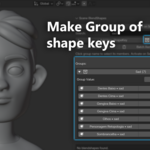
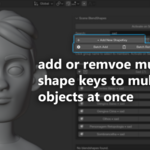
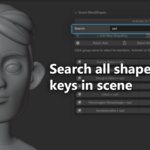
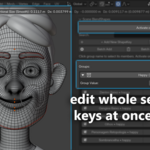
Shape Key Fixer – Installation & Usage Guide (Full PDF Content)
📦 Installation
Method 1: Install from ZIP (Recommended)
-
Download the addon
-
File:
shape_key_fixer.zip -
Do NOT unzip
-
-
Open Blender
-
Version 2.80 or newer
-
-
Open Preferences
-
Edit → Preferences → Add-ons
-
-
Install the Addon
-
Click Install…
-
Select
shape_key_fixer.zip
-
-
Enable the Addon
-
Search: Shape Key Fixer
-
Check the box to enable
-
Appears in 3D Viewport sidebar
-
-
Optional: Save Preferences
Method 2: Blender Extensions (Blender 4.2+)
-
Edit → Preferences → Get Extensions
-
Click ⚙️ → Install from Disk
-
Select the ZIP → Install
-
Extension will auto-enable (or enable manually)
🚀 Accessing the Panel
-
Open 3D Viewport
-
Press N to show sidebar
-
Find BlendShapes → Shape Key Fixer
🎯 Quick Start (5-Minute Guide)
Step 1: View All Shape Keys
Panel lists every shape key from every object in your scene.
Step 2: Add a Shape Key
-
Select objects
-
Click + Add New ShapeKey
-
Name it → Added to all selected meshes
Step 3: Create a Group
-
Click Make Group
-
Select keys → OK
Step 4: Use Group Sliders
-
Open a group
-
Use Group Value slider
-
All keys update together
Step 5: Batch Operations
-
Batch Add → Add the same key to many objects
-
Batch Remove → Remove specific keys from multiple objects
📚 Features in Detail
Scene-Wide Shape Key Browser
-
View all shape keys instantly
-
Updates in real time
-
Excludes Basis automatically
-
Filter with Search
-
Click a key name to select its object
Smart Grouping System
Create groups like:
-
Eyes
-
Smile
-
Phonemes
-
Correctives
-
Clothing deformation
Group management includes:
-
Expand/collapse
-
Rename
-
Add/remove members
-
Click group name to select related objects
Real-Time Group Sliders
Change one slider → all keys move.
Fantastic for:
-
Facial expressions
-
Corrective shapes
-
Lip sync
Activate on Select Mode:
Click a group name → instantly sets it to 1.0.
Batch Operations
Batch Add
Add the same shape key to many objects at once.
Batch Remove
Select any shape key → remove from multiple objects.
Remove All With Active
Select a key → delete that key from every object in the scene.
Quick Navigation
Click a shape key to:
-
Select object
-
Make it active
-
Set its shape key active
-
Frame it in the viewport
Search & Filter
Type keywords:
-
"smile"
-
"head"
-
"left"
Filters in real time.
Rename Anything
-
Pencil icon next to key
-
Pencil icon next to group
💡 Workflow Examples
Character Artist
-
Create facial expression keys
-
Group by eyes, mouth, brows
-
Test with sliders
Facial Rigger
-
Add phoneme keys to all face objects using batch
-
Create groups for A/E/I/O/U
-
Test rig quickly
Animator
-
Activate on Select
-
Click phoneme groups while animating lip sync
Game Developer
-
Organize shape keys by LOD
-
Clean unused ones with batch remove
🎯 Pro Tips
Organization
Use prefix naming:
-
Eye_
-
Mouth_
-
Brow_
Group by body part or function.
Time Saving
-
Use Search
-
Group early
-
Batch operations frequently
-
Activate on Select toggle for animators
⚠️ Important Notes
Works With:
✔ Mesh objects
✔ Multiple objects
✔ Relative & absolute shape keys
✔ Drivers
✔ Custom normals
Limitations:
❌ Cannot create initial Basis key
❌ Meshes only
❌ Cannot edit vertex positions (use Edit Mode)
Safety:
✔ Won’t delete Basis
✔ Undo/Redo supported
✔ No data corruption
🐛 Troubleshooting
Panel Not Showing
-
Press N
-
Ensure addon enabled
-
Try another workspace
-
Restart Blender
Shape Keys Missing
-
Check mesh type
-
Check search filter
-
Basis is hidden by design
Group Slider Not Working
-
Check group members
-
Re-add if deleted
Make Group / Remove All Issues
Fixed in current version.
📞 Support
Email: [email protected]
Include Blender version, addon version, and steps to reproduce.
🎓 Helpful Shortcuts
-
N → Toggle sidebar
-
Tab → Edit/Object
-
Alt + Click (slider) → Reset
-
Shift + Drag (slider) → Fine control
📖 Quick Reference
| Task | How To |
|---|---|
| View shape keys | Open Shape Key Fixer |
| Add key | Select → + Add New ShapeKey |
| Create group | Make Group → Select keys |
| Control group | Group Value slider |
| Delete key | X icon |
| Rename | Pencil icon |
| Find key | Search box |
| Batch add/remove | Batch tools |
| Clean scene | Remove All With Active |
Shape Key Fixer v1.5.1
© 2025 Junaid Alam (Blender Ustad), Salman Naseem (Being Animator)
Have questions about this product?
Login to message
| Blender Extension Compatible | Yes |
| Sales | 30+ |
| Published | 10 months ago |
| Blender Version | 3.0 - 5.0 |
| Extension Type | Add-on |
| Render Engine Used | Cycles, Eevee |
| License | GPL |

Discover more products like this
shape key manager blender manage shape keys multiple objects animation workflow shape keys shape key batch operations blender blender blend shapes organizer facial animation shape keys blender batch add shape keys blender control multiple shape keys with one slider blender shape key fixer