Shelf Filler
 Milad_Kambari



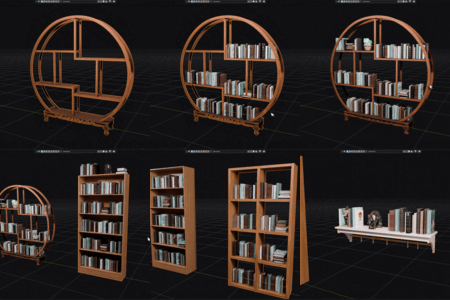
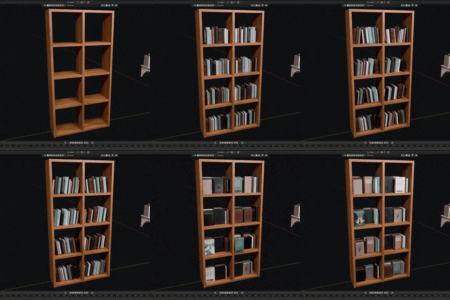
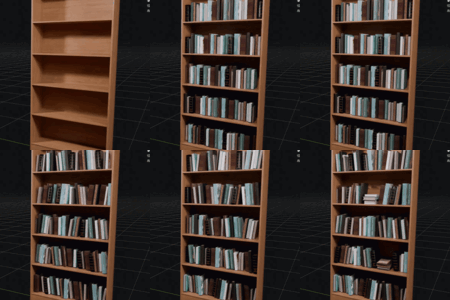
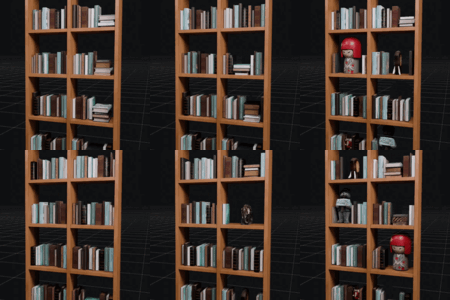
SUPERHIVE — DOCUMENTATION
MK SHELF FILLER — Auto-Fill Bookshelves With Books in One Click
MK Shelf Filler is a Blender addon that fills any bookshelf with natural, randomized, render-ready books in a single click. It detects each shelf level (and each separate compartment), then arranges standing, leaning, lying, and faced-out books with realistic spacing — plus optional decoratives between them. Everything updates in realtime.
INSTALLATION
- Open Blender and go to Edit > Preferences > Add-ons.
- Click Install, select the mk_shelf_filler.py file, and enable the checkbox.
- Open the 3D Viewport sidebar with the N key and find the "Shelf Filler" tab.
Note: If you are updating from an older version, remove the old add-on first, restart Blender, then install the new file. This avoids leftover settings from a previous version.
Compatible with Blender 3.6 and above (tested on 4.x and 5.x).
QUICK START
- Select your bookshelf in the viewport, then in the Shelf panel click the eyedropper to set it as the Shelf.
- Select one or more book models, then in the Books panel click Set (or Add +).
- (Optional) Select decorative props and add them in the Decorative panel.
- Press START. The shelf fills instantly.
- Adjust any slider in realtime, or change the Seed for a new random layout.
SETTINGS EXPLAINED
SHELF Set the shelf object the books will be placed on. Any mesh works — straight, divided, or multi-compartment.
BOOKS The list of book models used to fill the shelf. Add as many as you like for variety. Set replaces the list; Add (+) appends without clearing; the trash icon clears it.
GENERAL SETTINGS
- Book scale: overall size multiplier for the books.
- Gap between books: fixed spacing between standing books.
- Random gap: extra random spacing for a natural look.
- Side margin: empty margin left at each end of a compartment.
- Compartment gap: the gap size between faces that counts as a divider / separate compartment. Lower = more splits, higher = fewer splits. Increase this if separate units are being merged; decrease it if a single compartment is being split.
- Offset from back: pushes books toward the front or back of the shelf.
- Depth jitter: small random depth variation.
- Top shelf level: include or skip the very top surface.
- Duplicate to fill: when on, books are duplicated to fill the whole shelf; when off, only your selected models are placed once.
- Seed: the random seed. Use the refresh button for a new random layout.
LEANING (GROUPED)
- Lean angle: how far leaning books tilt.
- Lean group chance: chance of starting a leaning group.
- Books per lean group: how many books lean together (same direction, nested like dominoes).
- All lean to one side: makes every book on a level lean one way against the wall.
- Lean side: Random, Left, or Right.
TURN 90 (FACED-OUT)
- 90 turn chance: chance of placing a faced-out column (books rotated 90°, cover toward the front, stacked behind each other in depth).
LYING BOOKS (FLAT)
- Flat stacks: enable horizontal stacks of books.
- Books per flat stack: how many books per stack.
- Flat stack every N levels: 1 = every level, 2 = every other level, etc.
DECORATIVE
- Decorative enabled: turn decoratives on or off.
- Decorative list: figurines, plants, frames, or any prop. Set / Add (+) / clear like the books list.
- Percent of levels with decoratives: how many levels receive decoratives.
- Books per decorative: roughly how many books between each decorative.
- Margin between models, Side margin, Scale-fit limit: spacing and auto-shrink controls for decoratives.
RUN
- Realtime: rebuild the arrangement instantly on any change.
- START: build the arrangement.
- Apply: bake the placed books/decoratives in place so the next START (on another shelf) will not move or clear them.
- Clear: remove the generated copies.
MULTI-SHELF WORKFLOW
The source (original) book models never move — only copies are placed on the shelf. To dress several shelves:
- Select shelf 1, press START, and tweak in realtime.
- Press Apply to bake shelf 1 in place.
- Select shelf 2, press START. Shelf 1 stays untouched.
- Repeat for each shelf.
TIPS
- Mix several different book models freely. Each one is oriented correctly from its own axes, so they all stand uniformly.
- If books cross over a divider, lower the Compartment gap. If two separate units merge into one, raise it.
- Add more decorative models for more variety — the addon spreads them evenly with no back-to-back repeats.
Have questions about this product?
Login to message
| Sales | 30+ |
| Published | 4 months ago |
| Blender Version | 4.2 - 5.2 |
| Render Engine Used | Cycles, Eevee |
| License | GPL |
Discover more products like this
blender addon set dressing bookshelf scatter b3d automation props shelf filler game environment book filler Library books ArchViz Interior environment