Uv Unwrapping-Smart Uv Tool
 Anvil Interactive Solutions


Smart UV Tool — Technical Documentation
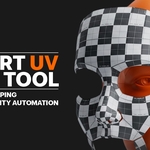
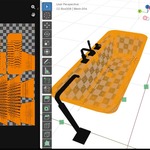
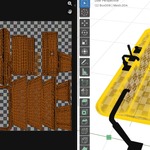
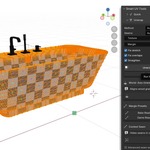
Smart UV Tool is a powerful Blender add-on designed for precise, efficient, and non-destructive UV unwrapping. It combines multiple unwrap methods, intelligent seam handling, real-time visualization, texel density control, and island straightening into a clean sidebar interface.
Installation
Download the add-on .zip file.
In Blender, go to Edit > Preferences > Add-ons.
Click Install, select the .zip file, and check the box next to "Smart UV Tool" to enable it.
Features
1. Unwrap & Seaming
One-Click Fix Everything: Diagnoses, seams, unwraps, fixes overlaps/stretch, normalizes texel density, and packs the entire mesh in the correct mathematical order automatically.
Context-Aware Auto-Seam: Uses curvature detection for hard edges and custom logic to cleanly unwrap cylindrical geometry like pipes or cables.
Intelligent Adaptive Unwrap: Automatically chooses the best method (Standard, Smart UV Project, or Project From View) based on your mesh type.
3D Seam Painting: Modal tool to draw seams directly in the viewport. Left Click to paint, Shift + Left Click to erase, and Right Click to finish.
Non-Destructive Temporary Seams: Uses temporary seams for unwrapping, then automatically restores your original seams.
Symmetry Unwrap: Mirrors and precisely stacks symmetrical islands, instantly saving up to 50% of your UV space.
Topology-Independent UV Transfer: Raycasts UV layouts from a clean source mesh onto any similar target mesh, regardless of polygon count.
Seam Visualization: Highlights seams directly in the 3D viewport with customizable color and thickness.
2. Island Tools
Smart Island Stacking: Auto-detects geometrically identical islands and stacks them perfectly to optimize texture space.
Automatic Island Straightening: Flattens quad-strips, bevels, and trim sheets into clean rectangles to eliminate texture aliasing.
Island Orientation Lock: Aligns islands to the U or V axis before packing to keep directional textures (like wood grains or fabric) consistent.
Quick UV Align Tools: One-click tools to align islands and edges along the X/Y axes.
Overlap Fixer: Automatically shifts intersecting islands into clean spaces using an automated shelf re-layout routine.
Stretch Analyzer & Auto-Relax: Displays a real-time GPU viewport heatmap (Blue/Green = Good, Red = Stretched). One click automatically relaxes only the stretched zones.
3. Texel Density & Packing
Texel Density Control: Input a project resolution and apply consistent texel density across any selection or cross-object assembly in one click. Includes a live-updating viewport HUD showing px/m and a density heatmap.
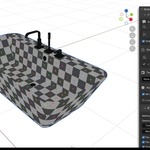
One-Click Checker Texture: Instantly applies a temporary checker pattern to easily check for visual distortion.
Dilation-Aware Packing: Packs islands using a customizable margin calculated directly from your target texture resolution, complete with a live pixel-count preview.
Smart UDIM Spiller: Groups islands by material slot and cleanly distributes them across UDIM tiles with built-in overflow handling.
UV Snapshots: Save and restore an unlimited number of named, non-destructive UV layout states per mesh.
UV Layout Export: Export layouts as transparent PNGs or scalable SVGs at custom resolutions up to 4096px.
Live UV: A background listener that automatically re-unwraps affected islands the moment you modify geometry in Edit Mode.
Game Engine Presets
Instantly configure resolution, texel density, and padding margins with one-click profiles:
Usage Guide - Optimal Workflow
- Prepare: In Edit Mode, select your target faces. For extreme high-poly meshes, temporarily use a Decimate Modifier (Ratio 0.2–0.5) for optimal performance. (Optional: Press H to hide unselected parts).
- Configure: Open the Smart UV tab in the Sidebar (N key). Choose your Unwrap Method, set your Island Margin (recommended: 0.01–0.03), and define your target Texel Density.
- Preview: Toggle Highlight Seams and click Preview Unwrap to verify layout, overlaps, and stretch in the UV editor safely without committing permanent changes. Use Auto-Fix Stretch if red zones appear.
- Apply & Export: Click Unwrap Selected to commit, then export your finalized UV layout as a PNG or SVG directly from the panel.
Troubleshooting & Support
- Overlapping Islands: Increase the Island Margin or lower your target Texel Density.
- Texture Stretching: Run the One-Click Auto-Fix Stretch tool to relax high-tension vertices.
- No Seam Highlights: Double-check that you are actively in Edit Mode and that the highlight option is checked in the panel.
- Export Fails: Ensure your current .blend file is saved to a local folder before exporting. Check Blender's System Console (Window → Toggle System Console) for specific error codes.
📩 Support Email: [email protected]
$20$10
 Included
Includes 12 months of
- Support from Anvil Interactive Solutions
- Product updates
Extend this product’s Support Period +12 months: 50% of product price
Have questions before purchasing?
Login to message
Discover more products like this
seam-management uv unwrapping uv-tools blender addons uv editing Texture Mapping 3D game asset Texel_Density uv export Smart UV Project