 ZibadMend


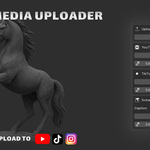

🚀 Social Media Video Uploader for Blender 🚀
Streamline Your Workflow & Share Your Creations Instantly!
Tired of rendering your Blender animations and then manually uploading them to multiple social media platforms? The Social Media Video Uploader addon is here to revolutionize your post-production process, saving you valuable time and effort. Directly upload your rendered videos from Blender to YouTube, TikTok, and Instagram with unparalleled ease.

✨ Key Features & Benefits ✨
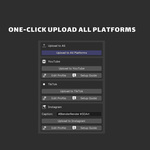
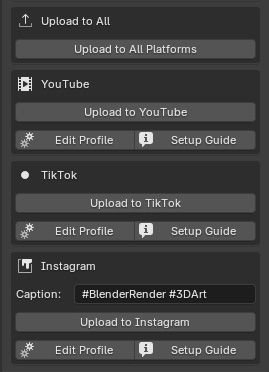
🎬 One-Click Multi-Platform Upload: Effortlessly send your finished renders to YouTube, TikTok, and Instagram with a single click. No more juggling browser tabs or cumbersome file transfers.
⚡ Smart Render Check & Auto-Rendering: The addon intelligently checks if your video is already rendered. If not, it can automatically initiate the render process within Blender, ensuring your file is ready before upload. It also intelligently handles Blender's default output paths (like
//tmp/), ensuring reliable file detection.📝 Comprehensive Metadata Customization: Easily set your video's Title, Description (multi-line), Tags (multi-line), and Privacy Status directly within Blender's Output Properties panel. All settings are conveniently organized for a seamless experience.
📊 Unified Progress Bar: Keep track of your overall upload progress with a single, intuitive progress bar displayed directly in Blender. See the status of each platform's upload at a glance.
🔑 Integrated API Setup Guides: Detailed, step-by-step guides for setting up YouTube API access are provided directly within the addon's panel. Get quick access to Google Cloud Console for credential setup. (TikTok and Instagram integrations are currently simulated, awaiting full API implementation due to platform complexities).
🛡️ Robust Error Handling & Debugging: The addon provides clear messages in the Blender System Console for troubleshooting any issues, including
DEBUGinformation for precise problem identification.-
⚙️ Integrated Render Profile Management (New!):
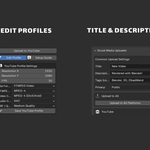
- Per-Platform Profile Editors: Easily adjust specific render settings such as Resolution, FPS, File Format, Video Codec, Audio Codec, and CRF (Quality) for YouTube, TikTok, and Instagram using dedicated, collapsible editors within the addon panel.
- CRF as Quality Presets: The Constant Rate Factor (CRF) is now presented as intuitive Quality options (e.g., 'Lossless', 'High', 'Medium', 'Low'), making it simpler to control video quality.
- Automatic Profile Application: When you click an upload button, the addon will automatically apply the saved render profile for that platform before rendering and uploading. Your original Blender render settings will be restored afterward. This ensures your videos always meet platform-specific recommendations.
📸 Screenshots
- One-Click Upload:

- Panel:
💡 How It Works 💡
Set Your Render Output: Configure your video output settings in Blender's Output Properties.
Fill in Details: Enter your video's metadata (title, description, tags, privacy) in the addon's dedicated panel.
Configure Platform-Specific Render Settings (New!): For each platform (YouTube, TikTok, Instagram), click the "Edit Profile" button (⚙️) to customize render settings like Resolution, FPS, Codec, and Quality (CRF) for that specific platform.
Click Upload: Choose to upload to a specific platform or use the "Upload to All Platforms" button. The addon will automatically apply the correct render profile.
Automated Process: The addon handles rendering (if needed), file detection, and initiates the API upload process, showing you the real-time progress.
🎯 Perfect For 🎯
3D Animators & Motion Graphics Artists: Save countless hours on repetitive upload tasks.
Blender Content Creators: Easily share your work across your favorite social media channels.
Anyone Looking to Streamline Their Workflow: Focus more on creation, less on logistics.
⚙️ Compatibility & Requirements ⚙️
Blender Version: Compatible with Blender 3.0 and newer (Blender 4.5+ recommended for optimal icon display).
Operating System: Windows, Linux, macOS.
Python Libraries: Requires
requests,google-api-python-client, andgoogle-auth-oauthlib. Easy-to-use installation scripts are provided in theinstallfolder.
Get the Social Media Video Uploader today and take your Blender workflow to the next level!
🔗 Contact
Creator: ZibadMend
Email: [email protected]