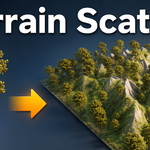
Terrain Scatter - Scatter Trees and Rocks on Any Terrain With Density Painting
 blenderustad


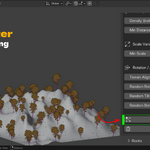
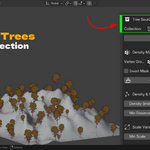
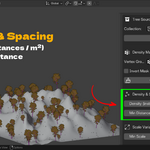
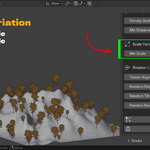
Installation
Download terrain_scatter.zip from your Superhive purchase.
In Blender open Edit > Preferences > Add-ons.
Click the arrow menu, choose Install from Disk, and select the ZIP.
Enable Terrain Scatter in the list.
In the 3D Viewport press N to open the sidebar and click the Terrain Scatter tab.
Download terrain_scatter.zip from your Superhive purchase.
In Blender open Edit > Preferences > Add-ons.
Click the arrow menu, choose Install from Disk, and select the ZIP.
Enable Terrain Scatter in the list.
In the 3D Viewport press N to open the sidebar and click the Terrain Scatter tab.
Quick start
Set the terrain. In the Terrain Scatter panel, put your ground mesh in the Terrain field.
Set the sources. Put your tree meshes in one collection and your rock meshes in another. Open the Trees sub-panel and assign the tree collection under Source. Do the same in the Rocks sub-panel.
Prepare pivots. Click Prepare Tree Pivots and Prepare Rock Pivots once. This moves each source object's origin to the bottom center of its bounding box so instances sit flat on the ground. The visible mesh does not move.
Preview. Click Refresh Preview. Axis markers appear where objects will land.
Tune. Adjust Density, Min Distance, the scale range, alignment, and rotation until the preview looks right. Refresh again after each change.
Scatter. Click Scatter Trees and Scatter Rocks. Instances are created in the Scattered Trees and Scattered Rocks collections.
Clear when needed. Use Clear Trees, Clear Rocks, Clear Preview, or Clear All Generated to remove generated objects and start over.
Set the terrain. In the Terrain Scatter panel, put your ground mesh in the Terrain field.
Set the sources. Put your tree meshes in one collection and your rock meshes in another. Open the Trees sub-panel and assign the tree collection under Source. Do the same in the Rocks sub-panel.
Prepare pivots. Click Prepare Tree Pivots and Prepare Rock Pivots once. This moves each source object's origin to the bottom center of its bounding box so instances sit flat on the ground. The visible mesh does not move.
Preview. Click Refresh Preview. Axis markers appear where objects will land.
Tune. Adjust Density, Min Distance, the scale range, alignment, and rotation until the preview looks right. Refresh again after each change.
Scatter. Click Scatter Trees and Scatter Rocks. Instances are created in the Scattered Trees and Scattered Rocks collections.
Clear when needed. Use Clear Trees, Clear Rocks, Clear Preview, or Clear All Generated to remove generated objects and start over.
Settings reference
Main panel
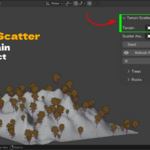
Terrain. The mesh object to scatter onto. Must be a mesh with faces.
Scatter Area (optional). Any object whose bounding box limits the scatter footprint on X and Y. Leave empty to use the whole terrain.
Seed. Random seed. Same seed and settings give the same layout every time.
Refresh Preview. Recomputes preview markers for both trees and rocks.
Clear Preview / Clear All Generated. Removes markers or every generated object.
Trees and Rocks sub-panels (identical controls, separate values)
Source Collection. The collection holding the objects to scatter. Nesting is fine, all mesh objects inside are used.
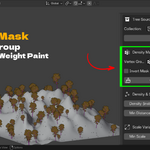
Density Vertex Group. The terrain vertex group used as a density mask. Empty means uniform scatter.
Invert Mask. Low weight becomes high density.
Create/Enter Weight Paint. Creates the vertex group if missing, fills it with weight 1, selects the terrain, and enters Weight Paint mode.
Density (instances / m2). Target instances per square meter before masking and spacing rejection.
Min Distance. Minimum distance between instance origins. Prevents overlap.
Min Scale / Max Scale. Each instance gets a random uniform scale in this range.
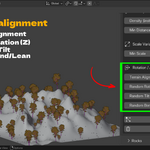
Terrain Alignment. 0 keeps objects upright, 1 aligns fully to the surface normal.
Random Rotation (Z). Maximum random yaw around the vertical axis. Default 360 degrees.
Random Tilt. Maximum random lean away from the up axis. Default 8 degrees.
Random Bend/Lean. Maximum bend angle from a non-destructive Simple Deform modifier on each instance. Default 10 degrees.
How it works
Placement. The addon builds a BVH tree from the terrain's evaluated mesh and casts rays straight down inside the scatter area. Each hit becomes a candidate point with the surface normal.
Density mask. A candidate point looks up the nearest original terrain vertex through a KD tree and reads its vertex group weight. Weight 0 rejects the point. Weights between 0 and 1 are accepted at random in proportion to the weight.
Spacing. A uniform grid spatial hash rejects any point too close to an already placed point.
Transform. Each accepted point gets a rotation blended between world up and the surface normal by the alignment slider, plus random yaw, tilt, and scale. If bend is above 0 a Simple Deform Bend modifier is added with a random angle.
Instancing. Each instance is a copy of a random source object that shares the source mesh data, linked into the Scattered Trees or Scattered Rocks collection.
Placement. The addon builds a BVH tree from the terrain's evaluated mesh and casts rays straight down inside the scatter area. Each hit becomes a candidate point with the surface normal.
Density mask. A candidate point looks up the nearest original terrain vertex through a KD tree and reads its vertex group weight. Weight 0 rejects the point. Weights between 0 and 1 are accepted at random in proportion to the weight.
Spacing. A uniform grid spatial hash rejects any point too close to an already placed point.
Transform. Each accepted point gets a rotation blended between world up and the surface normal by the alignment slider, plus random yaw, tilt, and scale. If bend is above 0 a Simple Deform Bend modifier is added with a random angle.
Instancing. Each instance is a copy of a random source object that shares the source mesh data, linked into the Scattered Trees or Scattered Rocks collection.
Tips
Run Prepare Pivots again if you add new objects to a source collection.
If scatter reports no points, lower Min Distance or raise Density, or check that your mask has painted weight.
Use a low density and a wide scale range for background forests, a higher density and tighter scale for dense woodland.
Set alignment near 0.2 to 0.4 for trees on a slope. Full alignment can make trunks look like they are falling over.
Rocks usually look best with alignment at 1 and a wide tilt and yaw range.
Keep a scatter area object slightly inside the terrain edge so instances do not clip the border.
Run Prepare Pivots again if you add new objects to a source collection.
If scatter reports no points, lower Min Distance or raise Density, or check that your mask has painted weight.
Use a low density and a wide scale range for background forests, a higher density and tighter scale for dense woodland.
Set alignment near 0.2 to 0.4 for trees on a slope. Full alignment can make trunks look like they are falling over.
Rocks usually look best with alignment at 1 and a wide tilt and yaw range.
Keep a scatter area object slightly inside the terrain edge so instances do not clip the border.
Troubleshooting
Trees float or sink. Run Prepare Tree Pivots. The origin must be at the base of the mesh.
Nothing scatters. Check that the terrain has faces, the source collection has mesh objects, and the density mask has painted weight if one is set.
Instances overlap. Raise Min Distance.
Layout never changes. Change the Seed value.
Terrain has a Displace modifier and trees land on the flat base. This should not happen. Make sure the modifier is enabled in the viewport, since placement uses the evaluated mesh.
Trees float or sink. Run Prepare Tree Pivots. The origin must be at the base of the mesh.
Nothing scatters. Check that the terrain has faces, the source collection has mesh objects, and the density mask has painted weight if one is set.
Instances overlap. Raise Min Distance.
Layout never changes. Change the Seed value.
Terrain has a Displace modifier and trees land on the flat base. This should not happen. Make sure the modifier is enabled in the viewport, since placement uses the evaluated mesh.
Have questions about this product?
Login to message
| Blender Extension Compatible | Yes |
| Published | about 2 months ago |
| Blender Version | 3.2 - 5.2 |
| Extension Type | Add-on |
| Render Engine Used | Cycles, Eevee, Freestyle |
| License | GPL |

Discover more products like this
terrain blender rock scattering addon low memory scatter blender terrain scatter blender scatter without geometry nodes forest scatter trees on terrain blender scatter objects on surface blender blender environment scattering addon scatter blender tree scattering tool align objects to terrain normal blender