 riccardo scuto


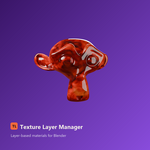
Build the material as layers. Keep Blender underneath.
Build complex Blender materials as layers — without managing the whole shader graph by hand.
Texture Layer Manager brings a familiar layer-based workflow to Blender materials.
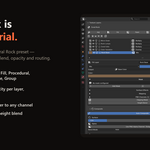
Stack fills, procedural patterns, painted details, adjustments and masks. Reorder them, blend them, change their opacity and decide which material channels they affect.
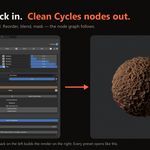
TLM builds the Blender shader nodes underneath for you.
No custom render engine.
No baked material snapshots.
No proprietary shader format.
The generated graph is made from regular Blender nodes, and your .blend can still render without the add-on installed.
A layer-based material workflow for Blender
Start with a Fill.
Add procedural variation.
Mask it to cavities, edges or specific regions.
Use layers to control colour and other material properties.
Then reorder, blend, mask and tweak the stack without rebuilding the material graph manually.
With Auto Composite enabled, TLM keeps the generated graph synchronized with the stack as you work. Many parameter changes update node values directly without requiring a complete rebuild.
Six layer types
Fill gives you flat colour and material values and is the natural starting point for many materials.
Procedural generates parametric patterns directly inside Blender.
Paint creates image layers that can be painted in Blender for logos, dirt, decals and manual touch-ups.
Adjustment modifies the composited result below it with Hue/Saturation, Brightness/Contrast, Levels, Color Balance or Gradient Map.
Group lets you organise multiple layers and control them together.
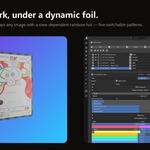
Reference brings images, artwork or textures into the layer workflow and can either use them directly or reinterpret their luminance through TLM's colour controls.
24 procedural patterns
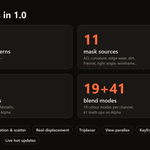
Build materials with Noise, Voronoi, Wave, Gradient, Musgrave, Checker, Marble, Brick, Magic, White Noise, Stripes, Hex Grid, Gabor, Dots, Ridged, Cracks, Fresnel, Wood, Tiles, Weave, Scratches, Truchet, Caustics and Scatter.
Most procedural workflows can generate directly in 3D space without requiring a UV unwrap.
Generated, Object and UV coordinate modes are available, together with offset, rotation and coordinate transformations. Supported procedural patterns can also use Triplanar projection to reduce stretching.
Tiles and Truchet are designed primarily around UV coordinates.
More than Base Color
Every layer has a main Output that can target:
Base Color · Roughness · Metallic · Emission · Transmission · Alpha
A layer can also contribute to additional material channels.
That means a single weathering layer can, for example, darken the Base Color, increase Roughness, reduce Metallic response and add Bump at the same time, with separate controls for each contribution.
19 colour blend modes
TLM includes familiar colour operations such as:
Normal, Multiply, Screen, Overlay, Add, Color Dodge, Soft Light, Difference, Hue, Saturation, Color and Luminosity.
When a layer is routed to Alpha, the blend control switches to 41 mathematical operations, allowing more advanced combinations between masks and cutout signals.
Geometry-aware masks
Masks decide where a layer appears.
TLM includes eleven mask sources:
Image · Ambient Occlusion · Pointiness · Wireframe · Edge Wear · Dirt · Curvature · Fresnel · Light Angle (N·L) · Half Vector (N·H) · Voronoi
They can be used for effects such as dirt collecting in cavities, worn material on exposed edges, real topology-based wireframes, Fresnel-driven effects, toon lighting bands and stylised highlights.
Live smart masks are evaluated directly from the shader and follow the geometry without first requiring a baked texture. When a fixed image is needed for painting or export, a smart mask can be baked.
Clipping Masks and Height Blend
Clipping Mask clips a layer to the alpha of the layer directly below it, following a workflow familiar from image-editing applications.
Height Blend compares height information when mixing a layer with the stack, allowing transitions to follow surface relief rather than relying only on a flat mixing factor.
Material-level controls
TLM goes beyond the layer stack with controls for IOR, Volume Absorption, Volume Scatter, true geometric Displacement, PNG alpha handling and keyframable layer opacity.
Volume controls can be used for materials such as coloured glass, ice, liquids and cloudy interiors.
True displacement modifies actual geometry rather than only surface shading and requires sufficient mesh subdivision.
Layer opacity can also be animated for effects such as progressive damage, transitions and dissolves.
13 editable materials included
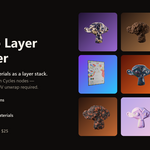
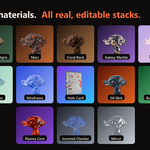
Texture Layer Manager ships with thirteen complete preset materials:
Anime · Bronze Verdigris Patina · Burn Dissolve · Coral Rock · Galaxy Marble · Holo Card · Inverted Checker · Mars · Mirror · Oil Slick · Plasma Core · Watercolor · Wireframe
These are not baked materials.
Every preset is a real TLM layer stack that can be opened, inspected and modified.
Use them directly, customise them for your project, or take them apart to understand how more complex materials are built.
Bake when you need textures
When your material needs to leave Blender, TLM can bake the composited material channels into regular image textures.
Channel Packing can then combine baked maps into packed RGB textures for workflows that require multiple maps in a single image.
This makes the same layer-based workflow useful for game engines, other DCC applications, asset delivery and conventional texture-based pipelines.
Blender stays underneath
Texture Layer Manager is not a replacement for Blender's Shader Editor.
It gives you a higher-level way to build and manage the material while Blender's node system remains underneath.
The generated material graph uses ordinary Blender nodes.
While TLM is managing a material, its generated nodes belong to the add-on and may be rebuilt as the layer stack changes. Once the layer-authoring stage is complete, you can continue with direct node editing when the material requires custom shader work.
Build with layers when that workflow is faster. Use Blender nodes when you need to go deeper.
Compatibility
Blender 5.0 or newer
Texture Layer Manager was developed and tested on Blender 5.0 and 5.1.
Cycles provides full feature coverage.
EEVEE supports the core workflow, including the main material channels, procedurals and masks, but some renderer-specific differences remain.
Emission-heavy setups can behave differently, volumetrics differ from Cycles, and true geometric displacement is a Cycles feature. Current limitations are documented in the included manual.
Who is Texture Layer Manager for?
TLM is designed for Blender artists who want to build procedural and layered materials, experiment without constantly rewiring shader graphs, combine reusable masks with PBR properties, create realistic or stylised surfaces and still retain Blender's native shader system underneath the workflow.
TLM isn't trying to replace the Shader Editor. It's designed to make material authoring easier to build, manage and iterate.
What you get
Texture Layer Manager v1.0.0
13 editable preset materials
TLM User Manual v1.0.0
Access to the official Texture Layer Manager website and documentation
Official website: texturelayermanager.netlify.app