 Toss
Toss


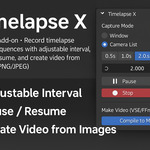
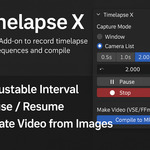





Timelapse X – Professional Timelapse Add-on for Blender
(Compatible with Blender version 5.2.)
Create stunning timelapse videos directly inside Blender.
Timelapse X is the ultimate tool for artists, modelers, and content creators who want to showcase their creative process in a smooth, professional way—without leaving Blender.
This addon was completed with the help of AI.
If there are any issues, please inbox me.
✅ Key Features
Capture Modes
• Blender Window – Record the entire UI for tutorials and workflow demos
• Camera List – Multi-camera capture with animated cameras supported
Smart Recording
• Idle Detection – Capture only when changes occur
• Lock Shading – Consistent viewport look for clean timelapse
Flexible Output
• PNG (with optional alpha) or JPEG
• Zero-padded filenames for easy sorting
Interval Control
• Live update with ✓ Apply
• Quick presets: 0.5s, 1.0s, 2.0s
Pause / Resume
• Stop wasting frames during breaks without resetting the counter
One-Click Video Export
• Compile image sequences into MP4 (H.264) via Blender’s VSE + FFmpeg
🎯 Why Choose Timelapse X?
All-in-One Solution – No external software needed
Perfect for: Modeling, Sculpting, Shading, Tutorials, and Social Media Content
Optimized Workflow – Save time and keep everything inside Blender
📦 What’s Included
Add-on .zip (Legacy & Extension formats)
📦 Versioned summary
-
5.2 :
Hotkey-Triggered Screenshot Capture (Window Mode)
Timelapse X's Window mode can now capture screenshots on demand instead of on a fixed timer. A new preference, "Capture on Input Only (Window)", disables the periodic capture timer and hands control to a fully customizable keyboard shortcut — every press of the hotkey saves exactly one frame.
How to use it:
- Start a recording in Window mode.
- In the sidebar panel (N-panel) under Quick Settings → Window Capture, enable "Capture on Input Only (Window)".
- A small hotkey widget appears below it, defaulting to
Ctrl+Shift+F9. Click the key field and press any key/modifier combo you want to rebind it. - From then on, no screenshots are taken automatically — press your chosen hotkey whenever you want a frame captured.
You can also rebind the shortcut from Blender's standard Preferences > Keymap > Window, searching for "Timelapse X: Capture Screenshot Now". Both places edit the same live binding, so changes made in either location take effect immediately, and the hotkey only fires while a Window-mode recording is active and unpaused — otherwise the key press passes through untouched.
New: custom hotkeys, action-based capture triggers (in both Window and Camera List modes), an emergency stop hotkey, camera turntable auto-rotation, a Stealth Camera mode for rock-stable Window-mode framing with automatic crop, and one-click hiding of reference blueprints or entire collections during capture. Plus reliability fixes for smoother, more accurate captures. -
Interaction with Timelapse's 'Blender Window' Mode
The synergy between "Clean Window" and the timelapse feature is especially powerful when using the 'Blender Window' capture mode.
This mode captures a timelapse by taking screenshots directly from your 3D viewport. By activating "Clean Window," you can instantly strip your main viewport of all distracting UI elements, turning it into a clean, cinematic display. The addon then opens a new, compact window containing all the necessary UI, allowing you to continue working seamlessly.
The result is a highly professional timelapse. Each captured frame is pristine and focuses entirely on your model's evolution, perfect for creating portfolio reels, "making-of" videos, or client presentations without any interface elements in the shot.
📝 Notes & tips
- For WINDOW idle stability, keep VIEW_3D + Stabilize ON; tune threshold (≈0.008–0.02) and downscale (32–64) to your scene.
- If you pause/resume and want an immediate frame, toggle “Capture immediately on Start” and (optionally) unpause/capture once manually.
- When compiling “Single MP4 (merge all)”, choose Concatenate for camera‑by‑camera blocks, or Round‑robin to interleave cameras by frame index.
+ Hope you like it! Thank you!