TQ SubstanceLink
 Techqon core


New v1.0.5b Version — macOS Support, One-Click Setup & Enhanced Texture Detection!
TQ SubstanceLink — Seamless Blender–Substance Painter Integration
Seamless, Organized, and Smart Connection Between Blender and Substance Painter
Automate your workflow, keep your assets synced, and eliminate the hassle of manual imports and exports.
Organized, Linked, and Efficient
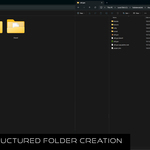
TQ SubstanceLink builds an organized structure for every Blender–Painter project you create. It keeps Blender assets and Substance Painter files permanently linked for full control, easy updates, and smart synchronization — even when Blender is not running.
✨ New in v1.0.5: One-click setup, enhanced texture detection, macOS support, and auto-import with Shelf display!
Key Features
- One-Click Setup — Get started in 30 seconds with automatic configuration
- Full Linking — Permanent connection between Blender assets and SP projects
- Live Update — Materials refresh automatically when you export from Painter
- Smart Texture Detection — Works with Color Ramps, Mix nodes, and complex setups
- Auto-Export — Send to SP now includes existing textures automatically
- Organized Projects — Clean folder structure with local or cloud storage
- Asset Browser Integration — Materials and assets appear automatically
- Team Collaboration — Works with Dropbox, OneDrive, Google Drive
- macOS Support — Full compatibility with proper permission handling
🚀 Quick Start (30 Seconds)
- Install the addon in Blender (Edit → Preferences → Add-ons)
- Press N in the 3D viewport → Click TQ SubstanceLink tab
- Click "Quick Setup (Use Default Paths)"
- Optionally click "Install Substance Painter Plugin"
- Done! The addon is ready to use
✅ Quick Setup automatically creates folders, sets paths, and configures everything for you!
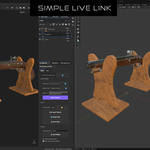
Simple Live Link
Quickly test and texture in real-time:
- Send mesh to Substance Painter with one click
- Paint and export textures (Ctrl+P)
- See immediate updates in Blender
- NEW: Existing textures export automatically!
Ideal for fast lookdev and material testing.
Material Projects
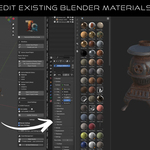
Create and manage reusable materials fully integrated into Blender's Asset Browser.
- Build materials in Blender, send them to Painter for texturing
- Live updates or manual refresh for fine control
- Saved materials appear in the Asset Browser automatically
- Perfect for tileable textures and material libraries
Asset Projects
Manage game assets with high/low poly workflows:
- Manage assets with high/low versions and unified folders
- Link Substance projects to Blender objects
- Reopen, edit, and sync automatically
- Updates apply even if Blender is not open
- Perfect for props, characters, and game assets
✨ What's New in v1.0.5b
- macOS Support: Fixed permission errors and native app launching
- One-Click Setup: New "Quick Setup" button configures everything automatically
- Smart Texture Detection: Fixed AO detection and support for Color Ramps/Mix nodes
- Auto-Export: "Send to SP" now exports existing textures automatically
- SP Plugin: Auto-import shows textures in Shelf instantly
- Better UX: Setup warnings, plugin prompts, and helpful instructions
Smart Synchronization
- Automatic texture updates with Live Update system
- Manual refresh with "Update Textures" button
- Configurable update frequency (1-30 seconds)
- Keeps your scenes consistent across changes
- Works even when Blender is closed
Library Management & Collaboration
- Create categorized libraries (e.g. "Wood", "Furniture", "Stone")
- Support for local and cloud libraries (Dropbox, Google Drive, OneDrive)
- Perfect for teams and multi-project studios
- Multiple libraries with custom names and paths
- Register directly in Blender's Asset Browser
Installation
Blender Addon
- Go to Edit → Preferences → Add-ons → Install
- Select the .zip file and enable TQ SubstanceLink
- Press N in 3D viewport to see the panel
Substance Painter Plugin (Recommended)
- In Blender addon preferences, click "Install/Update Plugin to Substance Painter"
- Restart Substance Painter
- The TQ SubstanceLink dock panel will appear
The plugin enables auto-export, project sync, live update, and automatic Shelf display features.
🔧 Common Issues & Solutions
Setup Required warning appears:
Click "Quick Setup (Use Default Paths)" in the N-panel
Substance Painter won't launch (macOS):
Ensure path points to: /Applications/Adobe Substance 3D Painter/Adobe Substance 3D Painter.app
Textures not updating:
Check if Live Update is enabled, verify folder permissions, or click "Update Textures" manually
SP plugin not appearing:
Folder must be named exactly: substancelink — Restart Substance Painter completely
📊 System Requirements
Software:
- Blender 4.1 or newer
- Substance Painter 11.0 or newer
- Windows 10/11 or macOS 10.15+
Recommended:
- 16GB RAM or more
- SSD for faster texture loading
- Dedicated GPU for Substance Painter
🎯 What's Included
- ✅ Blender addon (.zip installation file)
- ✅ Substance Painter plugin (auto-installable)
- ✅ Complete documentation
- ✅ Quick setup system
- ✅ Live Update system
- ✅ Asset Browser integration
- ✅ Lifetime updates
💬 Support
Direct support is available to help you set up your pipeline, fix sync issues, or maximize your productivity.
Need help? Join our Discord community or contact us through Superhive.
Have questions or suggestions?
Join our Discord server to get help, report bugs, or share your ideas about TQ SubstanceLink.
Join the Official DiscordWant to see it in action?
Watch the full step-by-step video tutorial to learn how to use TQ SubstanceLink efficiently.
▶ Watch Video Tutorial💜 Support Development
If you find TQ SubstanceLink helpful, consider supporting its continued development!
☕ Buy Me a CoffeeYour support helps improve and maintain this addon. Thank you!
Work Smarter. Stay Organized. Focus on Creativity.
TQ SubstanceLink keeps your Blender and Substance Painter workflows integrated, automated, and effortless.
Explore More Tools by TQ-coreTQ SubstanceLink v1.0.5b
Developed by TQ-core (TECHQON CORE) | Original Author: OakenPixel
Compatibility: Blender 4.1+ | Substance Painter 11+ | Windows & macOS
Discover more products like this
pbr-texturing asset management real-time game development texture-baking material work UDIM support unreal Substance painter unity blender addon live link