TQ SubstanceLink
 Techqon core


Changelog v2.0.1
Texture Persistence
- Textures imported from the shared folder are now packed into the .blend file automatically, so they survive the shared folder being overwritten between sessions
- Before any shared folder cleanup, all referenced textures are packed as a safety net — no more broken materials when starting a new Simple Live Link
UI
- Renamed "Live Update" → "Auto Update" across the entire addon
- New tooltip: "Automatically import texture changes exported from Substance Painter. When enabled, Blender monitors the export folder and updates materials as soon as new textures are detected"
Added:
- Checkboxes for granular collection export control
- Vertex color support for high poly and low poly auto exports
- Collection Export Checkboxes: Added individual checkboxes for each collection in the export panel, giving you precise control over what gets exported - Export only the collections you need instead of exporting everything at once
1. RELEASE_NOTES_1.0.5b
Perfect for:- GitHub releases
- Full documentation pages
- Detailed addon pages
2. SHORT_CHANGELOG.txt (Compact Version)
Perfect for:- Marketplace descriptions (Blender Market, Gumroad, etc.)
- Social media posts
- Quick update announcements
Key Highlights You Can Emphasize
For Users:- 🍎 macOS now works properly
- ⚡ One-click setup (no manual configuration)
- 🎨 Texture exports are more accurate
- 📤 Faster workflow (auto-export)
- Fixed texture type detection through intermediate nodes
- Official Adobe API integration
- Cross-platform improvements
- Better UX with setup prompts
SubstanceLink v1.0.4b - Changelog
🐛 Critical Bug Fixes
Substance Painter Plugin Stability:- ✅ Fixed crash when reopening Substance Painter projects - Resolved global state management issues that caused crashes when closing and reopening projects
- ✅ Fixed crash when closing Substance Painter projects - Eliminated signal disconnection errors and orphaned UI connections
- ✅ Fixed crash when exiting Substance Painter application - Removed unsafe Qt widget deletion calls (deleteLater(), setParent(None)) during application shutdown
- ✅ Enhanced cleanup system - Proper disconnection of all signals, timers, and UI elements without triggering Qt crashes
- ✅ Fixed IndexError in material/asset library toggle - Added automatic name generation from folder paths to prevent crashes when toggling asset library registration
- ✅ Fixed duplicate Normal Map nodes - Normal Map nodes are now intelligently reused instead of creating duplicates on every texture update
- ✅ Self-healing preferences - Automatically fixes mismatched library path/name lists
⚙️ Major Enhancements
Cross-Platform Support:- 🖥️ Automatic OS detection - Plugin auto-detects Windows and macOS
- 🌐 Platform-specific default paths - Automatically sets correct paths based on your operating system
- 🔧 Manual OS override - Override auto-detection if needed
- 📁 Customizable Substance Painter plugin installation path
- Editable path field in Blender preferences
- Windows default: %USERPROFILE%\Documents\Adobe\Adobe Substance 3D Painter\python\plugins
- macOS default: ~/Documents/Adobe/Adobe Substance 3D Painter/python/plugins
- Auto-updates when OS selection changes
- Supports custom Substance Painter installations
- Creates directories automatically if needed
- 🧹 Completely overhauled cleanup system - Now removes ALL disconnected nodes, not just Normal Map and Displacement
- Removes disconnected nodes: ColorRamp, Mix RGB/Mix, Bump, Math, RGB to BW, Invert, Vector Math, and all other orphaned shader nodes
- Preserves essential nodes: Principled BSDF, Material Output, Texture Coordinate, Mapping
- Removes unused image data from Blender files to reduce file size
- Works across ALL workflows: Simple Live Link, Material Projects, Asset Projects
- Results in completely clean materials with no node clutter
- Enabled by default for optimal workflow
- 🔄 Normal Map node reuse - Finds and reuses existing unused Normal Map nodes instead of creating duplicates
- Cleaner material node trees
- Better performance with complex materials
- Applies to all texture import functions
- 🏷️ Auto-generated library names - Folder names automatically extracted and used as default library names
- Self-healing preferences fix mismatched lists automatically
- Consistent behavior across all library management operators
- No more crashes when managing material/asset libraries
🔧 Technical Improvements
Substance Painter Plugin:- Enhanced error handling around project state checks
- Better detection of project open/close states with fallback logic
- Converted all UI buttons to instance variables for proper cleanup
- Removed reference cycles in keyboard shortcut callbacks
- Improved timer cleanup (auto-create timer properly stopped and disconnected)
- Better validation before widget operations
- Enhanced logging for troubleshooting
- Safer project state checking with try-catch blocks
- Better error messages when operations fail
- Improved library path validation
- Consistent safety patterns across all operators
- Environment variable expansion for paths (~, %USERPROFILE%, etc.)
- Eliminated unsafe Qt operations during shutdown
- All signal disconnections wrapped in proper exception handling
- Better separation of concerns
- Improved code documentation
- Eliminated duplicate code paths
📝 What This Update Fixes
✅ All known crash scenarios eliminated✅ Plugin handles project transitions cleanly✅ Application shutdown works without crash reports✅ Material node trees stay clean and organized✅ Cross-platform compatibility improved✅ Library management more robust✅ Better user experience overall🚀 Upgrade Instructions
- In Blender:
- Install/update the add-on as usual
- Open Preferences → Add-ons → TQ SubstanceLink
- Verify the plugin installation path (especially on macOS)
- Click "Install SubstanceLink Plugin to Substance Painter"
- In Substance Painter:
- Completely close and restart Substance Painter (important!)
- The SubstanceLink panel will appear in dock widgets
- No manual configuration needed
- Settings Migration:
- All settings are preserved from previous versions
- Plugin will auto-fix any mismatched configurations
- No manual migration required
BETA Version
SubstanceLink v1.0.3 b- Changelog
🐛 Critical Bug Fixes
Fixed Multiple Crash Issues:- ✅ Fixed crash when reopening Substance Painter projects - Resolved global state management issues that caused crashes when closing and reopening projects
- ✅ Fixed crash when closing projects - Eliminated signal disconnection errors and orphaned UI connections
- ✅ Fixed crash when exiting Substance Painter - Removed unsafe Qt widget deletion calls during application shutdown
- ✅ Improved plugin stability - Enhanced error handling throughout the cleanup process
- Proper cleanup of UI widgets and signal connections
- Fixed orphaned button connections that weren't being disconnected
- Eliminated memory leaks from Qt objects
- Removed reference cycles in keyboard shortcuts
- Better handling of plugin lifecycle events
⚙️ Enhancements
Cross-Platform Support:- 🖥️ Added automatic OS detection - Plugin now auto-detects Windows and macOS
- 🌐 Platform-specific default paths - Automatically sets correct shared folder paths based on OS
- 🔧 Manual OS override option - Users can manually select target OS if needed
- Added safer project state checking with fallback error handling
- Better error messages when project state is inaccessible
- Graceful handling of API failures
- Enhanced logging for troubleshooting
- Safer signal disconnection with proper exception handling
- Improved timer cleanup to prevent lingering callbacks
- Better widget lifecycle management
- More robust plugin shutdown sequence
🔧 Technical Improvements
- Enhanced auto-create timer cleanup
- Better validation before widget operations
TQ SubstanceLink v1.0.2 - Bug Fix Release
🐛 Bug Fixes
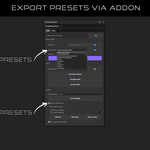
- Fixed custom export preset support: Custom user-generated export presets now work correctly in Substance Painter
- Previously all presets were incorrectly referenced as resource://starter_assets/, causing custom presets to fail
- Now correctly identifies and uses resource://user/ for custom presets and resource://starter_assets/ for built-in presets
✨ Improvements
- Enhanced preset discovery: Added support for scanning user's custom preset directory (Documents\Adobe\Adobe Substance 3D Painter\assets\export-presets)
- Better preset detection: Plugin now scans both default Substance Painter installation directories AND user custom preset folders
- Improved logging: Added detailed logging for preset loading showing context (user vs starter_assets) and URLs
🔧 Technical Changes
- Preset combo box now stores full preset metadata (URL + context) alongside display names
- Export functions retrieve correct resource URL from stored metadata
- Fallback mechanism ensures backward compatibility with existing workflows
Discover more products like this
UDIM support blender addon real-time pbr-texturing unreal game development material work unity asset management Substance painter live link texture-baking