US Road Sign Generator
 Michel's add-ons & more


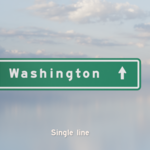
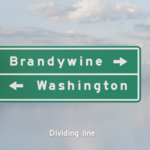
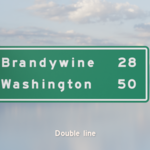
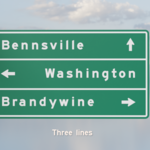
US Road Sign Generator
A simple and lightweight way to generate the iconic green US signs.
Features
- Implemented as geometry nodes
Easy to apply, easy to configure.
- Three variants
Signs with 1, 2 or 3 lines.
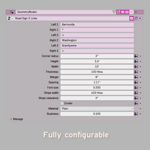
- Highly configurable
Not just the text, but height, width, margin, spacing, visible divider, material and more.
- Light and clean geometry
One quad per letter, plus a minimal number of faces to create the rest of the sign.
- Multiple materials
All characters are mapped to a character atlas and merged with the green/white material of the sign:
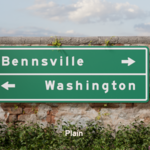
Plain fully procedural, clean, almost toon-like
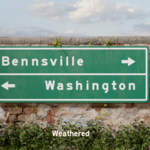
Weathered with a single images based smudge layer on top
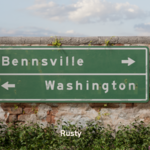
Rusty full PBR material with a configurable amount of rust
- Extended character set
Includes fractions and arrows commonly seen on signs.
Example video
A short example video showing how to install and use the nodes is available on YouTube.
Installation
- Download the file US Road Sign Generator - v1.blend
- From your .blend file select File > Append ...
- Locate the downloaded file and double click it
- Double click on the NodeTree folder
- Select the nodes Road sign 1 line, Road sign 2 lines, Road sign 3 lines
- Click Append
Usage
You can apply the geometry nodes to any mesh object. For example:
- Add a cube
- Go to the Modifier properties, click Add modifier and select Geometry Nodes
- Select one of the node trees from the dropdown
You can then change the text or any of the other properties. The default sizes are rather large and suitable for signs found on the verge of a highway, but you can make them any size you like. Just remember to change the font size so the lettering will fit the sign. Alternatively you can scale the objects as a whole.
Available characters
The text on the signs can contain any of the characters that are part of the "Highway Gothic" font, including space.
There are also a number of characters that are mapped to often used symbols, like arrows and fractions:
%    1/2  (fraction half)
;    1/4  (fraction quarter)
_    3/4  (fraction three quarters)
<    left arrow
>    right arrow
[    left up arrow
\    down arrow
]    right up arrow
^    up arrow
{    left down arrow
}    right down arrow
Caveats
Make sure that the width and height of the sign are large enough for the text. If they are too small, you might not even see the text are the geometry might be distorted.
Technical details
The signs are created with geometry nodes: one rectangular quad per character, with a suitable width. Each of these quads has UV coordinates that map the character to a single image, a.k.a. an atlas. This way we use just one texture no matter how many signs or how many characters are used.
Each sign therefore has two UV maps: UVmap and UVmap2 (you will only see the second one if you apply the modifier). The first one maps the character quads to the font atlas, the second one is a simple projection of the whole sign used for background color, lines, and dirt.
Each sign also has 4 associated materials: One for the font mapping, one for the sign base, and separate ones for the side and back. The last two are procedural and the first two come in plain, weather, and rusty variants.
With just one quad per character a sign object will have a lot less triangles than a comparable text object, which is convenient if you are on a tight polygon budget. A typical sign with two lines of about 15 characters each would be less than 500 tris.
Acknowledgements
The following assets were used and are part of the generated road signs:
Leaking 002, from AmbientCG, CC0
Green metal rust, by Rob Tuytel/Polyhaven, CC0
FHWA Series EM font, a.k.a. Highway Gothic, adapted from sammdot, MIT license
Have questions about this product?
Login to message
| Published | 3 months ago |
| Blender Version | 5.2 |
| Render Engine Used | Cycles, Eevee |
| Misc Data | Uvs-Unwrapped, Normal-Mapped, Textured |
| License | Royalty Free |
Discover more products like this
US Road Sign low poly USA road sign geometry nodes parametric