 Kapusto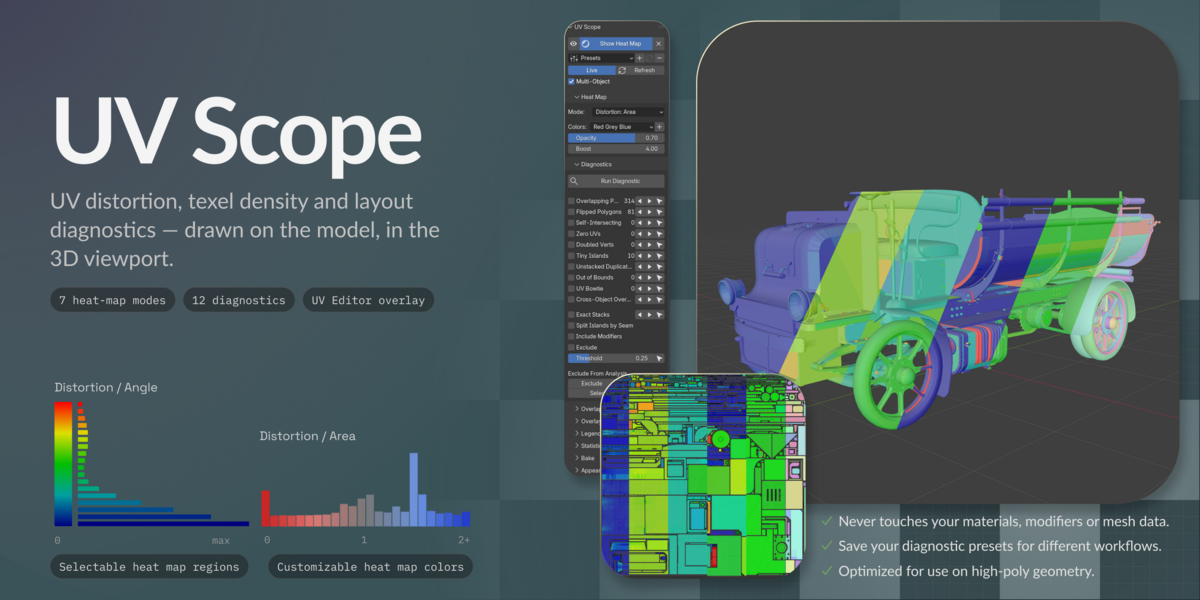
Installation ·Your first five minutes ·Where the controls live ·Heat map modes ·Diagnostics ·Overlays ·Legend, histogram and statistics ·Selecting ·Overlap Sets ·Baking ·Materials as texture sets ·Multiple objects ·Modifiers in Edit Mode ·Presets and modules ·Switching modules off ·Performance ·Language ·Known limitations ·Support
Installation
Download the .zip — do not unpack it. Drag it into Blender, or Edit → Preferences →Add-ons → Install from Disk. Enable UV Scope.
Requires Blender 4.2 LTS through 5.2. Windows, macOS, Linux. No dependencies.
Press N in the 3D viewport for the UV Scope tab. The UV Editor has its own panel.
Your first five minutes
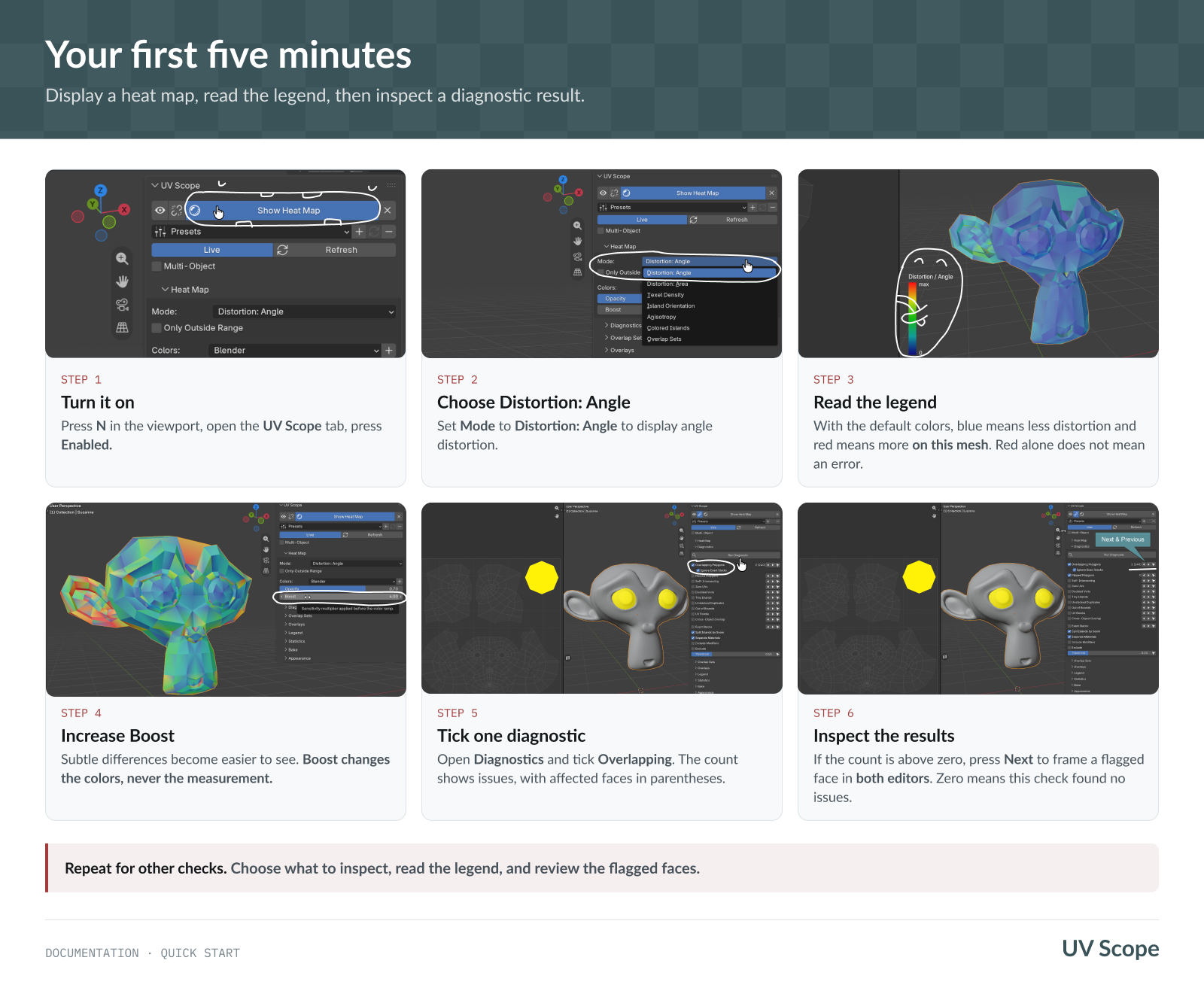
Select a mesh with a UV map. Open UV Scope in the 3D viewport sidebar and turn on Show Heat Map. Set Mode to Distortion: Angle and read the legend. Boost changes the color display, not the measurements.
Under Diagnostics, enable Overlapping. If the count is above zero, press Next to inspect a flagged face in the viewport and an open UV Editor. A count of zero means this check found no issues.
The Panel
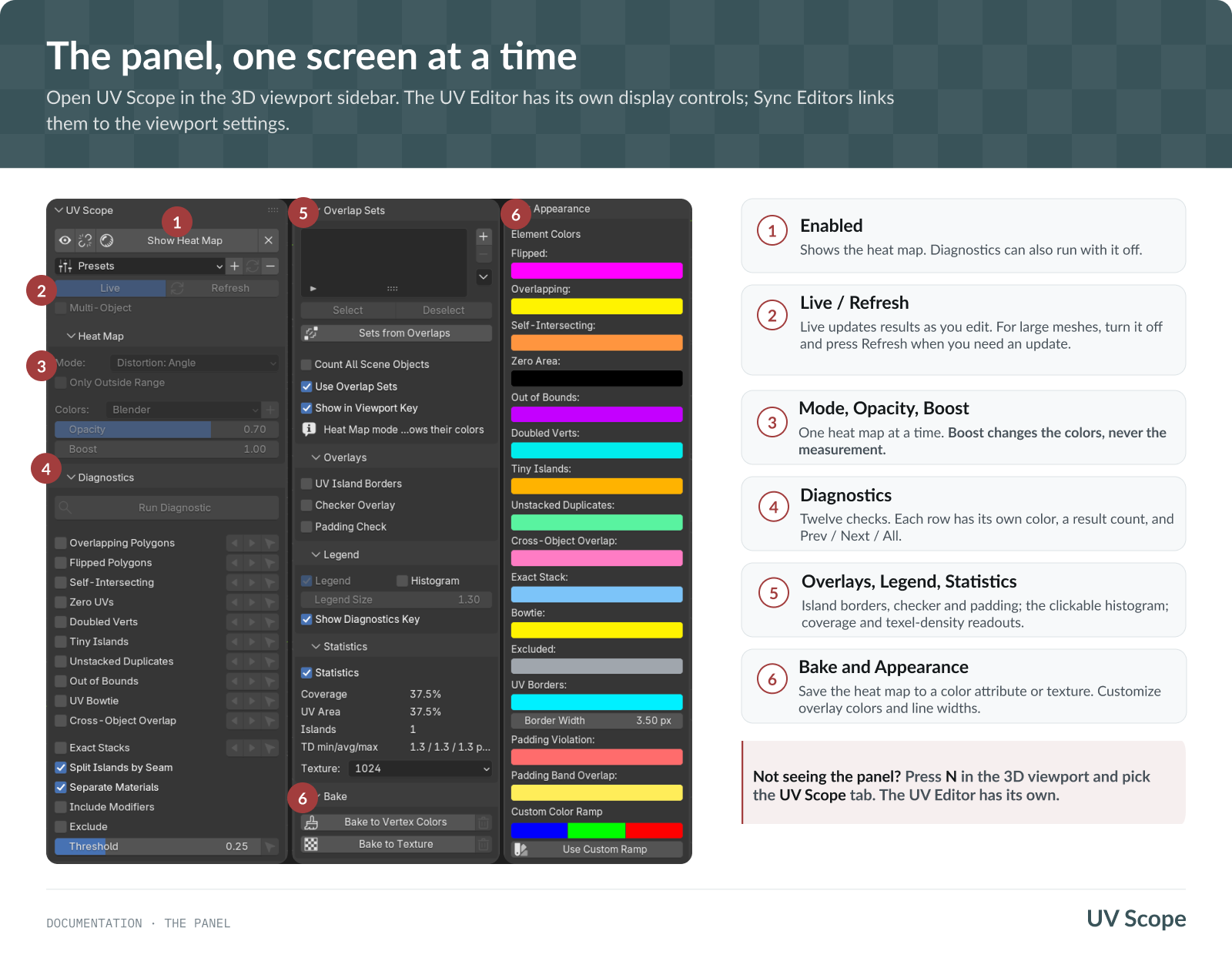
The 3D viewport panel contains the heat map, diagnostics, overlays and display settings.
With Live on, exact analysis refreshes after an Edit Mode transform finishes and Update Delay passes. Switch Live off and use Refresh on demand. During a transform, the default Frozen preview keeps the last exact overlay visible; the optional Live Coordinates preview moves supported overlays with the current UVs.
The UV Editor has separate display controls by default, including Show Heat Map, Opacity and Boost. Colors and line styles are shared.
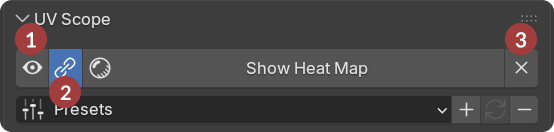
- Mute - Temporarily hide every diagnostic and overlay in both editors without changing a single checkbox. Switch it off and you get back exactly what is ticked. The heat map itself stays on.
- Sync - links the display controls. While linked, both editors use the 3D viewport settings, and changes in either panel apply to both. Turn it off to restore your previous UV Editor settings. Padding Band, Checker Overlay and Statistics stay separate because they are available in only one editor.
- Clear All switches off everything the add-on draws in both editors — the heat map included. Unlike Mute this is a real change to the checkboxes, so there is nothing to bring back.
Transform Preview during UV editing
Set Transform Preview in Preferences → General. Frozen is the default. With Live Coordinates and Live on, supported UV Editor heat-map faces, UV borders, Bowtie and Doubled Verts markers, padding lines and bands, and the 3D Checker follow native UV Move, Rotate and Scale in Edit Mode. Unsupported or over-budget interactions remain Frozen.
This previews coordinates, not new analysis: heat-map colors, diagnostic results, the histogram and statistics still describe the last complete result. UV Scope updates them after the transform settles. Include Modifiers and proportional editing use the Frozen fallback.
Heat map modes
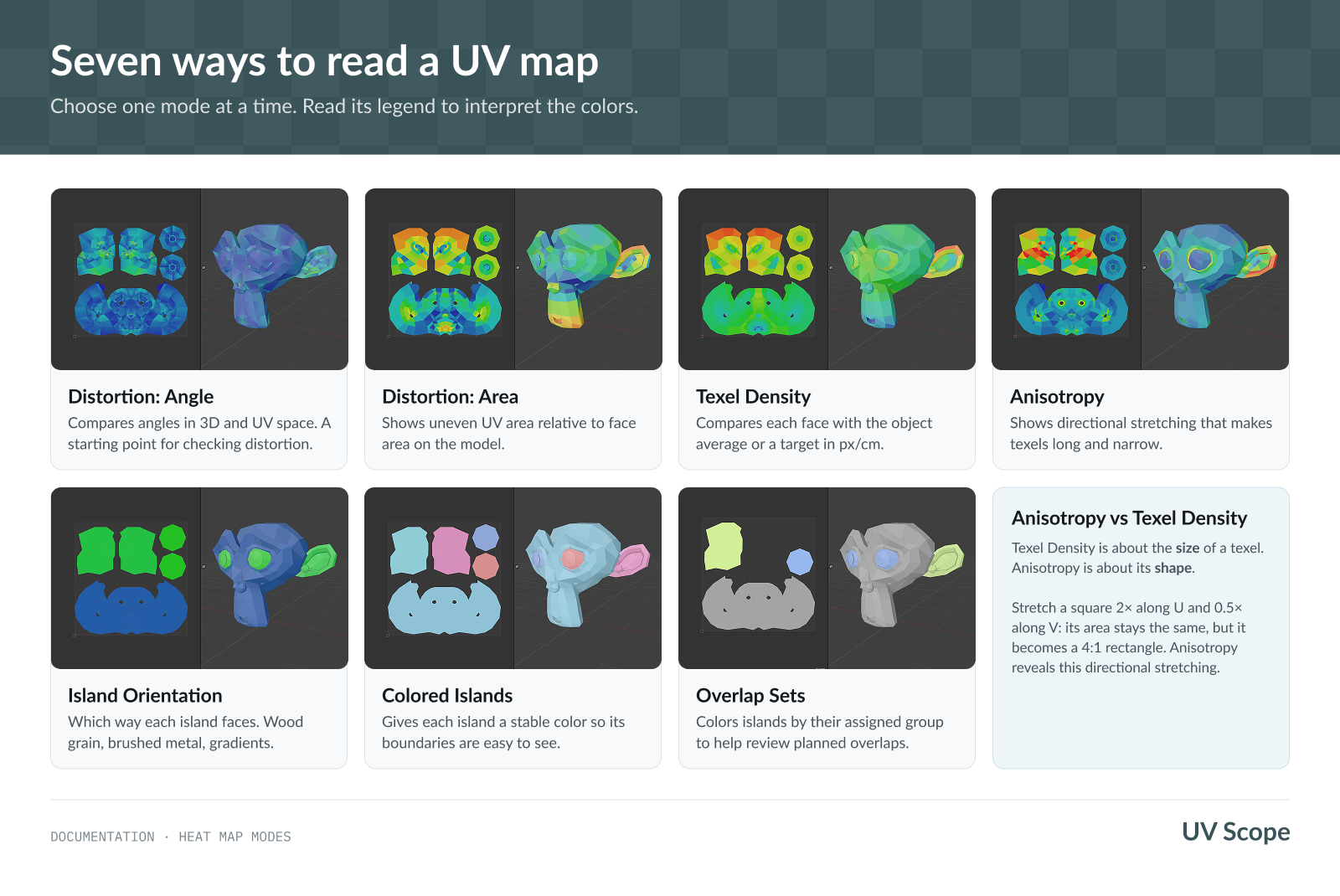
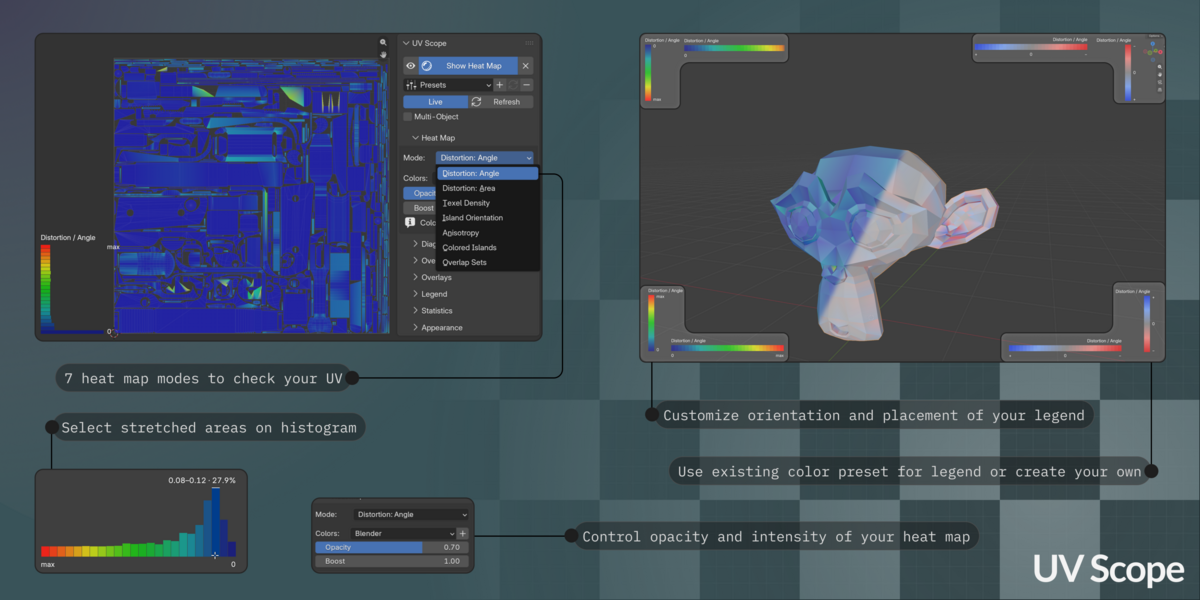
Use Distortion: Angle or Distortion: Area to inspect UV stretch, Anisotropy for uneven stretching along different directions, Colored Islands to identify islands, and Overlap Sets to see their assigned groups.
Texel Density compares UV density with the object's average or a target. Display: By Island is the default: every face in a UV island receives one color calculated from that island's combined UV and 3D areas. Choose By Face to see each face's own density. Excluded or invalid faces do not contribute to the island value. Split Islands by Seam also affects which faces form an island.
The reference can be Average or Target. Set a target in px/cm or px/m at the chosen texture size; object and scene scale are taken into account. Switching units converts the target without changing its physical density. Display is independent in the 3D Viewport and UV Editor unless Sync Editors is on.
For Distortion: Angle, Distortion: Area and Texel Density, Only Outside Range hides the heat-map fill on acceptable faces. In Angle and Area, a problem face keeps its complete gradient when any corner exceeds the limit. Texel Density filters individual faces in By Face, or whole islands in By Island, using lower and upper percentage deviations from Average or Target. Palette and Boost do not change which values are outside.
The filter is independent in both editors unless Sync Editors is on. It hides live fill only; the histogram, statistics and both bake commands still use the complete mesh/map. The histogram and bakes use the selected Texel Density Display mode.
Island Orientation shows rotation from the island's longest side or a chosen 3D axis (X/Y/Z, Local or World). Use 3D Axis to check texture direction, such as wood grain.
Color scales: Blender's exact spectrum, a Red Grey Blue signed scale, or your own. Save a custom ramp under a name and it joins the Colors dropdown.
Diagnostics
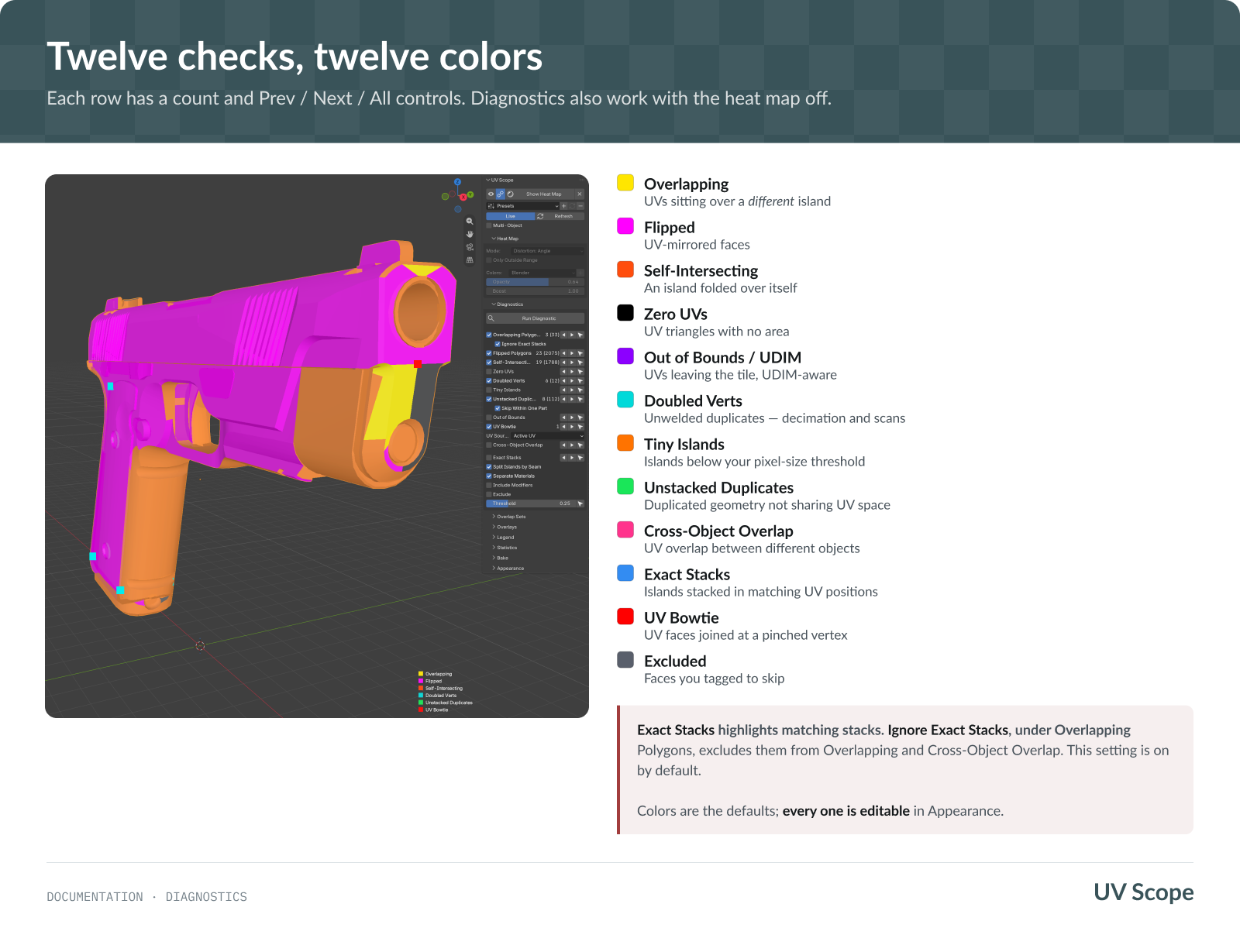
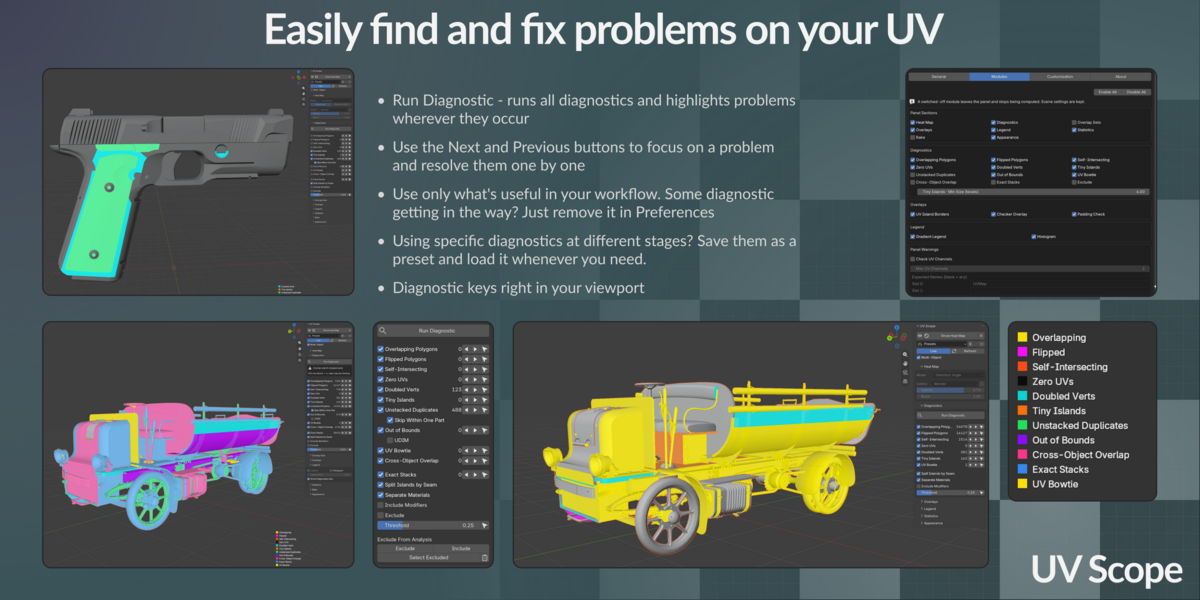
Each check has a live count and Prev / Next / All. Stepping frames the element in the 3D viewport and the UV Editor, and turns the view to look straight at it. All of it works with the heat map switched off.
Checks include Overlapping, Flipped, Self-Intersecting, Zero UVs, Out of Bounds / UDIM, Doubled Verts, Tiny Islands, Unstacked Duplicates, Cross-Object Overlap and UV Bowtie. Exact Stacks and Excluded show intentional stacks and faces you tagged to skip; a highlight does not always mean an error.
Doubled Verts marks the exact unwelded vertices instead of coloring adjacent faces. The 3D viewport shows one point per coincident location; the UV Editor shows every corresponding UV corner. A count such as 3 (6) means three locations containing six vertices, and the step buttons select those vertices directly.
UV Bowtie checks the active UV map. To compare UV0 with UE 5.8 Mesh Inspect, make UV0 active in Blender first. The diagnostic scans the whole mesh; hidden faces only hide their markers. Its rule follows UE 5.8 source behavior, and a real production model produced an exact vertex-for-vertex match in both applications.
Telling checks apart
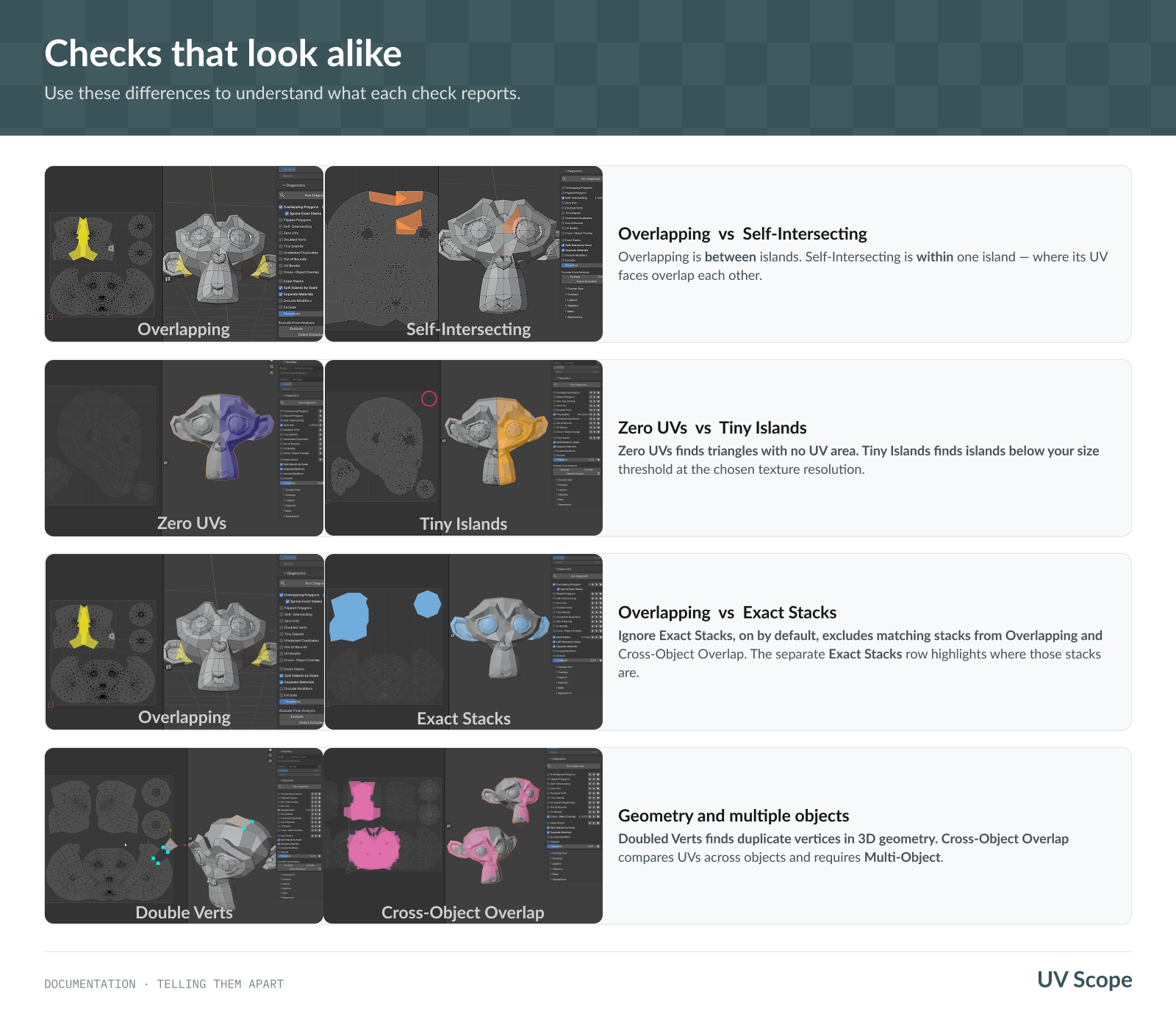
- Overlapping finds overlap between islands;
-
Self-Intersecting finds folds within an island.
- Zero UVs flags zero-area UV triangles;
-
Tiny Islands flags islands below your texture budget.
-
Ignore Exact Stacks is on by default; when enabled, exact stacks do not count as overlap errors; the separate
- Exact Stacks diagnostic shows where they are.
Mirrored models
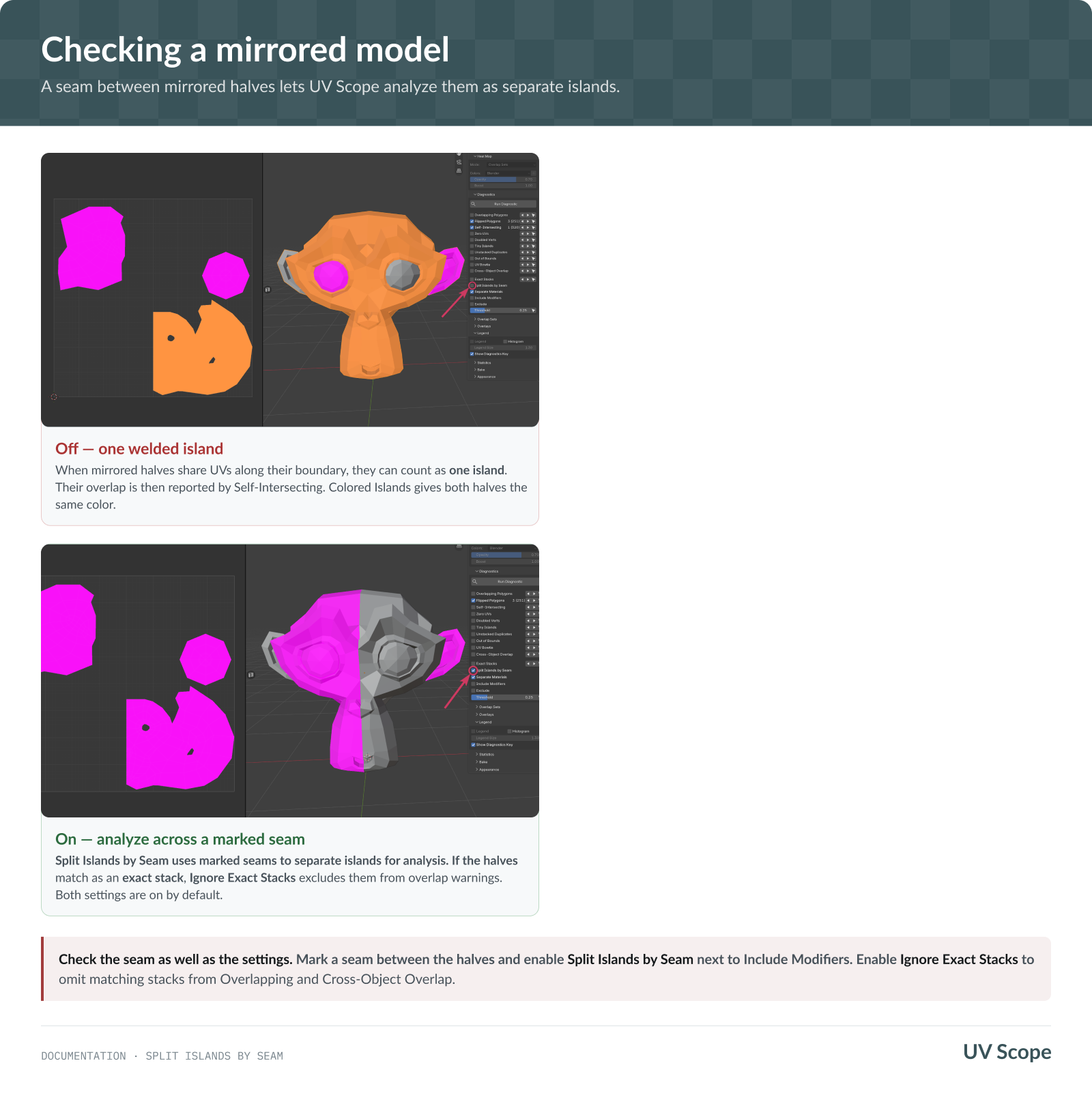
If mirrored halves share UV edges, mark a seam between them and enable Split Islands by Seam to treat them as separate islands during analysis.
Keep Ignore Exact Stacks enabled to ignore their overlap when the UVs match exactly. Inspect any remaining warnings.
Overlays
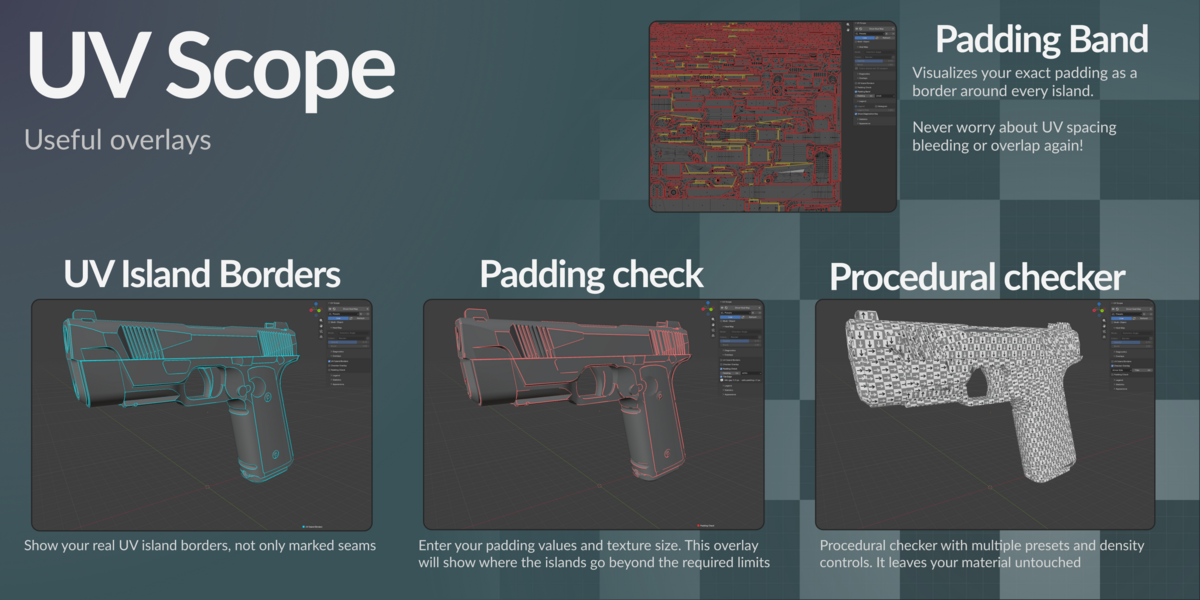
UV island borders draw where islands split, without marking a single seam.
Checker overlay is drawn by the overlay shader - no material node is ever created or modified. Four styles, including arrows along +V or +U that make rotation and flips obvious.
Padding and bleed
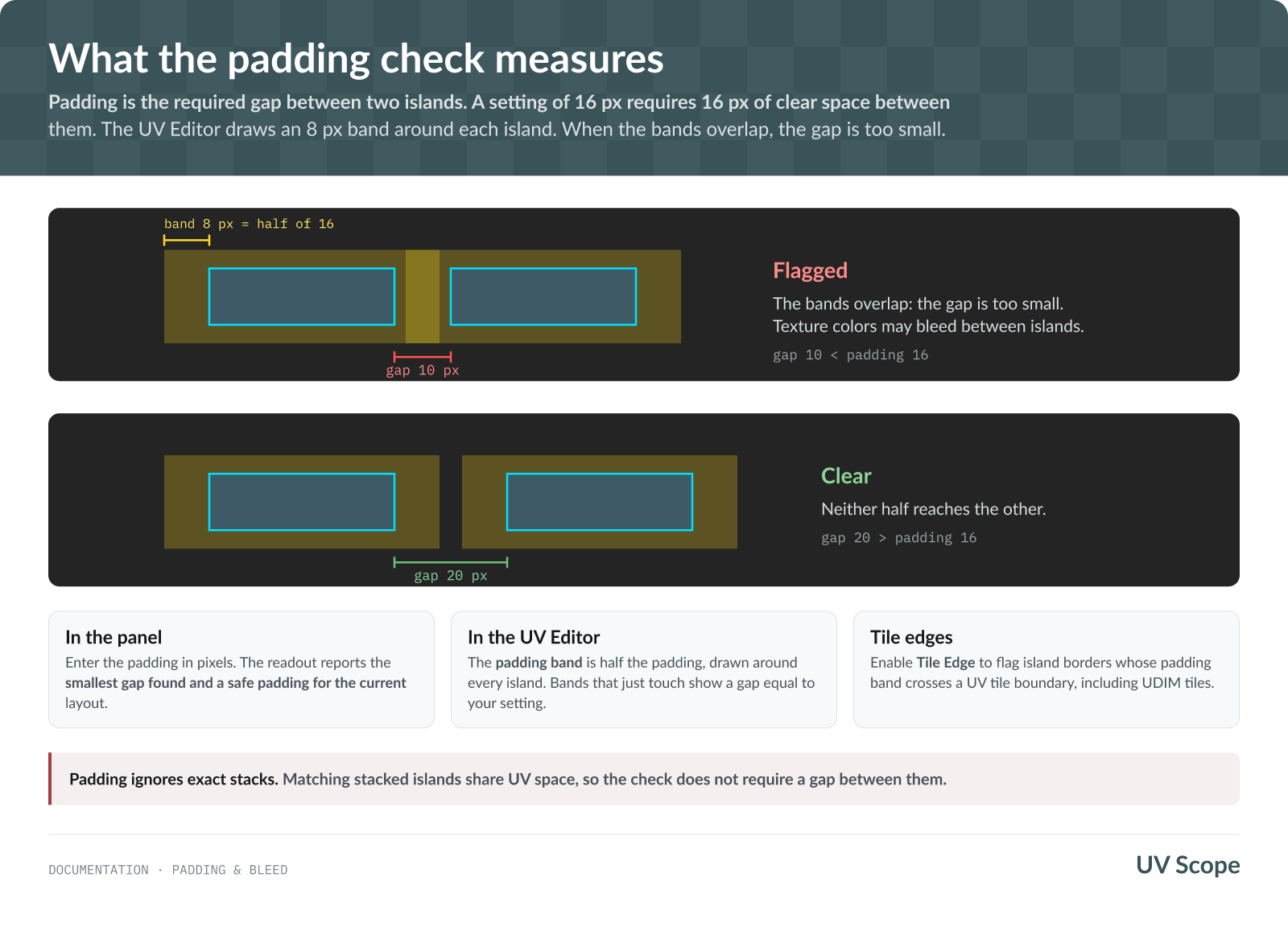
Padding Check flags gaps smaller than your chosen padding in pixels. An 8 px setting requires an 8 px gap;
Padding Band extends 4 px from each island in the UV Editor. Overlapping bands indicate insufficient space. Tile Edge also checks spacing at UV tile boundaries. The panel reports the smallest gap and safe padding when the search is complete.
Legend, histogram and statistics
The histogram's bar length is how much surface sits at each value, not how many faces. Click a bar to select those faces, Shift-click to add, Ctrl-click to select whole islands. It works with the heat map off — it is a selection tool in its own right. In Texel Density mode, its values follow the selected By Face or By Island display.
In the UV Editor, switch the source to Edges: U/V Alignment to see edges running along U, along V, or diagonally, and click to select that angle range.
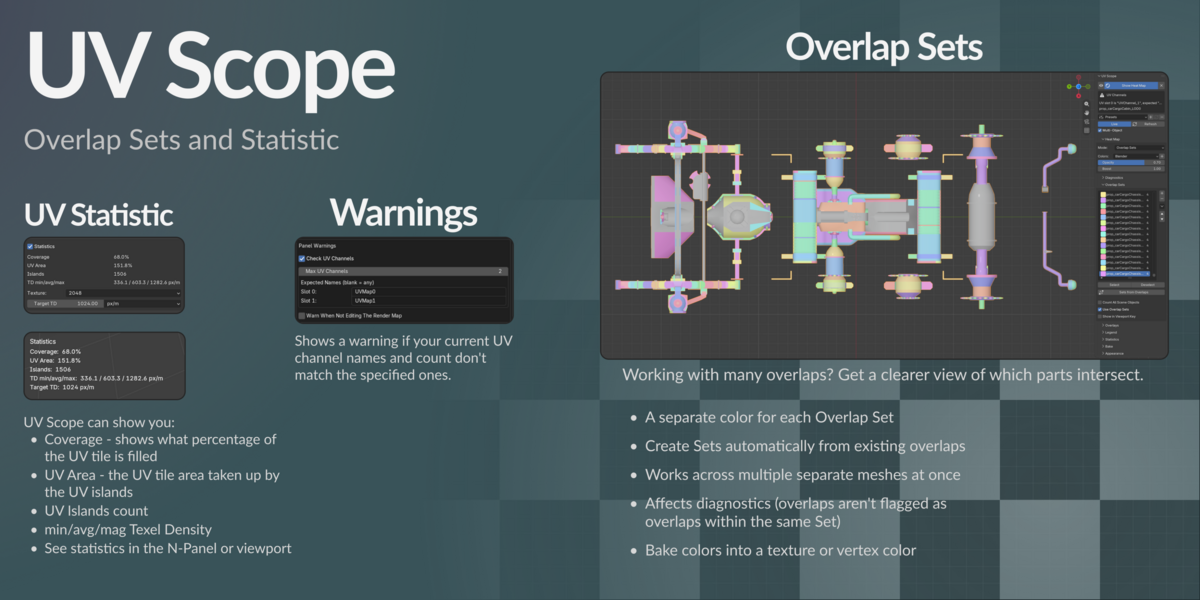
Statistics reports island count, texel density min / avg / max, and two area figures:
UV Area sums island areas, including overlaps. Coverage counts overlapping regions once and stays within 100%. Two islands that each fill the same UV tile give 200% UV Area and 100% Coverage. Enabling Statistics does not run diagnostic checks.
Placement is in Preferences → Customization: four corners, vertical or horizontal, pixel offset — independently for each editor. The statistics HUD follows the legend so the two can never overlap, unless you give it its own anchor.
Selecting
- Prev / Next / All on every diagnostic row. Stepping frames the element in the 3D viewport and the UV Editor — including a UV Editor in a separate window, and with UV Sync Selection off — and turns the 3D view to look straight at it. Shift-click a step button to frame only the editor you clicked in.
- Click a histogram bar for a value range.
- Select by Threshold selects every face whose distortion, texel-density deviation or island misalignment exceeds a severity slider. The threshold works on the raw metric, so it is independent of Boost, and you can tweak it live in the redo panel. For Texel Density, By Island selects the whole matching island.
- Exclude From Analysis tags faces or islands to skip. Excluded faces drop out of the overlap warnings and the texel-density average, and draw in their own color.
All of these switch to Edit Mode if you are not already in it.
Overlap Sets
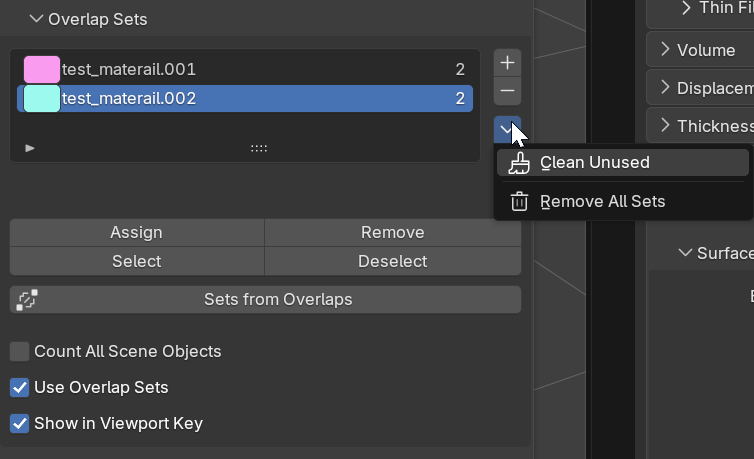
Named, colored groups of islands that are allowed to overlap. Sets from Overlaps builds them from existing overlaps, one Set per group, named after its material (Metal_01.001). Running it again does not duplicate Sets. To assign them manually, add a Set, select islands, press Assign, then switch the heat map to Overlap Sets.
Remove All Sets (in the specials menu) also clears the ids left in your meshes.
Show in Viewport Key hides the Set rows when there are too many to fit.
With Sets in use, overlap and padding checks ignore conflicts within each Set and report conflicts between Sets. Sets are stored in the scene, so one Set can span different objects.
Baking
Baking saves the heat map for display without live analysis and creates data in the .blend file.
- Bake to Vertex Colors — saves the heat map to a
UVScopecolor attribute. Clear Bake removes it. Displaying the baked attribute does not require live UV analysis. - Bake to Texture — saves the heat map to a UV image and displays it using a temporary material. Clear Baked Texture restores your original materials.
Both bake paths use the current heat-map mode. For Texel Density, By Island saves one aggregate density across each island; By Face keeps the per-face result. The Only Outside Range display filter is not baked.
Multiple objects
Turn Multi-Object on (available in both panels) to analyze selected mesh objects in Object Mode, or all mesh objects currently in Edit Mode, in one shared UV space. This is what makes atlas and trim-sheet work possible:
- Cross-Object Overlap can only exist here.
- UV channel consistency warnings compare objects against each other — different active channel indices, different channel names, more channels than your limit.
Materials as texture sets
Separate Materials (on by default) treats every material as its own texture set, so islands under different materials never flag each other for Overlapping, Cross-Object Overlap or Padding. Turn it off for a trim sheet or atlas, where several materials share one texture and an overlap between them is real.
Modifiers in Edit Mode
Include Modifiers lets Edit Mode analyze the modifier result instead of the original mesh.
It is view-only — faces a Boolean created do not exist in the editable mesh, so the select buttons refuse to run and say why. Blender hides Boolean in Edit Mode by default; UV Scope reports that and offers to enable it.
Presets and modules
Save a whole configuration as a named preset — one per kind of job. Store one as the startup default in Preferences → About.
Switching modules off
Preferences → Modules has a switch for every section, diagnostic and overlay, with
Enable All / Disable All. An off diagnostic is hidden and its dedicated pass does not run; shared mesh extraction may still serve other enabled features.
Performance
UV Scope is built for heavy meshes: numpy throughout, cached GPU batches rebuilt only when the data or the style actually changes, a debounce timer, and per-object incremental updates in Multi-Object mode.
If live analysis slows down your work:
1. Switch Live off and use Refresh on demand.
2. Turn off diagnostics you are not using, in Preferences → Modules.
3. Use Bake to Vertex Colors to display the saved heat map without live analysis.
Language
UV Scope is translated into Ukrainian. Enable it in Preferences → Interface → Translation.
Known limitations
- Blender 4.3 – 5.0 are supported but not tested. Full release QA for the v1.0.0 build passed on 4.2 LTS and 5.2.
- Live Coordinates moves supported display layers during a UV transform, but does not recompute distortion, texel density or diagnostics until the transform settles. Unsupported or over-budget interactions stay Frozen.
- The histogram selects one bin per click; drag-selecting a range of bins is not implemented.
- The checker overlay has no numbered cells — that needs a font texture atlas.
- Per-tile UDIM statistics (coverage and texel density per tile) are not implemented; the checks are UDIM-aware but the readout is per object.
Support
- Questions and bug reports: message me on Superhive
- Support and product updates follow the term shown for your purchased license variant.
- Licensed GPL-3.0-or-later. The distortion formulas are ported from Blender's own overlay engine.
-
$12
Includes 12 months of support.
-
$25
A small team of up to five people. Includes 12 months of support.
-
$60
Larger teams. Includes 12 months of support.
-
$120
Big team. Includes 12 months of support.
 Included
Includes 12 months of
- Support from Kapusto
- Product updates
Extend this product’s Support Period +12 months: 25% of product price
Have questions before purchasing?
Login to message
| Blender Extension Compatible | Yes |
| Dev Fund Contributor | |
| Published | about 16 hours ago |
| Blender Version | 4.2 - 5.2 |
| Extension Type | Add-on |
| Render Engine Used | Cycles, Eevee |
| License | GPL |
Discover more products like this
3dviewport uv check histogram UV Checker UV analysis uv uv editor heat map Texel_Density uvunwrapping 3DModelling UV Distortion