 Pardesco LLC


VesselLab
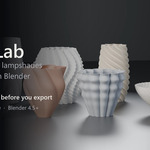
Design printable vases, lampshades and planters in Blender — parametrically, and validated watertight before you export.
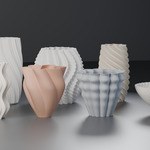
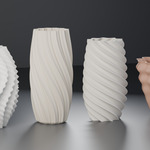
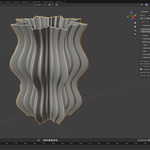
VesselLab adds a parametric vessel generator to Blender's sidebar. Pick a preset, drag sliders, and get a closed manifold mesh in millimetres that is ready for your slicer. Eight designed presets ship with it. Everything runs on your machine — no account, no download, no internet connection at any point.
8 designed presets · 1 click to a validated watertight export · 100% offline · 498 automated tests behind the geometry
THE PROBLEM
Most parametric vases are a twisted cylinder
Take a cylinder, add a wave, twist it. Every result looks like every other result, and the interesting settings are the ones that quietly break the mesh.
VesselLab composes the shape out of three independent layers instead:
- a silhouette — the profile seen from the side
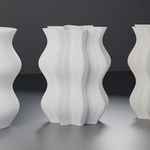
- a plan pattern — the cross-section seen from above, in seven styles
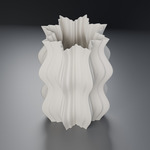
- a corrugation — smaller teeth nested inside the plan pattern
They multiply into one radius field, and the twist is applied in pattern space so nested teeth stay locked inside their lobes all the way up a twisted form instead of sliding out of them. There is no "complexity" slider. Every control maps to one term in one equation, which is why two designs that share no settings can still both look deliberate.
MEASURED, NOT ASSUMED
Max diameter means maximum diameter
Profile, taper, vertical wave, lobe depth and tooth depth all multiply. On a strongly patterned form they compose to roughly ten times — ask for 145 mm and a naive generator hands you a vessel 700 mm across.
VesselLab peak-searches the composed field, finds its true widest point and bakes in a single scale factor. What you type is what the object measures, held to within 0.3%.
PRINT-AWARE
The wall is checked, not assumed
A nominal 1.2 mm wall is not a 1.2 mm wall. Offset an inner surface straight inward on a patterned vessel and it starves: measured on the flagship preset, plain radial offset delivers 0.35 mm of a nominal 1.2 mm and sits under 0.8 mm across 57% of the surface.
VesselLab offsets by t / cos psi instead, compensating for surface angle, and measures the result across the whole vessel. The panel shows you the thinnest wall it actually achieved against the safety floor for that product type — a number, on every rebuild, not a promise.
Wall thickness is specified in whole extrusion perimeters, because that is what a printed wall quantises to. A lampshade defaults to 2, a vase to 4, a planter to 6.
VALIDATED
Watertight, or it tells you why not
Rebuild at Export Quality picks a resolution from your specific pattern — angular segments aligned to the tooth count, vertical resolution driven by the steepest twist rate — then runs a full census over the result:
- closed and edge-manifold
- the expected number of shells
- the expected Euler characteristic for that configuration
That last check is the one that matters. A mesh can be watertight and still be topologically wrong, and a slicer will silently "repair" it into something you did not design. The expected topology follows from how many openings reach the cavity, and every drainage slot counts as one.
The verdict appears in the panel: watertight manifold — validated, or a FAILED: line naming the exact check.
FOUR PRODUCTS, ONE DESIGN
Output types drive print intent
Lampshade, vase, spiral vase and planter each set their own wall default and floor, allowed base styles, drainage and print intent — but never the shape. So a design retargets from vase to planter and stays itself.
Switch type and VesselLab overwrites only the fields still holding the previous type's default, then tells you what it kept: Kept your edits: Wall thickness 2.20 mm, Base recessed
Choose Spiral vase and the wall control disappears, because in spiralize mode the slicer lays a single extrusion-width wall and a modelled thickness has no effect. Controls that do nothing are hidden, not left there implying an effect they do not have.
How it works
1. Click a preset in the sidebar. You get a finished vessel at the 3D cursor.
2. Drag anything. The mesh rebuilds as you drag — a real rebuild, not a modifier preview.
3. Rebuild at Export Quality, read the verdict, and export STL with Blender's own exporter.
What you get
- ✔ Eight presets — Radiant Pleat, Helix Rib, Faceted Column, Lantern Weave, Terrace Planter, Petal Bloom, Ripple Bowl, and a blank starting vessel
- ✔ Seven plan-pattern styles — circle, smooth lobe, sharp star, faceted star, petal, scallop, superformula
- ✔ Seven corrugation waveforms, with asymmetry, phase and tip/valley bias
- ✔ Five twist modes — none, uniform, eased, alternating, curve
- ✔ Six rim styles and five base styles
- ✔ Compensated wall offset with live thinnest-wall measurement
- ✔ Drainage slots snapped to the angular lattice — no bridging
- ✔ Lamp-ring bases with an opening and ring width
- ✔ Adaptive export resolution, tooth-aligned and twist-aware
- ✔ Full watertight-manifold validation with a named verdict
- ✔ Strength-over-height envelopes for both pattern layers
- ✔ Output-type retargeting that reports what it kept
- ✔ Written documentation — quick start, controls reference, printing guide, troubleshooting
Requirements
Blender 4.5 LTS or newer. Tested on 4.5.3 LTS and 5.1.2.
Nothing else. No other add-on, no Python packages to install, no account, no subscription, no API key, no internet connection. Nothing is downloaded at install time or at run time. There are no ongoing costs of any kind.
VesselLab exports through Blender's built-in STL exporter rather than adding its own.
What this is not
- Not a slicer. It models geometry; it does not simulate a print, generate supports, or know your filament.
- Not a substitute for a test print. No shipped preset has been physically printed. Validation here is measurement and automated testing — a stronger basis than most generators offer, and not the same thing as a printed object.
- Not a general modelling tool. It builds vessels of revolution with patterns, and cannot adopt a mesh you made some other way.
- No in-panel profile curve editor in 0.1.0. The engine supports control-point silhouettes and presets carry them; editing points in the panel comes in a later release. Profile wave controls are fully editable now.
- It does not know your lamp hardware. Lamp ring dimensions are dimensions. Measure your fitting.
Trust
- 🔒 Nothing leaves your machine. There is no network code in the add-on, and the extension manifest declares no permissions at all — Blender shows you that before you install, so you can verify it rather than take my word for it.
- 📦 Yours to sell. Geometry you make with VesselLab is yours, including commercial sale of printed objects and model files. The GPL covers the add-on's source, not the meshes it generates.
- ⬇ Free updates for the 0.x and 1.x line.
- ✉ Support within 72 hours, through SuperHive messaging.
Eight presets to start from, three layers to combine, and a validated watertight export every time.
Design printable vessels in Blender without leaving Blender.