VesselLab
 Pardesco LLC



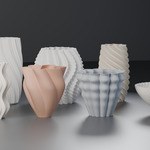
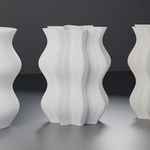
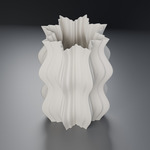
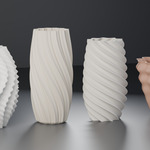
VesselLab documentation
This is the same documentation that ships inside the download, asdocs/getting-started.md, docs/controls-reference.md,docs/printing.md and docs/troubleshooting.md.
Getting started
Install
Download the ZIP and do not unzip it. Drag it into the Blender window, or use Edit > Preferences > Add-ons > Install from Disk. Enable "VesselLab" if it is not enabled already.
Blender 4.5 LTS or newer. Tested on 4.5.3 LTS and 5.1.2. No other add-on, no download, no account, no internet connection is required at any point.
Your first vessel
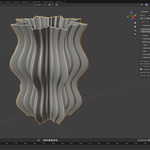
Open the VesselLab tab in the 3D viewport sidebar — press N if the sidebar is hidden. With nothing selected you get a list of presets. Click Radiant Pleat.
You now have a parametric vessel at the 3D cursor, and the sidebar has filled in with its controls. Drag anything and the mesh rebuilds as you drag. It is a real rebuild, not a modifier preview: the vessel you see is the vessel that will export.
The three buttons
- Add Vessel (one per preset) creates a new vessel at the 3D cursor.
- Apply Preset replaces the current vessel's parameters, keeping the same object.
- Rebuild at Export Quality is the one that matters. While designing, VesselLab builds at a resolution chosen for responsiveness. This rebuilds at a resolution chosen for fidelity — computed from your specific pattern — then runs a full watertight-manifold validation. Press it before you export, every time.
Export
VesselLab does not add an exporter, because Blender already has one that works.
1. Press Rebuild at Export Quality.
2. Check that Diagnostics says watertight manifold — validated.
3. File > Export > STL, with Selected Only ticked.
One unit is one millimetre
VesselLab builds in millimetres, Z-up, one Blender unit per millimetre — the convention every slicer expects. A 145 mm vessel is 145 Blender units across, and the exported STL measures 145 in the slicer.
Blender's default scene setting labels one unit as one metre, so the Item panel will call that same vessel "145 m". Nothing is wrong and nothing needs converting — the number is right and the label is not. Set Scene Properties > Units > Unit Scale to 0.001 and Blender will label it in millimetres. Do not scale the object; that exports a vessel that is not the size you asked for.
How the shape is built
The shape is one equation, and every control is one term in it:
r(theta, z) = R(z) · [ 1 + A1(z)·P(theta + twist(z)) + A2(z)·C(theta + twist(z)) ]
R(z) is the Profile — the silhouette. P is the Plan Pattern — the cross-section seen from above. C is the Corrugation — smaller teeth nested inside the plan pattern. A1 and A2 are their strength-over-height envelopes.
The twist is added to the angle before both P and C, which is why teeth stay locked inside their lobes all the way up a twisted vessel instead of sliding out of them.
If a control does nothing in your current configuration, it is hidden or greyed out rather than left there implying an effect it does not have.
Settings that matter, and why
Max Diameter is the maximum, not the average
A profile curve, a taper, a vertical wave, a lobe depth and a tooth depth all multiply together; on a strongly patterned form they compose to nearly ten times. Ask for 145 mm and, without normalisation, you could get a vessel 700 mm across.
VesselLab finds the true widest point of the composed field and bakes in a single scale factor, so what you type is what the object measures — held to within 0.3%. The Diagnostics panel shows the mean diameter beside it, since that is usually what you want to know about proportion.
Wall thickness: count perimeters, not millimetres
A printed wall quantises to whole extrusion perimeters. A 1.5 mm wall at a 0.4 mm nozzle is three perimeters plus 0.3 mm of gap-fill, and gap-fill on a varying wall is pattern-locked — the boundary where the slicer switches between three and four perimeters follows your lobes, and on a lit lampshade you will see it as banding.
So each output type's wall default is a perimeter count, converted for you: lampshade 2 perimeters with a floor of 2, vase 4 with a floor of 3, planter 6 with a floor of 4, spiral vase 2 with a floor of 1. Two perimeters is the minimum that closes reliably.
Offset Mode
normal is the compensated offset and the one you want. radial is the naive inner-equals-outer-minus-thickness, kept because it is occasionally useful for a decorative object where wall thickness does not matter. On a patterned form it starves the wall badly: measured on Radiant Pleat, a nominal 1.2 mm delivers 0.35 mm at its thinnest and sits under 0.8 mm across 57% of the surface.
Scallop is backwards, on purpose
The scallop plan style uses only the tip exponent, applied to the arc height, and a scallop's cusps are exactly where the arc reaches zero. So a low tip sharpness steepens the cusp, and raising it softens the whole pattern. Terrace Planter sits at 0.72 for this reason — at 0.42 the same shape starves its wall from 2.40 mm to 0.71 mm.
Two corrugation waveforms need a thick wall
triangle and alternating have hard corners, and alternating additionally scales every second tooth to 0.55 of full height. Because a triangle peaks at its own tooth boundary, that scaling arrives as a radial step where two teeth meet, not as a shorter tooth. The mesh stays valid and slices fine; the wall cannot follow a cliff. Measured: 0.04 mm of a 0.80 mm wall.
Twist Offset costs more than it looks like it should
Corrugation drift never touches the angular slope. It shows up entirely in the vertical one, which is the half of the surface-angle calculation that is easy to forget because nothing about the control suggests height. Measured on a shallow bowl: 90 degrees of drift gives 0.83 mm of a 1.60 mm wall, where 45 degrees gives 1.44 mm.
Output types
Lampshade, vase, spiral vase and planter set wall defaults and floors, allowed bases, drainage and print intent — never the shape, so a design retargets between products intact. Retargeting overwrites a field only where it still holds the previous type's default, and reports what it kept.
In spiral vase the wall control disappears: in spiralize mode the slicer lays a single extrusion-width wall and the modelled thickness has no effect.
What validation actually checks
On every export-quality rebuild: the mesh is closed and edge-manifold, has the expected number of shells, and has the expected Euler characteristic for its configuration.
That last check is the one that catches real problems. A mesh can be watertight and still be topologically wrong, and a slicer will happily "repair" it into something you did not design. The expected topology follows from how many openings reach the cavity: none gives a sealed double-walled cavity, one gives a bowl, and each additional opening — including every drainage slot — changes it again. A closed top over an open base is an upside-down bowl, not a sealed vessel.
Troubleshooting by symptom
"The VesselLab tab isn't in my sidebar"
Press N in the 3D viewport — the sidebar is hidden by default. If the sidebar is open but has no VesselLab tab, the add-on is installed but not enabled. The panel is in the 3D Viewport sidebar, not the Properties editor.
"The panel only shows a list of presets"
That is the no-selection state. VesselLab's controls belong to a vessel object, so select a vessel — or click a preset to make one. A vessel has to have been created by VesselLab to carry parameters; the add-on cannot adopt an arbitrary mesh.
"My vessel is 145 metres tall"
It is 145 millimetres and Blender is labelling it wrong. See "One unit is one millimetre" above. Do not scale the object.
"The slicer says the mesh needs repair"
First: did you press Rebuild at Export Quality, and did Diagnostics say watertight manifold — validated? Preview-quality meshes are built for responsiveness and are not what you should export.
If it was validated and your slicer still objects, the cause is almost never manifoldness. Usually it is one of: the wall is thinner than the slicer can express (check the thinnest-wall readout); you exported the whole scene rather than ticking Selected Only; or a modifier you stacked on the object is exporting too.
Please report a validated mesh that a slicer rejects, with the preset and the parameters. That is a bug worth having.
"The thinnest wall is far below what I asked for"
Expected on a strongly patterned form, and the number is real. Ordered by how much they help:
- Reduce corrugation depth. The strongest lever by a wide margin, because tooth slope scales with depth times tooth count.
- Reduce Twist Offset. Invisible in the angular direction, dominant in the vertical one.
- Reduce plan depth, or reduce the lobe count.
- Raise tip sharpness if the plan style is scallop — that one is backwards, and lowering it is the obvious move and the wrong one.
- Thicken the wall. Listed last on purpose: where the compensation clamp is already engaged, thickening scales both sides of the ratio and buys much less than it looks like it should. On one draft, doubling the wall moved the thinnest point from 0.04 mm to 0.08 mm.
"Radiant Pleat warns about the support ring"
The support ring is 6.1 mm wide at its narrowest, below the 12.0 mm requested.
Expected, and not a defect. Ring width is measured against the vessel's outer contour, and Radiant Pleat's base is an eight-point star — so the ring is full width at the star's points and narrower in its valleys. The ring is continuous and the bore is clear. Widen it by reducing the lamp opening, reducing plan depth, or raising the bottom scale.
"Rebuilds feel slow"
Export-quality rebuilds do far more work than preview: adaptive resolution, then a full validation census over a few hundred thousand triangles. If preview itself is sluggish, the cause is resolution driven by your pattern — angular resolution follows the tooth count and vertical resolution follows the steepest twist rate. An alternating twist with a high wave count is expensive even when its total rotation is zero.
"I changed the output type and lost an edit"
You should not have. Retargeting overwrites a field only where it still holds the previous type's default, and reports what it kept in the panel. If a genuine edit was overwritten, that is a bug — please report the before and after types.
Privacy and networking
Nothing leaves your machine, because there is nothing in the add-on that could send it. There is no network code, no telemetry, no licence check, no update check and no analytics. The extension manifest declares no permissions at all — not network, not file access — and Blender shows you an extension's declared permissions before you install it, so this is verifiable rather than a promise.
VesselLab reads and writes nothing outside the objects you create in your own scene. It works with the machine offline, permanently.
Reporting a bug
Include your Blender version, the preset you started from, what you changed, and the full contents of the Diagnostics panel. The verdict and build info lines identify the resolution and triangle count, which narrows most problems immediately.
Have questions about this product?
Login to message
| Blender Extension Compatible | Yes |
| Published | 2 months ago |
| Blender Version | 4.5 - 5.2 |
| Extension Type | Add-on |
| Render Engine Used | Cycles, Eevee |
| License | GPL |
Discover more products like this
3d printing lampshade parametric addon vase manifold planter product Design printable Generator pottery procedural