 TECA 3D



Important Note!
This add-on is currently only available for Windows; there is no Mac version yet. If you must use it on a Mac, please do not purchase it.
We will release a Mac version in the future, so please check our updates regularly.
Highlights
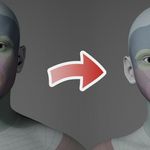

Adapting a base mesh with a standard topology to a target mesh, ensuring a perfect shape match and feature alignment, is a core challenge in 3D modeling and animation. This is precisely what this add-on does.
The Highlights of Our Tool
- Works with any model, including humans, animals, plants, equipment, buildings, terrain, etc.—any shape and topology you can imagine.
- Is 100% accurate and completely controllable.
- Requires very few landmarks; it automatically matches most features based on shape similarity.
- Is extremely fast, completing accurate retopology in tens of seconds or even seconds.
Getting Started
1. Create point pairs
2. Wrapping
This video will show you how to
perform a wrap operation. Once the operation is complete, the source
model will perfectly match the shape of the target model.
3.
Fine-tune
This video will show you how to make some fine adjustments to ensure that the shapes of the source and target models align perfectly in every detail.
Advanced Mode
An advanced mode was added starting with version 2.0.0. To enable this feature, simply go to Settings > Advanced mode.
In advanced mode, you can add, delete, and edit multiple point pairs at once without having to click the "Select" button for each pair.
In addition, if you want to wrap the same base mesh over multiple targets, we've added two new operators—Reset and Set—to make it easier and save a lot of time. You can use the Reset operation to set the target location for all point pairs to (0, 0, 0). Then use the Set operation to select the target location for each of them on the target mesh.
The workflow for wrapping a base mesh around multiple targets is as follows:
- For the first target mesh, set all point pairs and complete the wrapping. Then save all point pairs to a JSON file.
- Set the second target mesh as the wrapping target. Load the saved point pairs from the JSON file.
- Use the Reset operation to clear the target location of all point pairs.
- Use the Set operation to batch set the target location of all point pairs.
- Perform the wrapping operation.
- Repeat steps 2-5 for the other target meshes.
Tutorials
User Account
Requirements
OS: Windows 11
Blender: 5.0.0 or later
Contact US
Our Website
Bug Fixes
If you encounter any software errors or bugs during use, please contact us and we will fix them promptly.
If you have any questions, you can also send an email to: