YT-Tools for Blender
 Yoshiaki Tazaki


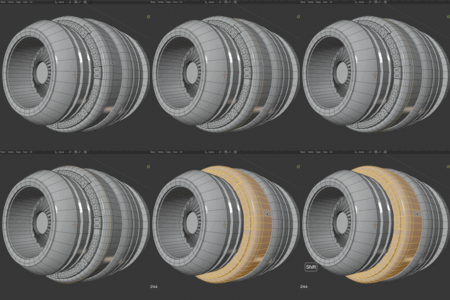
📖 YT-Tools for Blender
Overview
YT-Tools is a workflow-enhancing add-on for Blender.
It provides a collection of utilities designed to speed up common modeling and scene-editing tasks, especially useful for artists familiar with Modo or those seeking faster, more flexible modeling tools.
Compatible with Blender 4.0 and above on Windows, macOS.
* All code is written in Python, but not tested on Linux
Key Features
-
Selection Tools
-
Loop, boundary, and contextual selections
-
Modo-style selection expand/contract
-
-
Mesh Editing Extensions
-
Loop slice, polygon slice, and edge slice
-
Quick merge and vertex alignment tools
-
-
Viewport & Display Utilities
-
On-screen info: vertex/edge/face counts
-
Dimension and measurement overlays
-
Customizable transform centers
-
-
UI and Workflow Enhancements
-
Sidebar panel with categorized tools
-
Optional hotkeys for rapid access
-
Adjustable font size, offsets, thresholds
-
Installation
-
Download the YT-Tools zip file.
-
In Blender, open:
Edit → Preferences → Add-ons → Install… -
Select the downloaded zip and enable YT-Tools.
-
The add-on tools will appear in the YT-Tools tab in the Sidebar (
Npanel).
Usage
-
Access tools from the YT-Tools Sidebar Panel.
-
Many functions are available directly as operators or shortcuts.
-
Preferences (under Edit → Preferences → Add-ons → YT-Tools) let you customize:
-
Display options
-
Hotkeys
-
Behavior thresholds
-
Requirements & Limitations
-
Requires Blender 4.0 or later.
-
Some hotkeys may conflict with Blender defaults or other add-ons (reassignable).
-
Certain tools may have limited behavior in specific viewport or mode setups (e.g., UV sync off, split viewports).
License
-
GPL-3.0-or-later
-
Free to use, modify, and redistribute under GPL terms.
Support & Feedback
-
Bug reports and feature requests: Feedback Form
-
Documentation: English Manual, 日本語マニュアル
Maintainer: Yoshiaki Tazaki ([email protected])
-
Blog: Life with Modo
✨ With YT-Tools, you can speed up repetitive modeling tasks, gain Modo-style workflow flexibility, and enjoy a smoother Blender experience.