Adc Autodepth
 ADC - Automotive Design Community


Do I need to pay for anything after buying the addon?
No. Everything runs locally on your own machine. No subscriptions, no API keys, no cost per generation — ever.
I get a Python error mentioning "torch" or "transformers" when generating a depth map
This happens if a *different* Python package (from another addon, or a previous manual install) overwrote the AI library versions this addon needs. Fix: open a terminal, point it at Blender's Python (see the README for the exact path), and run:
```
pip uninstall torch transformers -y
pip install torch==2.1.0 --index-url https://download.pytorch.org/whl/cpu
pip install transformers==4.46.3
```
This reinstalls the exact versions verified to work together. (Newer Blender releases with a newer bundled Python may not have this exact pinned version available — in that case the addon automatically falls back to the latest compatible versions, no manual steps needed.)
The depth map preview looks almost all black, with just a few bright spots
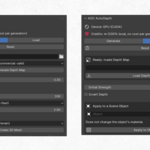
This usually means the depth map's contrast is concentrated in a narrow range. Use the **"Auto Contrast"** button in "Current Mesh Settings" — it analyzes the actual depth data (ignoring any fully-transparent background) and stretches the black/white points automatically. You can also fine-tune manually with the "Black Point" / "White Point" sliders.
Install Dependencies" gets stuck or shows a DLL error (WinError 1114)
This is almost always a missing Microsoft Visual C++ Redistributable, not an addon bug. Install the [VC++ Redistributable x64](https://aka.ms/vs/17/release/vc_redist.x64.exe), restart your PC, and try again.
Can I sell or use commercially the 3D models I create?
Yes, 100%. The models, depth maps, and any content you generate with this addon are entirely yours — no royalties, no attribution required back to us.
Does this work on Mac or Linux?
Currently tested and supported on Windows only. Mac/Linux support may come in a future update depending on demand.
Do I need a powerful GPU?
No. The addon auto-detects NVIDIA GPUs and uses CUDA acceleration automatically if available, but it also works fine on CPU — just slower per generation.
How is this different from cloud-based alternatives?
No per-generation cost, no images uploaded to a third-party server, no internet dependency after setup. Your photos never leave your machine.
Do I need a powerful GPU?
No. The addon auto-detects NVIDIA GPUs and uses CUDA acceleration automatically if available, but it also works fine on CPU — just slower per generation.
-
$5 $19.98
Complete Addon + 1 City Pack (Italy). City packs are ready-to-use building facade images
-
$10 $39.98
Complete Addon + All city packs (Italy + France + future packs). City packs are ready-to-use building facade images.
 Included
Includes 12 months of
- Support from ADC - Automotive Design Community
- Product updates
Extend this product’s Support Period +12 months: 50% of product price
Have questions before purchasing?
Login to message
| Blender Extension Compatible | Yes |
| Published | about 2 months ago |
| Blender Version | 4.5 - 5.2 |
| Extension Type | Add-on |
| Render Engine Used | Cycles, Eevee |
| License | Mit |
Discover more products like this
background depth map 3D Mesh backplate ai Visualization environment blender addon projection blender architectural automotive