Ams Splitter
 Imaginacreative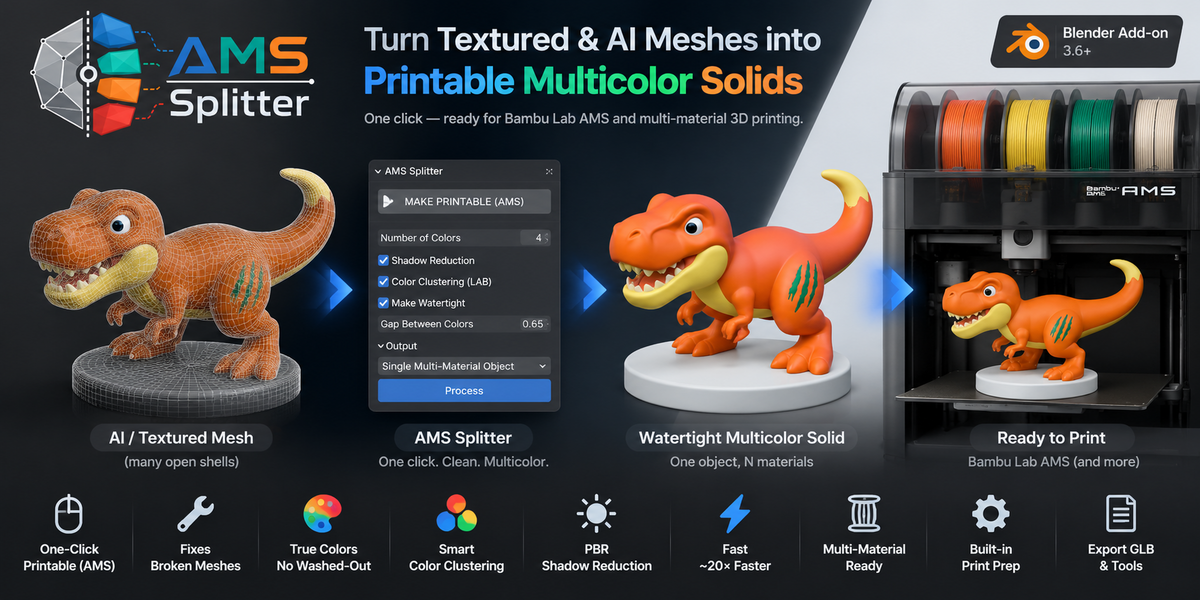


**1. Does it only work with Bambu Lab AMS, or other multicolor printers too?**
**4. Is it fast on heavy models?**
Yes. The pipeline runs on a vectorized numpy core, so even multi-million-face meshes
are processed in seconds rather than minutes. You can also dial in the voxel *Print
Detail* to balance detail against polygon count.
**5. Will my original model be modified?**
No. **Duplicate Object** is on by default, so AMS Splitter always works on a copy and
leaves your original mesh untouched.
**2. Do I need an AI-generated model, or does it work with any mesh?**
**3. How many colors can it separate, and do I control which ones?**
**6. Does it need an internet connection or account?**
No. AMS Splitter runs 100% locally inside Blender — no cloud, no login, no
subscription. Your models never leave your machine.
**3. How many colors can it separate, and do I control which ones?**
You set the target color count (typically 2–12, matching your filament slots) and the
add-on automatically detects the dominant colors from the texture. Smart clustering
in LAB space, PBR shadow reduction, and Cluster Headroom keep the result faithful —
so small regions (like hair) aren't swallowed by large gradients (like a dress).
**5. Will my original model be modified?**
No. **Duplicate Object** is on by default, so AMS Splitter always works on a copy and
leaves your original mesh untouched.
**4. Is it fast on heavy models?**
Yes. The pipeline runs on a vectorized numpy core, so even multi-million-face meshes
are processed in seconds rather than minutes. You can also dial in the voxel *Print
Detail* to balance detail against polygon count.
**3. How many colors can it separate, and do I control which ones?**
You set the target color count (typically 2–12, matching your filament slots) and the
add-on automatically detects the dominant colors from the texture. Smart clustering
in LAB space, PBR shadow reduction, and Cluster Headroom keep the result faithful —
so small regions (like hair) aren't swallowed by large gradients (like a dress).
**2. Do I need an AI-generated model, or does it work with any mesh?**
Any mesh works, as long as it has a **UV map** and a **Base Color texture** (solid
material colors are supported too). It shines on messy AI meshes (Meshy, Rodin, Luma,
Tripo) because it can rebuild thousands of open shells into one watertight solid — but
it works just as well on clean scanned or downloaded PBR assets.
**2. Do I need an AI-generated model, or does it work with any mesh?**
Any mesh works, as long as it has a **UV map** and a **Base Color texture** (solid
material colors are supported too). It shines on messy AI meshes (Meshy, Rodin, Luma,
Tripo) because it can rebuild thousands of open shells into one watertight solid — but
it works just as well on clean scanned or downloaded PBR assets.
**1. Does it only work with Bambu Lab AMS, or other multicolor printers too?**
It's slicer-agnostic. AMS Splitter's job is to turn one texture into **N separate
materials — one per color**. Any multi-material workflow that maps a filament to a
material works: Bambu Lab AMS (Bambu Studio), Prusa MMU, and manual filament changes
in other slicers. "AMS" is just the most common target.
**1. Does it only work with Bambu Lab AMS, or other multicolor printers too?**
It's slicer-agnostic. AMS Splitter's job is to turn one texture into **N separate
materials — one per color**. Any multi-material workflow that maps a filament to a
material works: Bambu Lab AMS (Bambu Studio), Prusa MMU, and manual filament changes
in other slicers. "AMS" is just the most common target.
**4. Is it fast on heavy models?**
Yes. The pipeline runs on a vectorized numpy core, so even multi-million-face meshes
are processed in seconds rather than minutes. You can also dial in the voxel *Print
Detail* to balance detail against polygon count.
**3. How many colors can it separate, and do I control which ones?**
You set the target color count (typically 2–12, matching your filament slots) and the
add-on automatically detects the dominant colors from the texture. Smart clustering
in LAB space, PBR shadow reduction, and Cluster Headroom keep the result faithful —
so small regions (like hair) aren't swallowed by large gradients (like a dress).
**1. Does it only work with Bambu Lab AMS, or other multicolor printers too?**
It's slicer-agnostic. AMS Splitter's job is to turn one texture into **N separate
materials — one per color**. Any multi-material workflow that maps a filament to a
material works: Bambu Lab AMS (Bambu Studio), Prusa MMU, and manual filament changes
in other slicers. "AMS" is just the most common target.
**2. Do I need an AI-generated model, or does it work with any mesh?**
Any mesh works, as long as it has a **UV map** and a **Base Color texture** (solid
material colors are supported too). It shines on messy AI meshes (Meshy, Rodin, Luma,
Tripo) because it can rebuild thousands of open shells into one watertight solid — but
it works just as well on clean scanned or downloaded PBR assets.
**1. Does it only work with Bambu Lab AMS, or other multicolor printers too?**
It's slicer-agnostic. AMS Splitter's job is to turn one texture into **N separate
materials — one per color**. Any multi-material workflow that maps a filament to a
material works: Bambu Lab AMS (Bambu Studio), Prusa MMU, and manual filament changes
in other slicers. "AMS" is just the most common target.
**2. Do I need an AI-generated model, or does it work with any mesh?**
Any mesh works, as long as it has a **UV map** and a **Base Color texture** (solid
material colors are supported too). It shines on messy AI meshes (Meshy, Rodin, Luma,
Tripo) because it can rebuild thousands of open shells into one watertight solid — but
it works just as well on clean scanned or downloaded PBR assets.
**2. Do I need an AI-generated model, or does it work with any mesh?**
Any mesh works, as long as it has a **UV map** and a **Base Color texture** (solid
material colors are supported too). It shines on messy AI meshes (Meshy, Rodin, Luma,
Tripo) because it can rebuild thousands of open shells into one watertight solid — but
it works just as well on clean scanned or downloaded PBR assets.
**3. How many colors can it separate, and do I control which ones?**
You set the target color count (typically 2–12, matching your filament slots) and the
add-on automatically detects the dominant colors from the texture. Smart clustering
in LAB space, PBR shadow reduction, and Cluster Headroom keep the result faithful —
so small regions (like hair) aren't swallowed by large gradients (like a dress).
**1. Does it only work with Bambu Lab AMS, or other multicolor printers too?**
It's slicer-agnostic. AMS Splitter's job is to turn one texture into **N separate
materials — one per color**. Any multi-material workflow that maps a filament to a
material works: Bambu Lab AMS (Bambu Studio), Prusa MMU, and manual filament changes
in other slicers. "AMS" is just the most common target.
**1. Does it only work with Bambu Lab AMS, or other multicolor printers too?**
It's slicer-agnostic. AMS Splitter's job is to turn one texture into **N separate
materials — one per color**. Any multi-material workflow that maps a filament to a
material works: Bambu Lab AMS (Bambu Studio), Prusa MMU, and manual filament changes
in other slicers. "AMS" is just the most common target.
**1. Does it only work with Bambu Lab AMS, or other multicolor printers too?**
It's slicer-agnostic. AMS Splitter's job is to turn one texture into **N separate
materials — one per color**. Any multi-material workflow that maps a filament to a
material works: Bambu Lab AMS (Bambu Studio), Prusa MMU, and manual filament changes
in other slicers. "AMS" is just the most common target.
**2. Do I need an AI-generated model, or does it work with any mesh?**
Any mesh works, as long as it has a **UV map** and a **Base Color texture** (solid
material colors are supported too). It shines on messy AI meshes (Meshy, Rodin, Luma,
Tripo) because it can rebuild thousands of open shells into one watertight solid — but
it works just as well on clean scanned or downloaded PBR assets.
**1. Does it only work with Bambu Lab AMS, or other multicolor printers too?**
It's slicer-agnostic. AMS Splitter's job is to turn one texture into **N separate
materials — one per color**. Any multi-material workflow that maps a filament to a
material works: Bambu Lab AMS (Bambu Studio), Prusa MMU, and manual filament changes
in other slicers. "AMS" is just the most common target.
 Included
Includes 12 months of
- Support from Imaginacreative
- Product updates
Extend this product’s Support Period +12 months: 25% of product price
Have questions before purchasing?
Login to message
| Published | 3 months ago |
| Blender Version | 4.0 - 5.2 |
| Extension Type | N/A |
| Render Engine Used | Arnold, Blender-Internal, Blender-Game-Engine, Cycles, Eevee, Freestyle, Luxrender, Mental-Ray, Octane, Vray, Yafaray |
| License | Mit |

Discover more products like this
3d printing AMS Bambu Lab color separation bambu studio multicolor filament meshy PBR multimaterial