 Pixonix Studio



ARCANE RIFTER
The Next-Generation Hard Surface Modeling & Boolean Powerhouse for Blender.
Zero cognitive friction. Pure visual flow.

Legacy hard-surface addons were built for a different era of Blender—locking artists behind cryptic shortcuts, deeply nested pie menus, and confusing contextual modes.
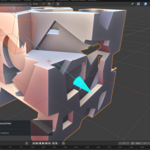
Arcane Rifter flips the script. Engineered as a native Blender Active Tool with modern GPU shaders and automated modifier orchestration, it empowers you to click, drag, shape, and refine Boolean cuts directly on the mesh surface with instant visual feedback and zero menu diving.
Select the tool from your Blender toolbar and draw directly on any mesh surface. Box, Circle, and validated NGON shapes draw with instant depth projection.
• Evaluated Depsgraph & BVH caching
• Unobtrusive viewport orbit passthrough
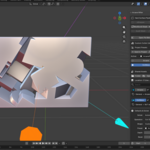
Cycle active wheel adjustments between Width, Height, and Depth on the fly with C. Sizing remains independent for all shapes.
• Live on-screen HUD dimension readout
• Dedicated 3D viewport gizmo handles
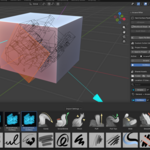
Bevel cutters without rounding the entrance hole. Arcane Rifter calculates front overhang to keep outer caps flush while preserving exact penetration depth.
• Toggle/adjust bevel radius live (B)
• Optional target-side entrance rounding
Turn any closed mesh into a reusable cutter preset in 1 click. Publish to a shared cross-project library with native isometric thumbnails and tags.
• Search & filter by category and tags
• Atomic asset updates & zero data loss
Hold Ctrl to snap to evaluated vertices, edges, or grid increments. Cuts automatically inherit active Mirror modifiers.
• Multi-axis, bisect & clipping sync (M)
• Lock with Tab for Blender G/R/S
Audit mesh health for non-manifolds, zero-area faces, and loose edges. Scroll modifier history with the mouse wheel to inspect operations.
• Visual ModScroll on-screen HUD
• 1-Click Game Engine Exporter (FBX/glTF/OBJ)
Arcane Rifter eliminates the guesswork from Boolean modeling. Draw directly on surfaces with full control:

Need pinpoint accuracy? Press Tab during any draw to lock the preview in 3D space. Once locked, invoke Blender’s native G (Move), R (Rotate), and S (Scale) hotkeys with axis constraints (X/Y/Z). Press Tab again to return to fluid drawing.
Arcane Rifter automatically conducts Blender's modifier stack to maintain the optimal procedural order: Mirror → Booleans → Bevel → Smooth-by-Angle (GeoNodes) → Weighted Normals.
1-Click smooth shading, marks sharp edge bevel weights, and appends managed Smooth-by-Angle Geometry Nodes + Weighted Normal modifiers for razor-clean shading.
Bakes existing Booleans cleanly into the base mesh, recomputes sharp boundary bevel weights, and applies a fresh non-destructive Bevel modifier.
Safely applies Booleans in sequence, purges orphan cutter geometry, and re-establishes non-destructive Bevel and Weighted Normal finishing layers.


Never remodel recurring details like vents, latches, hex bolts, panels, or sockets:
.blend file.• Publish Shared: Native Blender assets with tags, metadata, and auto-generated isometric previews.
• Asset Browser Sync: Registers your shared cutter library folder with Blender’s native Asset Browser in 1 click.
• Radial Arrays on Custom Cutters: Place intricate mechanical parts along circular objects instantly.
Exporting procedural Boolean models to game engines often results in shattered shading. Game Engine Export Prep automates the entire delivery:
✓ Automated triangulation to lock vertex normals & prevent engine shading distortion
✓ Correct unit scale & forward/up axis mapping for FBX, glTF 2.0 (GLB), and OBJ
All features are accessible from the N-Panel sidebar and Toolbar, but power users can work at lightning speed with modal hotkeys:
| Shortcut | Action | Description |
|---|---|---|
| D | Cycle Operation | Cycle Difference → Slice → Union → Intersect → Inset |
| S | Cycle Shape | Cycle Box → Circle → NGON → Custom Preset |
| C | Cycle Dimension | Switch mouse wheel between Depth, Width, and Height |
| Mouse Wheel | Adjust Dimension | Scale active dimension (Hold Shift for precision) |
| B + Wheel | Cutter Bevel | Toggle / dynamically adjust cutter edge bevel |
| T + Wheel | Solidify Cut | Toggle / adjust wall thickness for hollow cuts & profiles |
| V + Wheel | Array Duplication | Toggle Linear or Radial Array (X/Y/Z to switch axis) |
| Ctrl (Hold) | Smart Snapping | Snap to evaluated vertices, edges, or custom grid |
| M | Mirror Symmetry | Toggle mirror-aware cutting across target Mirror modifier |
| Tab | Lock Preview | Freeze cutter in 3D space to freely use standard G / R / S |
| Shift + Q | Radial Pie Menu | Fast context-sensitive radial menu for sharpening, bakes & tools |
| LMB / Enter | Commit Cut | Apply non-destructive Boolean cut to the target mesh |
| Feature | Arcane Rifter | Legacy Addons | Vanilla Blender |
|---|---|---|---|
| Interaction Style | Native Active Tool + 3D Gizmos | Modal Key Sequences & Nested Menus | Manual Modifier Setup |
| Learning Curve | ✓ Instant (Visual Flow) | ✗ Steep (40+ Shortcuts) | ✗ Slow & Tedious |
| Evaluated Snapping | ✓ Verts, Edges & Grid | Partial / Uncached | Basic 3D Cursor |
| Bevel Hole Protection | ✓ Smart Overhang Clearance | ✗ Manual Fixes Needed | ✗ None (Breaks Topology) |
| Blender 4.2+ Extensions | ✓ Native Manifest & Sandboxed | Legacy bl_info ZIPs | ✓ Native |
| Shared Asset Library | ✓ Built-in + Asset Browser Sync | Separate Paid Addons | Manual Asset Marking |
| Game Engine Export | ✓ 1-Click Duplicate & Bake | Manual Cleanup Scripts | Multi-step Manual Setup |
blender_manifest.toml) and utilizes modern GPU shaders and Geometry Nodes Auto Smooth.Includes the Arcane Rifter Extension, full documentation, and free lifetime updates across upcoming Blender releases.