 Anvil Interactive Solutions


AssetSentinel — Blender Add-on — v1.1.0
Stop hand-checking every asset before it goes to engine.
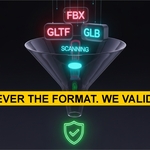
Point AssetSentinel at a folder. It imports every FBX, glTF, GLB and OBJ into a throwaway scene, checks each one against your target profile — Unity, Unreal, Godot, or your own — scores it 0–100, and tells you exactly what's wrong. Then it fixes the common problems in one click. A batch of 40 props that used to be a half-day of babysitting becomes one scan and one report.
See Documentation ✓ Source files never modified · No telemetry, no network calls
REQUIREMENTS — 30 SECONDS TO SET UP
Blender 3.6 or newer
Windows, macOS, Linux. Standard Extension install. No dependencies, no internet required.
A folder of assets
FBX, glTF, GLB, or OBJ. Pick a profile, point it at the folder, click Scan. That's the whole workflow.
THE PROBLEM IT KILLS
"On a batch of 40 props, checking each one by hand before export is a half-day that shouldn't need a human."
One scan, the whole folder, a per-asset verdict
AssetSentinel walks every file in the folder (subfolders optional), imports each into a temporary scene, runs the full check suite, then cleans up and moves on. Import failures never stop the batch — a broken file is flagged and explained, and the scan keeps going. Your source files are never touched.
"Something slipped through — wrong scale, missing UVs, over budget — and it broke downstream."
A 0–100 health score per asset, weighted by severity
Every asset gets a score, not just pass/fail — triangle overruns cost the most, errors cost more than warnings. Sort the batch by score and triage the worst offenders first. The batch average lands in the summary panel and every report.
WHAT IT CHECKS
| Geometry Triangle and vertex counts vs profile limit (with a "reduce by ~N% to pass" hint), n-gon detection, bounding-box scale sanity — catches assets exported at scene-scale or microscale — negative scale, and unapplied transforms. | Textures & UVs Missing external textures, max resolution per profile, embedded-vs-external reporting. Meshes with no UV map, possible island overlaps, multiple UV channel detection. | Naming & LOD Spaces and illegal characters in object and material names (configurable per profile). LOD naming (_LOD0–_LOD9), glTF MSFT_lod extras, and custom pipeline properties. |
| Armatures Bone count vs profile limit, action count and empty-action detection, root-motion bone presence. | Duplicate geometry Flags accidental re-exports across the whole batch — the duplicate that would otherwise ship twice — before you publish. | Import health Files that fail to import are caught, labelled in plain English, and given a fix suggestion — the batch never stalls on one bad asset. |
DON'T JUST FIND IT — FIX IT
One-click repair operators, run directly in Blender
The fixes panel acts on the problems the scan finds:
• Apply transforms — scale and rotation on all mesh objects
• Fix negative scale — flips, applies, recalculates normals
• Sanitise names — replaces spaces and illegal characters with underscores
• Decimate to profile limit — calculates the exact ratio to hit max_tris and applies it across all meshes in one click
• Fix negative scale — flips, applies, recalculates normals
• Sanitise names — replaces spaces and illegal characters with underscores
• Decimate to profile limit — calculates the exact ratio to hit max_tris and applies it across all meshes in one click
FIVE PROFILES OUT OF THE BOX — OR YOUR OWN
| Profile | Max tris | Max tex | LOD | Max bones |
|---|---|---|---|---|
| Unity — Mobile | 20,000 | 2048px | Yes | 64 |
| Unity — Desktop | 80,000 | 4096px | No | 256 |
| Unreal — Desktop | 120,000 | 4096px | No | 256 |
| Godot 4 | 100,000 | 4096px | No | 128 |
| Generic — Marketplace | 50,000 | 4096px | No | — |
All thresholds are editable in a plain JSON file — no Python. Add studio limits, client requirements, or a custom pipeline profile in a minute.
Example — a 40-prop drop, before it ships
Profile: Unreal — Desktop · Folder: /exports/props · Scan
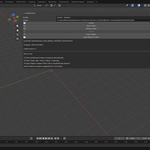
31 passed, 6 warnings, 3 failed. Two props 40% over budget (decimate-to-limit, one click), one with a space in a material name (sanitise, one click), one accidental duplicate of another export (flagged before it shipped twice). Report exported, shared, done — in the time it used to take to check the first three by hand.
THE REPORT, AND THE SPEED
| Shareable HTML + CSV Dark-theme HTML report that opens in any browser: summary cards, a scan-history chart tracking batch quality across runs, per-asset cards with health badge and triangle bar, filter by pass/warning/fail, sort by severity/score/tris/name. Full CSV for spreadsheets or pipeline tooling. | Delta scan & auto-scan Delta scan skips files that haven't changed since last run (fingerprinted by size + modification time), so repeat scans of a large library are near-instant. Auto-scan on export re-checks the folder automatically after every Blender export — zero extra steps. |
NO SURPRISES
Source files are never modified — every asset is checked in a temporary scene that's discarded afterwards. No telemetry. No network calls. No bundled packages. MIT licensed. Runs entirely offline.
Anvil Interactive Solutions — [email protected]
quadify3d.com → 